Free E-Signature Tools in 2026: Best Options for Small Businesses
Compare the best free e-signature tools available in 2026. Detailed analysis of free tiers from AiDocX, DocuSign, HelloSign, SignNow, and more — features, limitations, and when to upgrade.
 Chloe · Brand Manager February 10, 2026 9 min read
Free E-Signature Tools in 2026: Best Options for Small Businesses
Electronic signatures have become a non-negotiable part of doing business. Whether you are signing a client contract, a vendor agreement, an employment offer letter, or a simple NDA, the expectation in 2026 is that it happens digitally. Paper signatures are not just inconvenient — they signal to clients and partners that your business has not kept up with basic operational standards.
The good news is that you do not need to pay hundreds of dollars per year for e-signature capability. Several platforms offer genuinely functional free tiers that handle the signing needs of freelancers, solopreneurs, and small businesses. The challenge is that free tiers vary dramatically in what they actually provide. Some offer generous functionality with reasonable limits. Others are essentially trial periods disguised as free plans, designed to get you hooked before forcing an upgrade.
This guide provides an honest comparison of the best free e-signature options available in 2026, examining what each platform actually gives you for free, where the limitations hit, and when it makes sense to start paying.
What to Look For in a Free E-Signature Tool
Before comparing specific platforms, establish what "free" should actually mean for a usable e-signature tool.
Must-Have Features
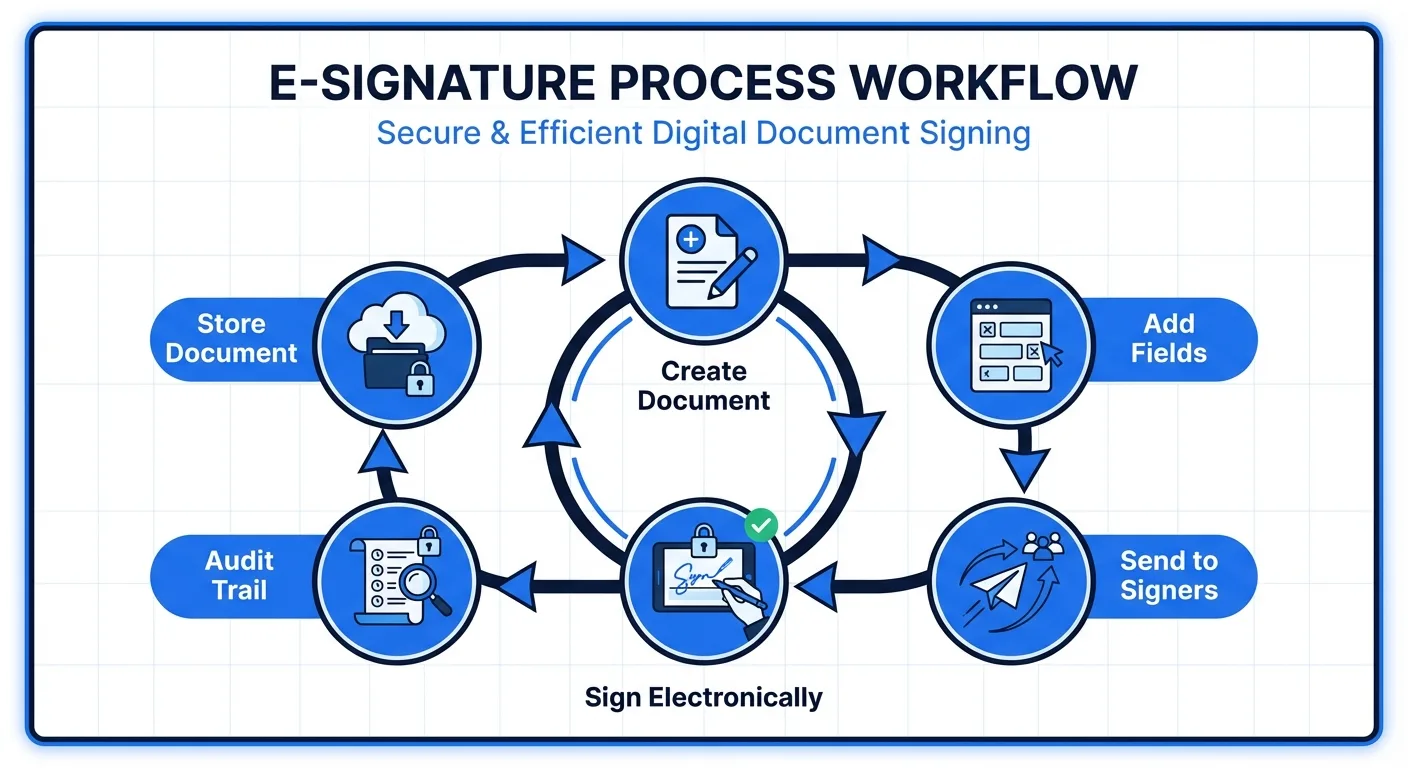
A genuinely useful free e-signature tool should provide legally binding signatures that comply with the ESIGN Act (United States) and eIDAS regulation (European Union). It should allow you to upload your own documents — not just use pre-built templates. It should support at least basic signing workflows where you send a document and the recipient signs it. And it should store your signed documents securely with an audit trail.
Important Differentiators
Beyond the basics, the features that separate good free tools from merely adequate ones include the number of signature requests allowed per month, whether you can have multiple signers on a single document, the availability of form fields (text fields, checkboxes, date fields) beyond just the signature itself, mobile signing support for recipients, and whether signed documents include a certificate of completion or audit trail.
Red Flags
Watch out for free plans that require a credit card on signup (they will charge you when the trial ends), that limit you to a 7 or 14-day trial period rather than providing an ongoing free tier, that watermark your signed documents with the platform's branding, or that restrict file types so severely that you cannot upload standard business documents.
The 2026 Free E-Signature Landscape
Here is a detailed breakdown of the major free e-signature options available today.
AiDocX Free
AiDocX takes a fundamentally different approach to its free tier. Rather than offering a stripped-down signing tool, the free plan provides access to an integrated document management platform that includes e-signatures as one component alongside AI document analysis, document tracking, and secure sharing.
What you get for free:
- 3 signature requests per month
- AI-powered contract review and risk analysis
- Document tracking links with real-time view analytics
- Secure document sharing with access controls
- Audit trail and certificate of completion for every signed document
- Support for 13 languages
- No credit card required
Limitations:
- 3 signature requests per month (sufficient for many freelancers and solopreneurs)
- Limited AI analysis credits
- AiDocX branding on shared documents
Why it stands out: AiDocX is the only free e-signature tool that bundles AI contract analysis and document tracking analytics at no cost. Before you send a contract for signature, the AI reviews it for risky clauses and potential issues. After you send it, tracking analytics tell you when the recipient views and signs the document. No other free tier combines these three capabilities.
Upgrade path: The Basic plan at $6 per month increases signature volume, AI analysis capacity, and adds custom branding. This is significantly less expensive than comparable plans from dedicated e-signature platforms.
DocuSign Free Trial
DocuSign is the most recognized name in e-signatures, and for good reason — their platform is mature, reliable, and widely integrated. However, their "free" offering is more accurately described as a trial.
What you get for free:
- 30-day free trial of the Personal plan
- Up to 5 signature requests during the trial period
- Core signing functionality including templates and real-time notifications
- Mobile app access
Limitations:
- The free trial expires after 30 days regardless of usage
- Requires a credit card on signup, and automatically converts to a paid plan ($10/month billed annually) when the trial ends
- No free ongoing tier exists — once the trial expires, you must pay or lose access
- No document tracking or analytics
- No AI analysis features
Why it falls short for small businesses: DocuSign's trial is useful for evaluating the platform, but it is not a long-term free solution. If you are a freelancer who signs two or three documents per month, paying $10 per month ($120/year) for a signing tool is difficult to justify. DocuSign's strength is in enterprise deployments where the volume and integration requirements justify the cost.
Paid pricing: Personal plan starts at $10/month (billed annually). Standard plan at $25/month adds more features. Business Pro at $40/month adds payment collection and advanced fields.
Dropbox Sign (formerly HelloSign) Free
Dropbox Sign, rebranded from HelloSign after the Dropbox acquisition, offers one of the more straightforward free tiers in the market.
What you get for free:
- 3 signature requests per month (ongoing, not a trial)
- 1 signer per document
- Core signing functionality with audit trail
- Integration with Dropbox for document storage
- Mobile-friendly signing experience for recipients
Limitations:
- Only 1 signer per document on the free plan — if your contract needs two signers, you need to upgrade
- Limited template functionality
- No custom branding
- No API access
- No document tracking or analytics
Why it works for some: If your signing needs are simple — one signer per document, three or fewer per month — Dropbox Sign's free tier is genuinely functional. The integration with Dropbox is convenient if that is already your cloud storage solution.
Why it falls short: The one-signer limitation is a dealbreaker for most business contracts, which typically require at least two parties to sign. This effectively forces an upgrade for any standard business use case. The Essentials plan starts at $15 per month per user.
SignNow Free Trial
SignNow, part of the airSlate Business Cloud, positions itself as an affordable alternative to DocuSign with a strong focus on team workflows.
What you get for free:
- 7-day free trial of the Business plan
- Full feature access during the trial period
- Team management and collaboration features
- Template library and bulk sending
Limitations:
- 7-day trial only — the shortest in the industry
- Requires credit card, auto-converts to paid plan ($8/month/user billed annually)
- No ongoing free tier
- Seven days is barely enough to evaluate the platform, let alone use it for real business
Why it falls short: A 7-day trial is not a free tier. It is a sales tactic. For small businesses evaluating e-signature options, SignNow's trial provides almost no usable value unless you happen to need exactly one signing burst during that week.
Paid pricing: Business plan at $8/month/user (billed annually). Business Premium at $15/month/user. Enterprise pricing available.
PandaDoc Free eSign
PandaDoc offers a genuinely free e-signature tool that is worth serious consideration, particularly for businesses that also need document creation capabilities.
What you get for free:
- Unlimited signature requests (genuinely unlimited)
- Document uploads and basic templates
- Mobile-friendly signing
- Audit trail
- Payment collection integration
Limitations:
- No document tracking or analytics
- Limited template functionality (advanced templates require paid plan)
- No AI features
- The free plan is primarily a signing tool — proposal creation, CPQ, and workflow features require the Essentials plan at $19/month/user
- No contract analysis or risk detection
Why it works for some: If your only need is getting documents signed and volume is your primary concern, PandaDoc's unlimited free signatures are hard to beat on pure signing capacity.
Why it falls short: Signing is only one piece of the document management puzzle. Without tracking analytics, you do not know when recipients view your documents. Without AI analysis, you are signing contracts without automated risk review. PandaDoc's free tier solves one problem well but leaves significant gaps.
Other Free Options Worth Mentioning
Zoho Sign offers a free plan with 5 documents per month for a single user. Decent functionality but limited to the Zoho ecosystem for maximum value.
DigiSigner provides a free plan with 3 signature requests per month. Simple and functional but very basic — no templates, limited fields, and a dated interface.
Smallpdf eSign allows 2 free signature requests per day, which is surprisingly generous. However, the platform is primarily a PDF tool, and the signing experience is basic.
Comparison Table: Free E-Signature Tiers at a Glance
When evaluating these platforms side by side, the differences become stark.
AiDocX Free provides 5 signatures per month, supports multiple signers per document, includes AI contract analysis, offers document tracking analytics, requires no credit card, and is available as an ongoing free plan — not a trial.
DocuSign provides 5 signatures total during a 30-day trial only, supports multiple signers, has no AI analysis, no document tracking, requires a credit card, and is a trial that auto-converts to $10 per month.
Dropbox Sign Free provides 5 signatures per month on an ongoing basis, supports only 1 signer per document, has no AI analysis, no document tracking, requires no credit card, and is a genuinely ongoing free tier.
SignNow provides full access during a 7-day trial only, supports multiple signers, has no AI analysis, no document tracking, requires a credit card, and auto-converts to $8 per month per user.
PandaDoc Free eSign provides unlimited signatures on an ongoing basis, supports multiple signers, has no AI analysis, no document tracking, requires no credit card, and is an ongoing free tier.
When to Upgrade to a Paid Plan
Free tiers are designed for low-volume users. Here are the signals that you have outgrown your free plan and should consider upgrading.
Volume Signals
If you regularly hit your monthly signature limit and find yourself delaying document execution because you have used your allocation, it is time to upgrade. Delaying a contract signature to save $6 per month is a false economy.
Feature Signals
If you need custom branding on your documents, want to remove the platform's watermark, need API access for automation, or require advanced signing workflows like sequential signing or conditional fields, most free tiers will not suffice.
Growth Signals
When your business starts sending more than ten documents per month for signature, the efficiency gains from a paid plan (better templates, team management, integrations) typically pay for themselves in time savings alone.
The Best Value Upgrade
When the time comes to upgrade, evaluate the total cost of your document management stack rather than just the e-signature tool in isolation. Many businesses end up paying for three or four separate tools:
- E-signature platform: $10 to $25 per month
- Document tracking: $10 to $18 per month
- AI document analysis: $20 to $50 per month
- Secure document sharing or VDR: $15 to $50 per month
That is $55 to $143 per month for capabilities that AiDocX bundles into its Basic plan at $6 per month or its Professional plan at a still-modest premium. Before upgrading any single tool, consider whether an all-in-one platform delivers better total value.
Making the Right Choice for Your Business
The best free e-signature tool depends on your specific situation.
Choose AiDocX Free if you want the most complete free package — signing plus AI contract review plus document tracking. Ideal for freelancers, consultants, startups, and small businesses that handle contracts regularly and want AI assistance in reviewing them before signing.
Choose PandaDoc Free eSign if signing volume is your primary concern and you do not need tracking or AI analysis. Good for businesses that send many simple documents (waivers, basic agreements) where risk review is less critical.
Choose Dropbox Sign Free if your signing needs are extremely simple (one signer per document) and you are already invested in the Dropbox ecosystem.
Avoid trial-only offerings (DocuSign, SignNow) as free solutions unless you are genuinely evaluating them for a paid purchase. These are not free tools — they are time-limited previews of paid products.
The e-signature market in 2026 has matured to the point where paying $10 or more per month just to sign documents electronically is unnecessary for most small businesses. Free tiers have become genuinely functional, and platforms like AiDocX are redefining what "free" includes by bundling AI intelligence and analytics into their no-cost plans. The tools exist. The only cost is the few minutes it takes to set up your account and start signing.
Ready to automate your documents with AI?
Start free with AiDocX — AI contract drafting, meeting minutes, consultation notes, e-signatures, and more in one platform.
Get Started FreeMore from AiDocX Blog

AI Addiction Counseling Notes: Templates & Automation Guide for 2026
Complete guide for addiction counselors on writing MI session records, relapse prevention plans, and CBT notes — with AI automation tips and HIPAA 42 CFR Part 2 compliance.
 SophieKim March 13, 2026 13 min
AI Counseling Notes Guide (2026): Free Templates + Auto-Generate in Minutes
Complete guide to writing counseling notes in 2026. Includes copy-paste templates for psychology, legal, sales, and general counseling, plus how to auto-generate structured records with AI.
SophieKim March 13, 2026 12 min
AI Domestic Violence Counseling Notes (2026): Templates + Safety Guide for DV Advocates
Complete guide to domestic violence counseling documentation in 2026. Includes intake records, danger assessment checklists, safety plan templates, and how to automate records with AI while protecting victim privacy.
SophieKim March 13, 2026 13 min