How to Sign Documents Online for Free — No Credit Card, No Tricks (2026)
Looking for a way to sign documents online for free? We tested 6 e-signature tools and found which ones are actually free — no hidden fees, no forced upgrades. Here's what works in 2026.
 Sophie · Product Marketing March 2, 2026 7 min read
How to Sign Documents Online for Free — No Credit Card, No Tricks (2026)
TL;DR: You can sign documents online for free without entering a credit card. The best options are AiDocX (5 docs/month + AI contract review), PandaDoc (unlimited signatures, no extras), and Smallpdf (2 docs/day). DocuSign and Adobe Sign require a credit card and are free trials, not free plans.
Here's a frustrating experience: you Google "sign documents online free," click the first result, and within 30 seconds you're staring at a credit card form. That's not free. That's a free trial with automatic billing.
I tested six popular e-signature tools to find out which ones let you sign documents online without paying, without entering payment info, and without a ticking clock. Here's what I found.
What "Free" Should Actually Mean
Before comparing tools, let's set the bar:
- No credit card required — If they ask for payment info, it's a trial
- No time limit — "14 days free" is a trial, not a free plan
- You can actually send documents — Just signing your own PDF isn't enough; you need to send it to someone else for their signature
These three criteria eliminate most "free" e-signature tools. Let's see who passes.
The 6 Tools We Tested
1. AiDocX — Free E-Signatures + AI Contract Review
This one surprised me. Most free e-signature tools give you signing and nothing else. AiDocX includes AI-powered contract analysis in the free plan.
What's free:
- 5 documents per month
- Send signature requests to others
- AI contract review (risk detection, missing clause alerts)
- Document tracking links (see when recipients open your doc)
- Audit trail certificates
- No credit card needed
Limitations:
- 5 documents/month (enough for freelancers and solopreneurs, tight for teams)
- AiDocX branding on shared documents
Why it stands out: It's the only free e-signature tool that also reviews your contracts with AI before you sign. If someone sends you a contract, you can upload it, let the AI flag risky clauses, and then sign — all without paying.
Paid upgrade: Basic plan starts at $6/month.
2. PandaDoc — Unlimited Free Signatures
If you need volume and don't care about extras, PandaDoc is generous.
What's free:
- Unlimited e-signatures
- Basic document editor
- Mobile signing
Limitations:
- No templates, analytics, or automation
- No AI review
- No document tracking
- Interface is English-only
Best for: Teams that send a high volume of simple documents and just need signatures.
3. Smallpdf eSign — Quick and Simple
Smallpdf is known for PDF tools, and their e-sign feature is clean and straightforward.
What's free:
- 2 documents per day
- Upload, sign, send
- Basic signature requests
Limitations:
- 2 per day is tight for regular use
- No contract analysis
- Audit trail certificates are paid
Best for: Occasional signers — one or two documents a week.
4. DocuSign — It's a Trial, Not Free
DocuSign is the biggest name in e-signatures, but let's be honest: there is no free plan.
What you get:
- 30-day free trial
- Full features during trial
The catch:
- Credit card required at signup
- Auto-charges after 30 days ($10/month)
- You have to remember to cancel
Best for: Testing DocuSign before committing. Not for ongoing free use.
5. Adobe Acrobat Sign — Also a Trial
Similar story to DocuSign.
What you get:
- 7-day or 30-day free trial (varies by promotion)
- Full features
The catch:
- Credit card required
- Auto-renewal at $12.99+/month
- Cancellation process is deliberately confusing
Best for: Existing Adobe Creative Cloud subscribers who might get a bundle deal.
6. SignNow — 7-Day Trial
What you get:
- 7 days of full access
- Unlimited documents during trial
The catch:
- Credit card required
- $8/month after trial
Best for: Short-term projects where you need to blast through a lot of signatures in a week.
Side-by-Side Comparison
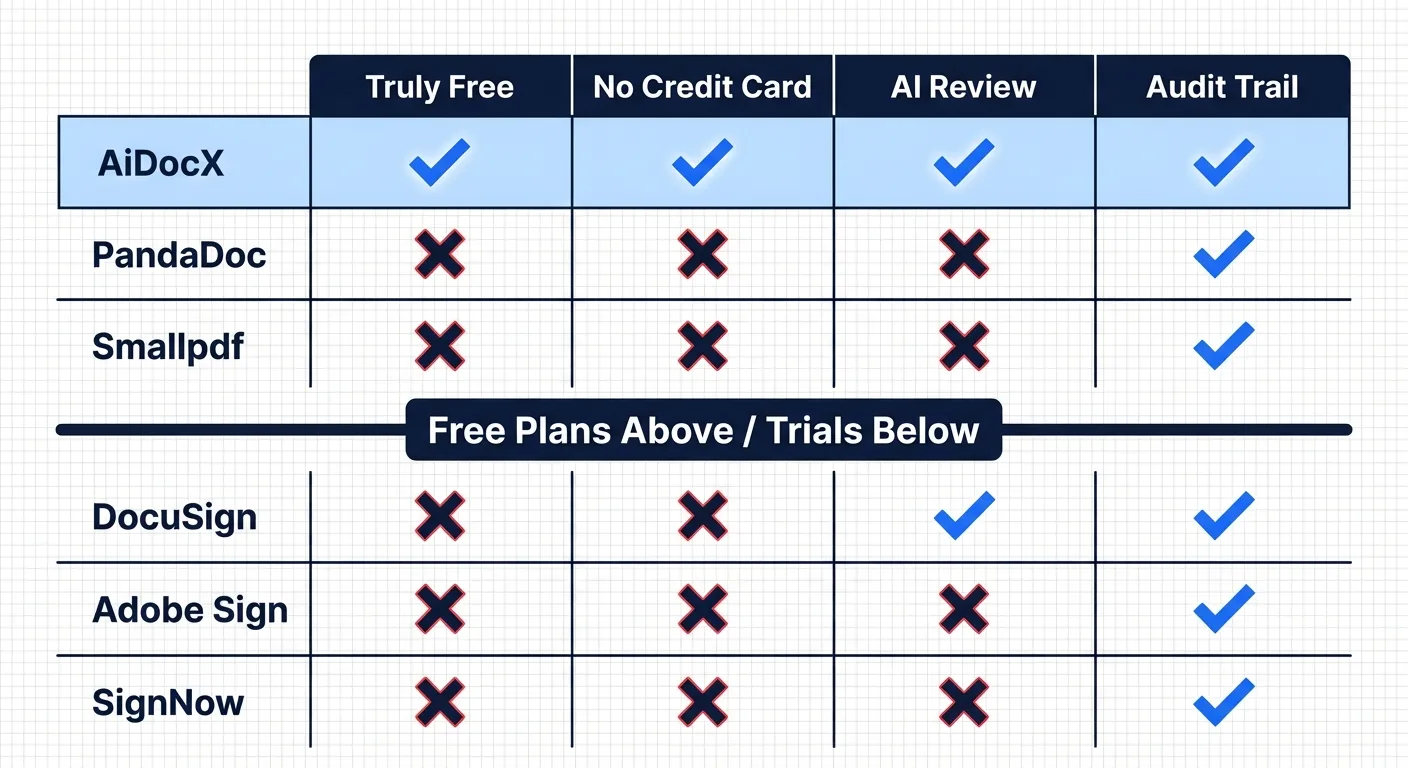
| Tool | Free Docs | Credit Card | AI Review | Tracking | Mobile |
|---|---|---|---|---|---|
| AiDocX | 5/month | Not needed | ✅ | ✅ | ✅ |
| PandaDoc | Unlimited | Not needed | ❌ | ❌ | ✅ |
| Smallpdf | 2/day | Not needed | ❌ | ❌ | ✅ |
| DocuSign | 30-day trial | Required | ❌ | ✅ | ✅ |
| Adobe Sign | 7-30 day trial | Required | ❌ | ✅ | ✅ |
| SignNow | 7-day trial | Required | ❌ | ❌ | ✅ |
Are Free E-Signatures Legally Valid?
Yes. In nearly every major jurisdiction:
- United States: The ESIGN Act (2000) and UETA give electronic signatures the same legal standing as handwritten signatures for virtually all business transactions.
- European Union: The eIDAS Regulation recognizes three tiers of e-signatures, all legally valid. Simple electronic signatures (what free tools provide) are sufficient for most business contracts.
- United Kingdom: The Electronic Communications Act 2000 and subsequent case law confirm e-signatures are legally binding.
- Canada: PIPEDA and provincial electronic commerce acts recognize e-signatures.
The tool you use doesn't affect legal validity. What matters is:
- Intent to sign — both parties intended to enter into an agreement
- Consent to do business electronically — both parties agreed to use e-signatures
- Record retention — the signed document is preserved in its final form
An audit trail (which records who signed, when, from what IP address) strengthens enforceability if a dispute arises. This is why tools that generate audit trail certificates add real value.
How to Sign a Document Online (Step by Step)
- Prepare your document — Have it ready as a PDF, Word, or Google Doc
- Upload to your chosen tool — Create a free account (no credit card) and upload
- Place signature fields — Drag and drop where each party needs to sign
- Add recipient emails — Enter the signer's email address
- Send — They receive a link, open it in any browser, and sign
- Done — Both parties get the signed PDF + audit trail
The whole process takes 2-3 minutes once you're familiar with it.
When Free Isn't Enough
Free plans work great for:
- Freelancers signing client contracts
- Solopreneurs handling NDAs and agreements
- Small teams with fewer than 10 documents per month
You'll want a paid plan when:
- You need templates for recurring documents
- You send more than 10-15 documents per month
- You need team features (multiple users, shared templates)
- You require advanced authentication (ID verification, SMS codes)
Bottom Line
You can absolutely sign documents online for free in 2026. The key is avoiding "free trials" disguised as free plans.
- Need AI contract review + signing? → AiDocX
- Need unlimited simple signatures? → PandaDoc
- Just need to sign one thing today? → Smallpdf
Don't pay for something you can get for free. And don't hand over your credit card for a "free" tool.
Ready to automate your documents with AI?
Start free with AiDocX — AI contract drafting, meeting minutes, consultation notes, e-signatures, and more in one platform.
Get Started FreeMore from AiDocX Blog

AI Addiction Counseling Notes: Templates & Automation Guide for 2026
Complete guide for addiction counselors on writing MI session records, relapse prevention plans, and CBT notes — with AI automation tips and HIPAA 42 CFR Part 2 compliance.
SophieKim March 13, 2026 13 min
AI Counseling Notes Guide (2026): Free Templates + Auto-Generate in Minutes
Complete guide to writing counseling notes in 2026. Includes copy-paste templates for psychology, legal, sales, and general counseling, plus how to auto-generate structured records with AI.
SophieKim March 13, 2026 12 min
AI Domestic Violence Counseling Notes (2026): Templates + Safety Guide for DV Advocates
Complete guide to domestic violence counseling documentation in 2026. Includes intake records, danger assessment checklists, safety plan templates, and how to automate records with AI while protecting victim privacy.
SophieKim March 13, 2026 13 min