SSO (Single Sign-On) Explained — How One Login Unlocks All Your Work Apps
Not sure what SSO is? This guide covers everything: how it works, protocol comparisons (SAML, OAuth, OIDC), enterprise benefits, and a step-by-step adoption checklist — all in plain language.
 Sophie · Content Planner February 27, 2026 10 min read
SSO (Single Sign-On) Explained — How One Login Unlocks All Your Work Apps
Key takeaway: SSO (Single Sign-On) lets you log in once and access every app you need without entering another password. For businesses, it solves three problems at the same time: stronger security, higher productivity, and lower IT costs. This guide walks through how SSO works, compares the major protocols, and gives you a practical adoption checklist — no engineering background required.
Think about the first ten minutes of your workday.
You open Gmail. Then Slack. Then Notion. Then Jira. Then your CRM. Then maybe a project management tool, a design app, and an analytics dashboard. If every single one of those services required you to type a separate username and password, you would spend more time authenticating than actually working.
But that is not what happens, is it? You sign in with your Google or Microsoft account once, and everything just... opens. That seamless experience is SSO (Single Sign-On) in action.
"Isn't that just saved passwords?" you might be thinking. Not at all. SSO is a fundamentally different technology from having your browser auto-fill credentials, and the distinction matters a lot — especially if you are responsible for your company's security. Let's break it down.
What Is SSO, Exactly?
SSO (Single Sign-On) is an authentication system that lets you access multiple independent applications with a single set of credentials.
Here is the simplest analogy: think of a wristband at an amusement park. You pay at the gate, get a wristband, and then every ride inside the park lets you on just by checking your wrist. You do not buy a separate ticket for each ride.
SSO works the same way:
- The wristband (authentication token) = a digital proof-of-identity issued after you log in once
- The park entrance (Identity Provider) = the system that verifies who you are and issues the token
- Each ride (Service Provider) = the individual apps that check the token and grant you access
SSO vs. Password Managers vs. Password Reuse
These three approaches get confused all the time. Here is how they differ:
| Approach | How It Works | Security Level | Best For |
|---|---|---|---|
| Reusing the same password | One password across every service | Very dangerous — one breach exposes everything | Never recommended |
| Password manager (1Password, etc.) | Stores a unique password per service | Moderate — depends on the master password | Individual users |
| SSO | A central server authenticates you once, then issues tokens | High — centralized control, MFA-ready | Organizations and teams |
A password manager remembers many passwords for you. SSO eliminates the need for many passwords in the first place. They solve the same symptom — password fatigue — but in fundamentally different ways.
How Does SSO Actually Work?
Before getting into protocols and acronyms, let's walk through what happens when you log into an app in an SSO-enabled workplace.
A Typical SSO Login Flow
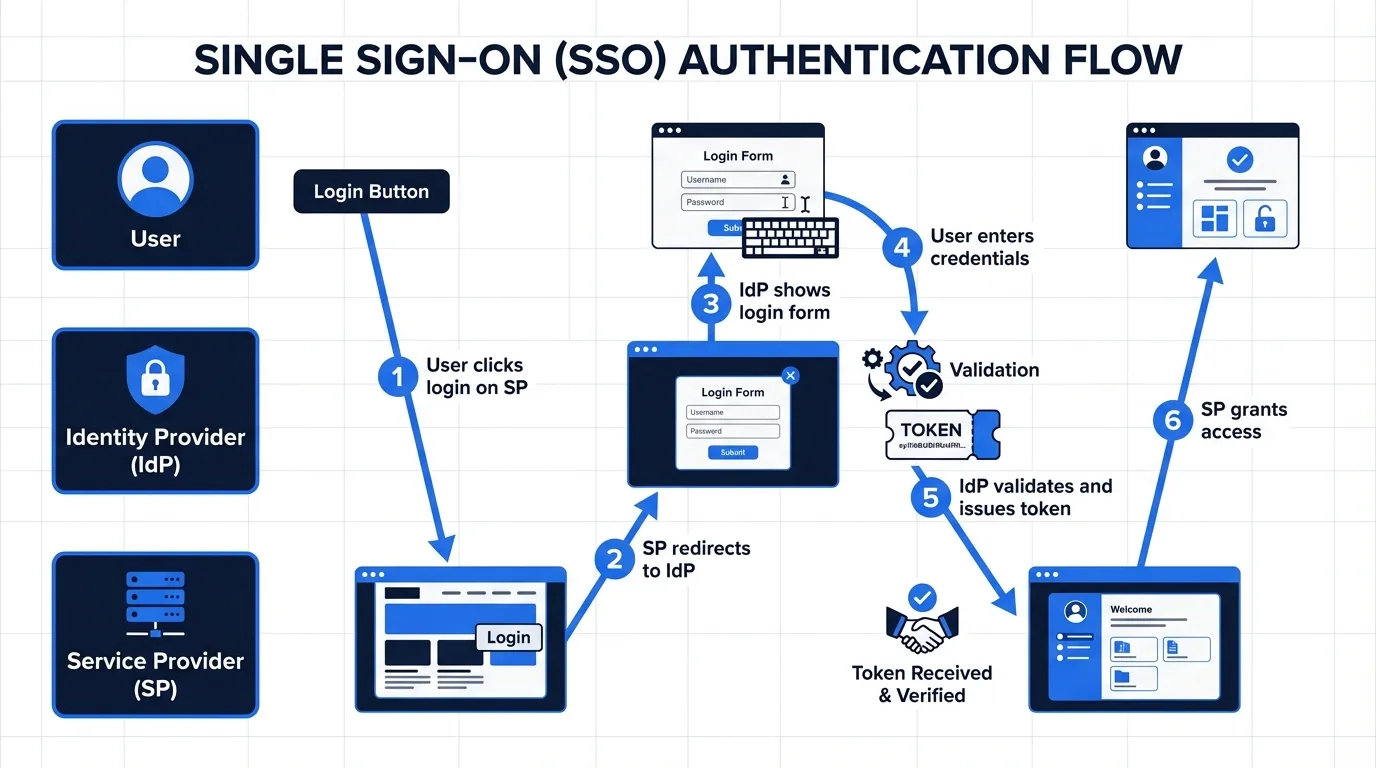
- You navigate to Slack — Slack does not have your credentials, so it redirects you to your company's Identity Provider (IdP).
- The IdP shows a login screen — You enter your company email and password (and complete MFA if required).
- The IdP issues a token — A cryptographic token that says "this person is verified" gets sent back to Slack.
- Slack reads the token and lets you in.
Here is where the magic happens: when you then open Notion, it also redirects to the IdP. But the IdP already has an active session from step 2, so it immediately issues a new token without asking for your password again. That is the "single" in Single Sign-On — you authenticate once, and every subsequent app gets instant access.
The Three Core Components
- IdP (Identity Provider): The central server that verifies your identity and issues tokens. Okta, Microsoft Entra ID (formerly Azure AD), and Google Workspace are the most common ones.
- SP (Service Provider): Each application that relies on the IdP to confirm who you are. Slack, Notion, Salesforce, Jira — these are all SPs in an SSO setup.
- Token / Assertion: The digital certificate the IdP sends to the SP. It says: "This user is authenticated, here is their identity information, and here are their permissions."
The Three SSO Protocols You Need to Know: SAML, OAuth, and OIDC
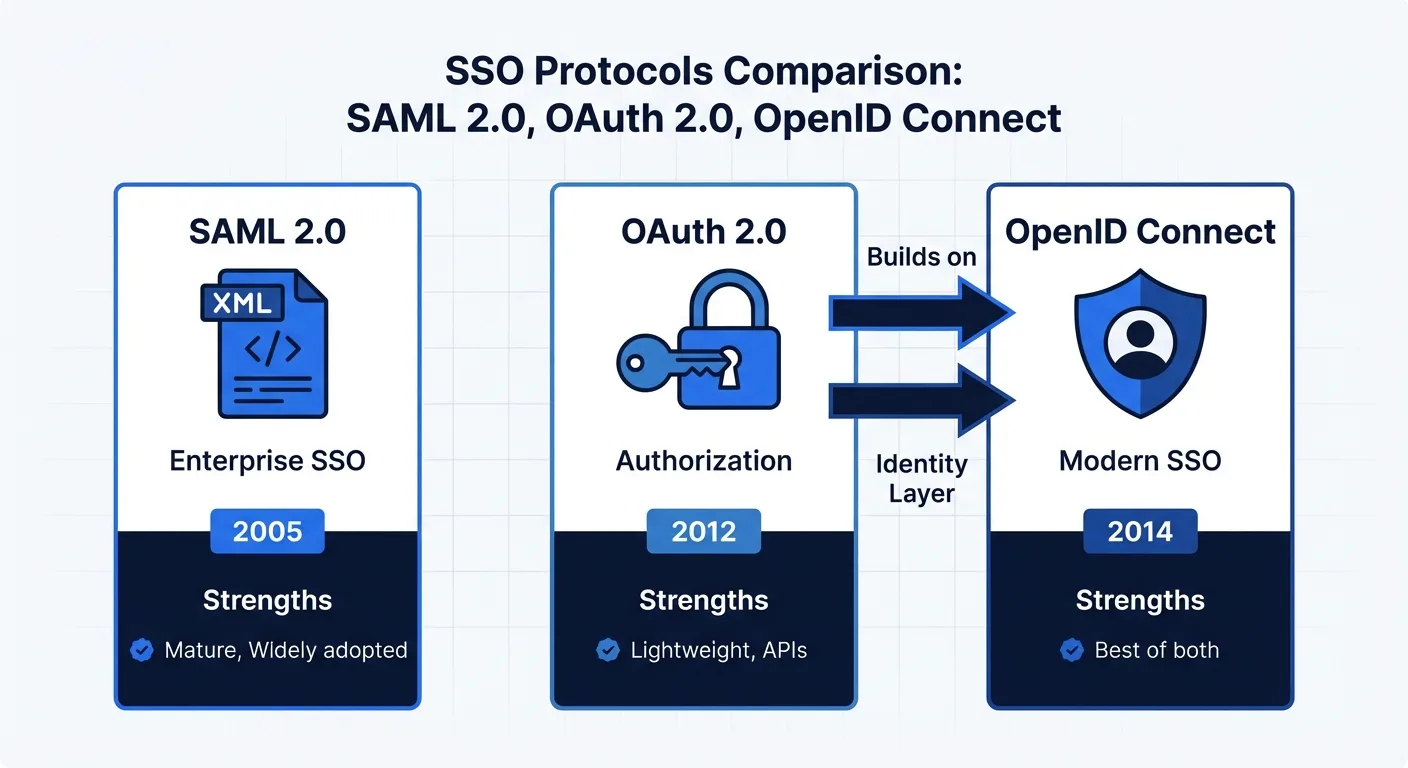
SSO is a concept. The protocols are the specific technical standards that make it work. Three dominate the landscape.
SAML 2.0 — The Enterprise Veteran
SAML (Security Assertion Markup Language) has been around since 2005, making it the oldest SSO standard still in wide use.
- Format: XML-based, verbose but thorough
- Best for: Large enterprise environments, B2B SaaS integrations
- Limitations: Clunky on mobile, complex to configure
Think of SAML as the corporate security badge of authentication protocols. It is heavy, formal, and not the most modern — but it is battle-tested and universally accepted in enterprise IT.
OAuth 2.0 — "Allow This App to Access..."
OAuth is technically not an SSO protocol at all. It is an authorization framework — it handles what an app is allowed to do, not who you are.
That popup you see when an app asks "Allow this application to access your Google Drive files?" — that is OAuth. It lets you grant an app limited access to your data without sharing your password.
- Format: JSON-based, lightweight, flexible
- Best for: Social login buttons, mobile apps, API integrations
- Limitations: Handles authorization, not authentication — it does not tell the app who you are
OpenID Connect (OIDC) — The Modern Standard
OIDC solves OAuth's identity gap by adding an authentication layer on top of OAuth 2.0. Where OAuth only says "this app has permission to do X," OIDC also says "and the person granting that permission is Jane from Engineering."
- Format: OAuth 2.0 + an ID Token containing user identity
- Best for: Modern SaaS applications, mobile + web simultaneously
- Advantages: Lighter than SAML, more secure than plain OAuth
Most new applications built today use OIDC. The "Sign in with Google," "Sign in with Microsoft," and "Sign in with Apple" buttons you see everywhere are all OIDC under the hood.
Protocol Selection Guide
| Scenario | Recommended Protocol | Why |
|---|---|---|
| Legacy enterprise system integration | SAML 2.0 | Broadest legacy compatibility, meets strict corporate security policies |
| Building a new SaaS product | OIDC | Modern, mobile-friendly, easier to implement |
| Adding social login only | OAuth 2.0 | Simplest implementation for consumer-facing apps |
| Serving both enterprise and consumer users | OIDC + SAML | OIDC as the default, with SAML available for enterprise customers |
Five Reasons Every Growing Business Needs SSO
1. It Solves the Password Problem at the Root
The average employee uses around 27 different work applications. Nobody creates 27 unique, strong passwords. In reality, people reuse the same password across services or create easily guessable variations like "Company2026!" — and every security team knows it.
SSO eliminates this problem by design. There is only one password — the one for your IdP — and you can protect that single credential with MFA (multi-factor authentication). One strong, MFA-protected password beats 27 weak ones every time.
2. Offboarding Becomes Instant
When someone leaves the company, how many accounts need to be deactivated? With 27 apps, that is 27 separate systems where IT has to revoke access. Miss even one, and a former employee still has a door into your company's data.
With SSO, disabling the IdP account instantly cuts off access to every connected service. This is sometimes called "Single Sign-Off," and it is one of the most compelling security benefits of SSO.
3. Productivity Gains Are Real and Measurable
According to Okta's research, employees enter passwords an average of 9.3 times per day. Password reset requests account for 20-50% of all IT helpdesk tickets. After SSO adoption, both numbers drop to near zero. That is time your team gets back for actual work, and support volume your IT staff no longer has to handle.
4. It Makes Compliance Audits Dramatically Easier
If you are pursuing certifications like SOC 2, ISO 27001, or GDPR compliance, auditors want to see robust access controls and clear audit trails. SSO centralizes all authentication events in the IdP, giving you a single pane of glass to show exactly who accessed what service, when, and from where.
5. IT Administration Costs Drop Significantly
When a new employee joins, instead of creating accounts in 27 different systems, IT adds them to the IdP once and assigns role-based access. The right apps light up automatically. This is called auto-provisioning, and when combined with the SCIM protocol, it can automate the entire lifecycle — onboarding, department transfers, and offboarding — without manual intervention.
SSO Is Not Perfect: What You Should Watch For
SSO offers enormous benefits, but it is not without trade-offs. Being aware of these before you start will save you headaches later.
Single Point of Failure
If the IdP goes down, nobody can log into anything. This is the biggest operational risk of SSO. Enterprise-grade IdPs mitigate this with 99.99% uptime SLAs and redundant infrastructure, but the risk is never zero.
Mitigation: Maintain emergency "break glass" admin accounts that bypass SSO, and document an incident response procedure for IdP outages.
Setup Complexity Is Front-Loaded
SSO is not a plugin you install in five minutes. You need to audit every application you use, verify SSO support (and which protocol), configure each integration with the IdP, and test thoroughly. Legacy systems may not support SSO at all, requiring workarounds or replacements.
Practical tip: Do not try to migrate everything at once. Start with your most critical apps — email and collaboration tools — then expand in phases.
Vendor Lock-In Is Real
When every authentication flow runs through a single IdP, switching providers becomes a major project. Every SP integration has to be re-configured. The initial choice of IdP matters more than most teams realize.
Mitigation: Choose an IdP that uses open standards (SAML and OIDC). Avoid any provider that relies on proprietary protocols — they make migration significantly harder down the road.
Shadow Accounts Can Bypass SSO
Even after SSO is deployed, some applications may still have local admin accounts or service accounts that do not go through the IdP. These "back doors" create security blind spots and need to be audited regularly.
Document Management Platforms and SSO
SSO becomes especially critical when you are dealing with sensitive business documents — contracts, IR decks, financial data, board materials, and investor communications.
Why?
- Contracts contain pricing, terms, and confidential obligations
- IR decks include non-public financial projections and strategy
- Multiple external parties (investors, legal counsel, counterparties) need controlled access to these documents
Without SSO, you have to create and manage individual accounts for every person who needs access, then remember to revoke each one when a project ends or a relationship changes. With SSO, access is controlled through the IdP — adjust permissions in one place, and it applies everywhere.
AiDocX supports SAML and OIDC-based SSO for enterprise customers, enabling seamless integration with your existing corporate identity system. Employees can start using the platform immediately with their company credentials — no separate sign-up required — while IT administrators maintain centralized control over who can access contracts, signatures, and sensitive documents.
SSO Adoption Checklist
If you are evaluating SSO for your organization, use this phased checklist to stay on track.
Phase 1: Assess Your Current State
- Inventory all SaaS applications currently in use across the organization
- Check each application's SSO support (SAML, OIDC, or none)
- Identify applications that do not support SSO and evaluate alternatives
- Gather data on password-related incidents and helpdesk ticket volume
Phase 2: Choose Your Identity Provider
- Verify compatibility with your critical applications
- Confirm MFA (multi-factor authentication) support and options
- Check SCIM (auto-provisioning) support for user lifecycle management
- Compare pricing models (per-user vs. flat rate vs. bundled with existing tools)
- Review SLA terms — target 99.99% uptime minimum
Phase 3: Roll Out in Stages
- Select a pilot group (typically IT or engineering — they can troubleshoot themselves)
- Integrate core services first (email, messaging, file storage)
- Establish and document emergency access procedures
- Conduct company-wide training and share clear migration timelines
- Schedule decommissioning of legacy local accounts
Identity Provider Comparison
| IdP | Strengths | Price Range | Best Fit |
|---|---|---|---|
| Okta | Largest app integration catalog, market leader | $6–15/user/month | Mid-size to enterprise |
| Microsoft Entra ID | Seamless Microsoft 365 integration | Included with M365 or $6+/user/month | Microsoft-centric organizations |
| Google Workspace | Built-in SSO for Google ecosystem | Included with Workspace plans | Google-centric organizations |
| OneLogin | Intuitive UI, fast setup | $4–8/user/month | Startups and SMBs |
| JumpCloud | Combines SSO with device management | $7–15/user/month | Remote-first companies |
Conclusion: SSO Is Infrastructure, Not a Feature
SSO is not just a convenience for avoiding password prompts. It is foundational infrastructure that underpins your organization's security posture, operational efficiency, and compliance readiness.
Here is a practical starting point based on company size:
- Under 10 employees: Start with the SSO built into Google Workspace or Microsoft 365. It costs nothing extra and covers the basics.
- 10 to 100 employees: Evaluate a dedicated IdP like Okta or OneLogin. As your app stack grows, centralized identity management pays for itself quickly.
- 100+ employees: You need a comprehensive IAM (Identity and Access Management) strategy combining SSO, SCIM auto-provisioning, MFA, and conditional access policies.
Regardless of your size, make SSO support a non-negotiable criterion when evaluating any new SaaS tool. An application that does not support SSO today will become a security blind spot tomorrow.
And if your organization handles sensitive documents — contracts, investor materials, financial reports — SSO is not optional, it is essential. AiDocX supports enterprise SSO so that your document security and access management stay centralized, auditable, and under your control.
Ready to automate your documents with AI?
Start free with AiDocX — AI contract drafting, meeting minutes, consultation notes, e-signatures, and more in one platform.
Get Started FreeMore from AiDocX Blog
AI Addiction Counseling Notes: Templates & Automation Guide for 2026
Complete guide for addiction counselors on writing MI session records, relapse prevention plans, and CBT notes — with AI automation tips and HIPAA 42 CFR Part 2 compliance.
SophieKim March 13, 2026 13 min
AI Counseling Notes Guide (2026): Free Templates + Auto-Generate in Minutes
Complete guide to writing counseling notes in 2026. Includes copy-paste templates for psychology, legal, sales, and general counseling, plus how to auto-generate structured records with AI.
SophieKim March 13, 2026 12 min
AI Domestic Violence Counseling Notes (2026): Templates + Safety Guide for DV Advocates
Complete guide to domestic violence counseling documentation in 2026. Includes intake records, danger assessment checklists, safety plan templates, and how to automate records with AI while protecting victim privacy.
SophieKim March 13, 2026 13 min