Stop Scope Creep with Change-Order Clauses (2026 Guide)
Learn how change-order clauses protect your agency’s margins, keep clients aligned, and turn scope creep into billable work without damaging relationships.
 James · Content Manager July 4, 2026 5 min read
Stop Scope Creep with Change-Order Clauses (2026 Guide)
Scope creep doesn’t happen overnight. It arrives through Slack DMs, “quick favors,” and kickoff calls that left the original boundaries fuzzy. Left unchecked, it erodes margins, burns out your team, and turns profitable projects into money losers. The fix isn’t stricter client management—it’s a properly structured change-order clause in your contract.
Why scope creep kills agency margins
Unbillable work compounds faster than most agency owners realize. A few extra slides here, a last-minute landing page there, and suddenly your team is working 15% over budget for free. The financial impact is real: agencies typically lose 5–12% of gross revenue annually to scope expansion that never gets invoiced.
But the hidden costs hit harder. Timeline slippage triggers chain reactions across other projects. Junior staff absorb “just one more revision” until engagement drops. And clients? They start treating your agency as an unlimited resource rather than a strategic partner.
The root cause is almost always the same: ambiguous boundaries in the initial agreement. When the contract doesn’t define what falls inside versus outside the scope, every request becomes a negotiation. A change-order clause removes that negotiation entirely.
What a change-order clause actually does
A change-order clause is a contractual provision that requires written approval for any work outside the original Statement of Work. It doesn’t block collaboration—it structures it.
Specifically, it does three things:
- Sets a clear boundary: Defines what’s included, what’s excluded, and how revisions are handled.
- Quantifies impact: Forces a cost and timeline estimate before any extra work begins.
- Requires sign-off: Makes approval a documented, two-way commitment rather than a verbal promise.
Clients actually benefit too. They get transparency on how their requests affect budget and delivery, and they avoid surprise invoices at project close. When your contract handles the “what if” upfront, you stop playing bad cop in week eight. AiDocX contracts include change-order clauses so extra work always gets paid, and they’re drafted in plain language clients actually read.
The 5-step change-order process that actually works
A clause is only useful if your team knows how to deploy it. Here’s the workflow that keeps projects moving without burning relationships:
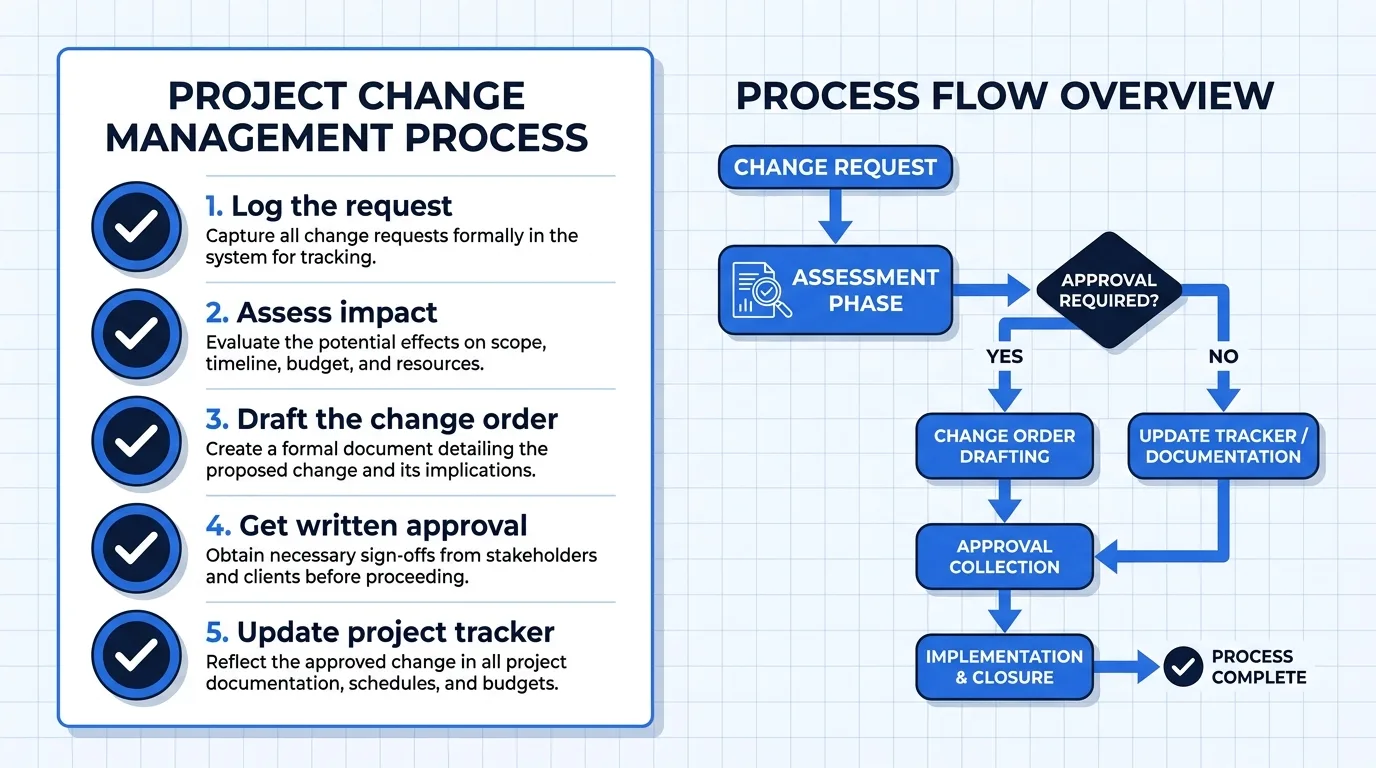
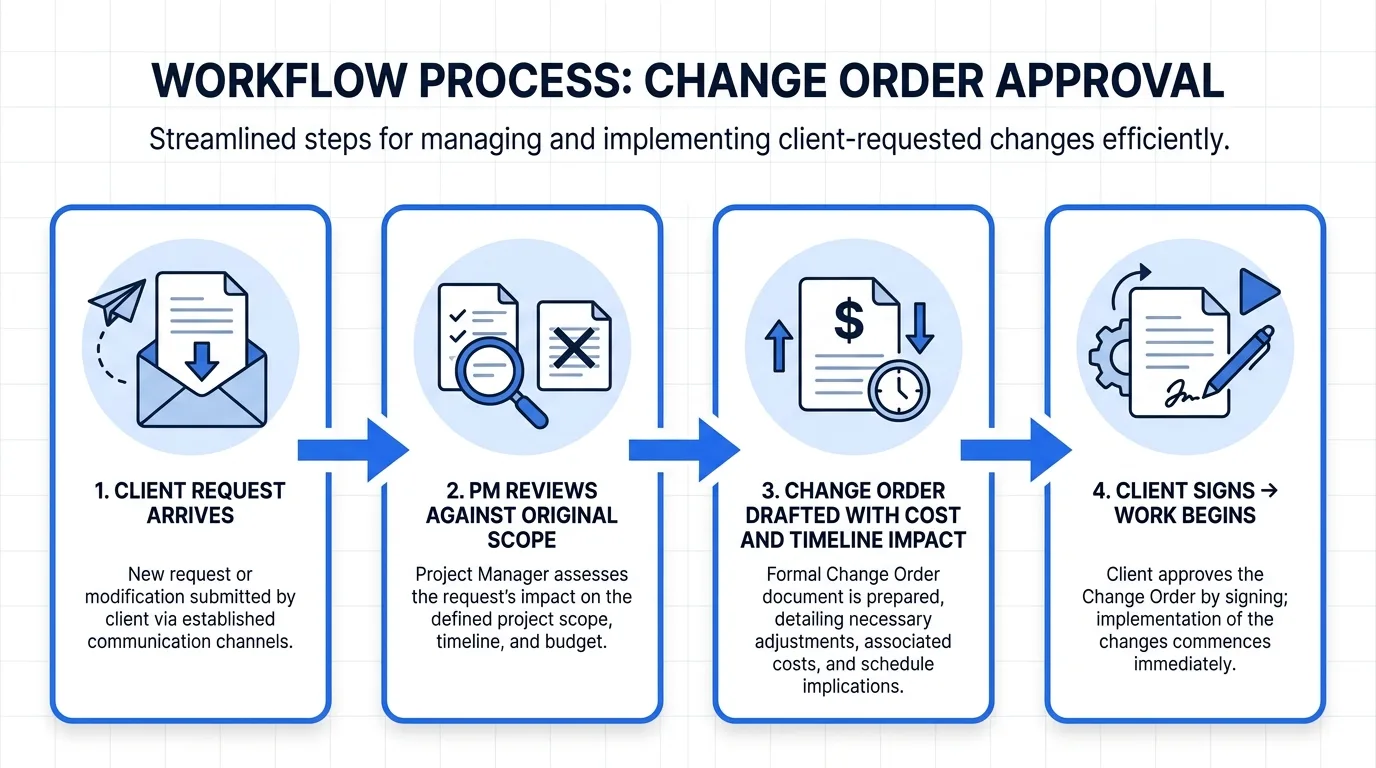
- Log the request immediately. Don’t let it live in chat. Capture it in your project tracker with the date, requester, and description.
- Assess the impact. Pull your original SOW, estimate hours, calculate cost, and note timeline shifts. Be specific, not defensive.
- Draft the change order. Use a standardized template. Include scope description, revised fee, payment terms, and updated delivery date.
- Get written approval. Email, e-signature, or portal acceptance. Verbal “sure, go ahead” doesn’t hold up when the invoice arrives.
- Update the project baseline. Attach the signed change order to the original contract, refresh your Gantt or sprint plan, and notify the team.
When this process runs consistently, clients stop treating scope changes as informal favors. They start viewing them as normal project decisions with clear trade-offs.
How to write a change-order clause that clients will sign
Your clause needs to be firm but collaborative. Avoid legalese that makes clients defensive. Instead, focus on clarity, fairness, and mutual protection.
Include these five elements:
- Scope definition: Reference the original SOW by title and date. List inclusions, exclusions, and revision limits.
- Approval threshold: State that any request exceeding X hours or Y% of the original budget triggers a change order.
- Pricing model: Specify whether out-of-scope work is billed hourly, at a fixed rate, or via a pre-approved change-order fee schedule.
- Timeline language: Clarify that delivery dates shift proportionally to added scope unless the client absorbs the delay.
- Signature requirement: Require both parties to sign before work begins. State that work commencing without a signed change order is at the agency’s discretion.
Example phrasing: “Any request outside the original Statement of Work will be documented as a Change Order, including estimated hours, cost impact, and revised delivery dates. Work will not begin until both parties sign the Change Order.”
Attach a one-page change-order template to your contract. Make it obvious, not buried in appendices.
When to escalate vs. when to absorb
Not every out-of-scope request deserves a formal change order. Your team’s energy matters too. Use this decision framework:
Absorb when:
- The request takes less than two hours
- It’s a minor tweak within an existing deliverable
- You already budgeted for revisions in your margin
- The client relationship is new and trust is still building
Escalate to a change order when:
- The request adds a new deliverable or channel
- It pushes the timeline past the current milestone
- The client has requested the same out-of-scope item twice
- Your team is already working over budget on the project
The “two-strike” rule is especially useful: if a client asks for the same extra item twice, treat the second request as a formal change order. It signals that your boundaries aren’t negotiable without compensation.
Quick-reference checklist
- Contract includes a change-order clause with clear approval language
- Scope of Work defines inclusions, exclusions, and revision limits
- Change-order template ready to drop into any project
- Team knows the exact trigger for a change order (hours, deliverables, timeline)
- All change orders routed through a single approval channel
- Signed change orders archived in the project folder before work starts
- Monthly P&L review flags projects exceeding 10% unbillable scope
Scope creep thrives in ambiguity. A well-drafted change-order clause turns “Can you just do this?” into a clear yes-or-no decision with predictable costs. If your current contracts don’t have one, it’s time to build it out. AiDocX contracts include change-order clauses so extra work always gets paid, letting you protect your margins without damaging client relationships.
Ready to automate your documents with AI?
Start free with AiDocX — AI contract drafting, meeting minutes, consultation notes, e-signatures, and more in one platform.
Get Started FreeMore from AiDocX Blog
Machine Shop Job Traveler Template: Routing Sheet + Example
Copy a machine shop job traveler template for small job shops. Includes a routing sheet, filled example, traceability fields, sign-offs, and setup tips.
Weekly Status Report Template: 4 Formats + Examples
Copy one of four weekly status report templates for individual work, projects, leadership, or blockers. See a worked example and a practical review checklist.

How to Read a Business Contract: A Founder's Checklist (2026)
A practical way to review parties, scope, money, IP, liability, and exit terms before signing a business contract.
 MinjiLee October 7, 2026 9 min