
Credit Note Template 2026: Fix Invoices & Refunds
Learn how to issue credit notes correctly in 2026. Avoid tax errors, keep books balanced, and use our template for seamless invoice corrections and refunds.
 James · Content Manager August 3, 2026 11 min read
Incorrect invoicing is inevitable. Whether it’s a typo in the amount, a shipped item that was returned, or a pricing error discovered after the fact, the need to correct financial records arises frequently. In 2026, the expectation for transparency and auditability in small business accounting has never been higher. Simply sending an email saying "I’m refunding you $50" is no longer sufficient for compliant bookkeeping or customer trust.
A credit note is the professional mechanism for reversing or adjusting charges without issuing a full new invoice. It serves as a formal record that reduces the amount a customer owes, or creates a credit balance for future purchases. For small business owners and bookkeepers, understanding how to draft, issue, and record a credit note is essential for maintaining clean books, satisfying tax authorities, and preserving customer relationships. This guide provides a practical framework for handling corrections in 2026, including a template structure and best practices that keep your finances accurate.
Why You Need a Credit Note Instead of Just a Refund
Many small business owners confuse a refund with a credit note. While a refund is the movement of money, a credit note is the documentation that justifies that movement in your accounting system. If you simply process a bank refund without creating a corresponding accounting entry, your General Ledger will show money leaving the business but no reduction in sales revenue or accounts receivable. This discrepancy creates immediate problems during tax season or when reviewing profit and loss statements.
A credit note acts as a negative invoice. It reduces the total value of the original transaction. In double-entry bookkeeping, it ensures that your revenue figures reflect the actual value of goods or services retained by the customer. For example, if you billed a client $1,000 but they returned defective goods worth $200, issuing a credit note for $200 reduces your recorded revenue to $800. This is critical for accurate financial reporting.
Furthermore, credit notes are often required by tax authorities, such as the IRS in the United States or HMRC in the UK, to support adjustments to VAT or GST filings. If you charged tax on an invoice and then issued a refund, you must prove that you are adjusting the tax liability. A properly formatted credit note with a unique reference number provides this proof. Without it, you risk overpaying taxes or facing audits due to unexplained discrepancies in your sales records.
The Anatomy of a Valid Credit Note
To be legally valid and useful for accounting, a credit note must contain specific information. In 2026, digital compliance standards increasingly require digital signatures and immutable audit trails, making the structure of the document more important than ever. A poorly formatted note may be rejected by auditors or cause confusion for your accounts receivable team.
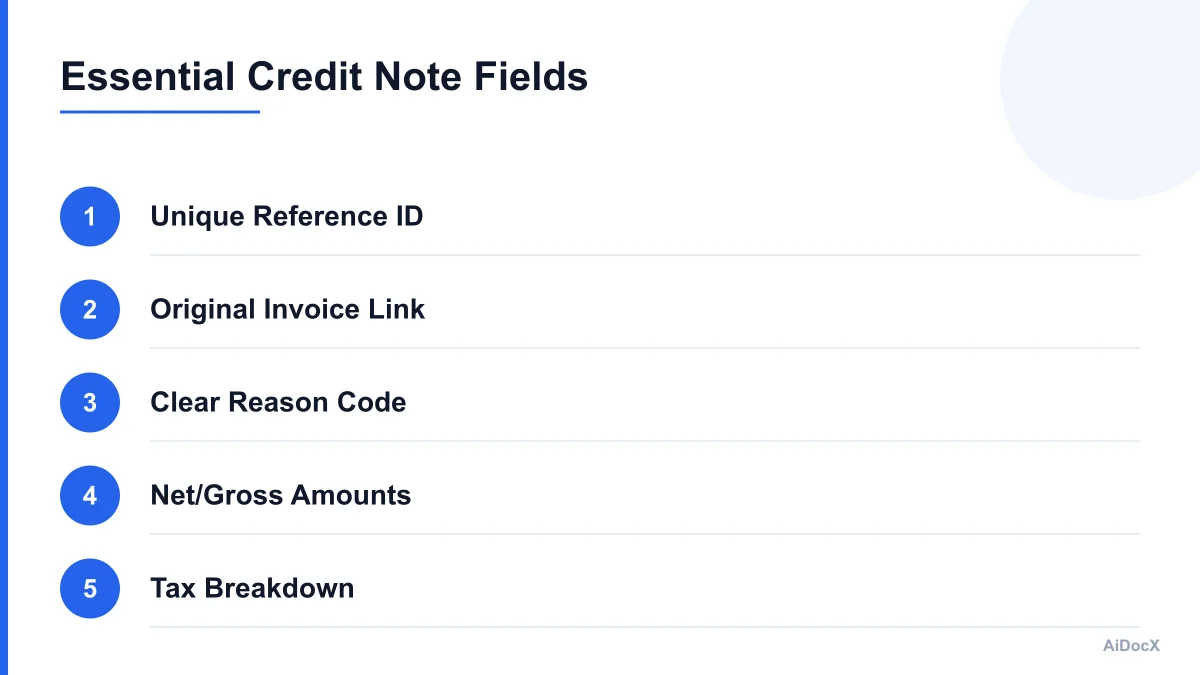
At a minimum, a professional credit note template must include:
- Clear Labeling: The document must be prominently titled "Credit Note" or "Credit Memo."
- Unique Reference Number: A sequential ID that distinguishes it from the original invoice. This should follow your organization’s numbering convention.
- Date of Issue: The date the credit note is created, not necessarily the date of the original error.
- Original Invoice Details: A clear reference to the original invoice number, date, and total amount. This links the two documents in your accounting software.
- Supplier and Customer Information: Full legal names, addresses, and tax IDs for both parties.
- Description of Goods/Services: A detailed line-item breakdown of what is being credited. Vague descriptions like "refund" are insufficient for audit purposes.
- Net Amount and Tax Breakdown: The subtotal before tax, the applicable tax rate, and the tax amount. This ensures your tax filings remain accurate.
- Total Credit Amount: The final amount being credited to the customer.
- Reason for Credit: A brief explanation, such as "Goods returned," "Pricing error," or "Service adjustment." This helps with internal tracking and customer service.
Including these elements ensures that the credit note is not just a courtesy to the customer, but a robust financial document that stands up to scrutiny.
Common Scenarios for Issuing Credit Notes
Understanding when to use a credit note versus other methods is key to efficient bookkeeping. Here are the most common scenarios where a credit note is the correct tool:
- Returns and Refunds: A customer returns damaged or unwanted goods. Instead of re-invoicing for the remaining balance, you issue a credit note for the returned items.
- Pricing Errors: You accidentally charged a customer a higher price due to a typo or system glitch. A credit note corrects the overcharge without voiding the entire invoice.
- Shortages: You shipped fewer items than invoiced. A credit note adjusts the total to match the actual delivery.
- Discounts Applied Post-Invoice: A customer negotiated a discount after the invoice was sent. A credit note applies this discount formally.
- Service Adjustments: A project was completed with fewer hours than estimated, or a service was cancelled mid-contract. A credit note adjusts the final bill.
In each case, the goal is to align your records with reality. Using a credit note ensures that your historical data remains intact while accurately reflecting the current financial position.
Step-by-Step: Issuing a Credit Note
Issuing a credit note should be a standardized process to prevent errors and ensure consistency. Follow these steps to maintain control over your accounts receivable.
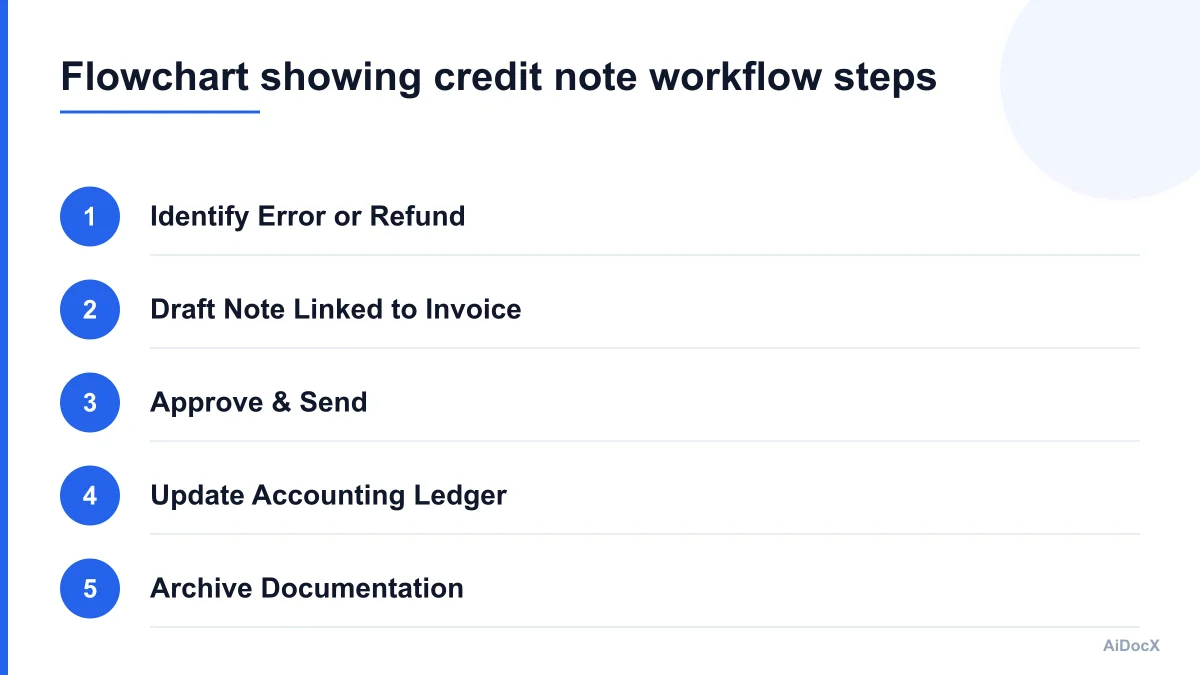
1. Identify and Verify the Error
Before creating any document, verify the discrepancy. Check the original invoice, the customer’s request, and your inventory or service logs. Confirm that the customer is eligible for a credit. For example, if a customer claims they didn’t receive an item, verify the shipping records first.
2. Draft the Credit Note
Use a template to ensure all required fields are present. In 2026, manual spreadsheets are increasingly prone to error and lack audit trails. Consider using AiDocX to draft a credit note linked to the original invoice, keeping refunds and corrections traceable instead of buried in email threads. This linkage is crucial for automated accounting systems that can pull data directly from the credit note to update ledgers.
3. Approve and Sign
Depending on your company’s internal controls, a manager or bookkeeper may need to approve the credit note, especially for large amounts. Once approved, apply your digital signature or seal if required by local regulations.
4. Send to the Customer
Send the credit note via email or through your customer portal. Ensure the customer understands how the credit will be applied. Will it be refunded to their bank account, or applied as a credit balance for future purchases? Clearly state this in the accompanying message.
5. Update Your Accounting System
This is the most critical step for bookkeepers. Record the credit note in your accounting software. This action will reduce your accounts receivable and adjust your revenue and tax liabilities accordingly. Do not skip this step, as it is what keeps your books balanced.
6. Archive the Documentation
Keep a copy of the original invoice, the credit note, and any correspondence regarding the adjustment. This documentation is vital for audits and dispute resolution.
Best Practices for 2026: Compliance and Efficiency
As accounting software becomes more integrated, the way we handle credit notes is evolving. Here are best practices to stay compliant and efficient in 2026.
Digital-First Documentation
Paper credit notes are becoming obsolete. Digital credit notes are faster, easier to store, and less prone to loss. Ensure your digital notes are in a widely accepted format like PDF, which is non-editable and preserves formatting. If you use e-invoicing standards, ensure your credit notes comply with local e-invoicing mandates, such as PEPPOL in Europe or specific national frameworks.
Automated Linking
Manual entry of credit notes leads to errors. Use accounting software that allows you to create credit notes directly from original invoices. This automation ensures that the reference numbers, customer data, and line items are pre-filled, reducing the risk of typos. It also creates a digital link between the two documents, making it easy for auditors to trace the transaction history.
Clear Communication
Transparency builds trust. When issuing a credit note, communicate clearly with the customer. Explain why the credit is being issued and how it affects their account. If it’s a refund, specify when the money will appear in their account. If it’s a credit balance, explain how they can use it. This reduces follow-up questions and improves customer satisfaction.
Regular Reconciliation
Perform monthly reconciliations of your accounts receivable. Check for any outstanding credit notes that haven’t been applied or refunded. Unapplied credits can clutter your ledger and make it difficult to assess true receivables. Address these discrepancies promptly to maintain clean books.
Common Mistakes to Avoid
Even experienced bookkeepers can make mistakes when handling credit notes. Avoid these common pitfalls to ensure accuracy and compliance.
- Voiding Instead of Crediting: Some business owners prefer to void the original invoice and issue a new one. While this can work for simple errors, it can disrupt audit trails and complicate tax reporting if the original invoice was already filed. Credit notes are often cleaner for adjustments.
- Ignoring Tax Implications: Failing to adjust the tax amount on the credit note can lead to overpayment or underpayment of taxes. Always ensure the tax breakdown matches the original invoice’s tax treatment.
- Lack of Documentation: Issuing a credit note without a written reason or supporting documents can lead to disputes. Always attach a note explaining the reason for the credit.
- Manual Data Entry Errors: Typing in customer details or amounts manually increases the risk of errors. Use templates or automated tools to pull data from the original invoice.
- Failing to Update Ledgers: Creating a credit note but not recording it in the accounting system is a critical error. This results in overstated revenue and receivables. Always ensure the credit note is posted in your ledger.
How AiDocX Simplifies the Credit Note Process
Managing credit notes manually can be time-consuming and error-prone, especially for small businesses with high transaction volumes. AiDocX offers a streamlined approach to document management that integrates seamlessly with your workflow.
AiDocX drafts a credit note linked to the original invoice, keeping refunds and corrections traceable instead of buried in email threads. This linkage ensures that every credit note is tied to its source, providing a clear audit trail. The platform allows you to customize templates to match your brand and compliance requirements, ensuring consistency across all documents.
By automating the creation and distribution of credit notes, AiDocX reduces the administrative burden on small business owners and bookkeepers. It minimizes the risk of human error and ensures that your financial records are always accurate and up-to-date. This efficiency allows you to focus on growing your business rather than managing paperwork.
Checklist: Before You Issue a Credit Note
Use this checklist to ensure you don’t miss any critical steps when issuing a credit note.
- Verify the original invoice details and customer information.
- Confirm the reason for the credit (return, error, discount).
- Calculate the correct net amount and tax adjustment.
- Draft the credit note using a compliant template.
- Include a unique reference number and date.
- Link the credit note to the original invoice.
- Approve the credit note according to internal policies.
- Send the credit note to the customer with clear instructions.
- Record the credit note in your accounting software.
- Archive the documentation for future reference.
Conclusion
Issuing credit notes is a fundamental aspect of small business accounting. It ensures that your financial records accurately reflect the value of goods and services provided, maintains compliance with tax regulations, and preserves customer trust. By following the steps outlined in this guide and leveraging tools that streamline the process, you can handle corrections and refunds efficiently and accurately.
In 2026, the expectation for transparency and auditability in business transactions is higher than ever. A well-drafted credit note is not just a formality; it is a critical component of your financial integrity. Take the time to implement a robust process for issuing credit notes, and your books will remain clean, your audits will be smooth, and your customers will appreciate the professionalism.
Start by reviewing your current credit note process. Are you using templates? Are you linking them to original invoices? Are you updating your ledgers promptly? If not, now is the time to make changes. Consider exploring platforms like AiDocX to simplify your document workflow and ensure compliance. By taking control of your credit note process, you protect your business and set the stage for long-term financial health.
Ready to automate your documents with AI?
Start free with AiDocX — AI contract drafting, meeting minutes, consultation notes, e-signatures, and more in one platform.
Get Started FreeMore from AiDocX Blog

Korea's AI Basic Act: 9 Contract Checks for AI Vendors and Buyers (2026)
A practical checklist for AI contracts connected to Korea: supplier roles, training data, user notices, high-impact AI, model changes, incident response, and exit terms.

Consulting Proposal Template (2026): 9 Sections + Example
Copy a consulting proposal template with nine sections, pricing options, and a filled example. Includes tips to make the proposal easy to approve.
 AiDocX Team October 24, 2026 11 min
Internship Agreement Template (2026): Paid & Unpaid Interns
Copy an internship agreement template for paid or unpaid interns. Covers U.S. and UK pay rules, duties, IP, confidentiality, and a filled example.
AiDocX Team October 24, 2026 12 min