E-Signature Audit Trail: Your Legal Proof in 2026
Discover how an e-signature audit trail protects your business from contract disputes. Learn what it records, why courts require it, and how to verify document integrity.
 James · Content Manager July 4, 2026 4 min read
E-Signature Audit Trail: Your Legal Proof in 2026
When a contract dispute lands on your desk, your e-signature platform is the first place you look for evidence. But a simple “signed” status isn’t enough to stand up in court. What you actually need is a complete, tamper-evident audit trail. This document doesn’t just prove who signed—it proves when, how, and whether the file changed afterward.
What an E-Signature Audit Trail Actually Records
An audit trail is a chronological log attached to every document in your signing workflow. It captures metadata that a plain PDF stamp never will. Specifically, it records:
- The exact identity of each signer (verified via email, SMS, or SSO)
- The IP address and device used at the moment of signing
- Timestamps for every action: document view, field fill, signature placement, and final submission
- The cryptographic hash that locks the document to its original state
- Any routing changes, reminders sent, or access attempts by unauthorized parties
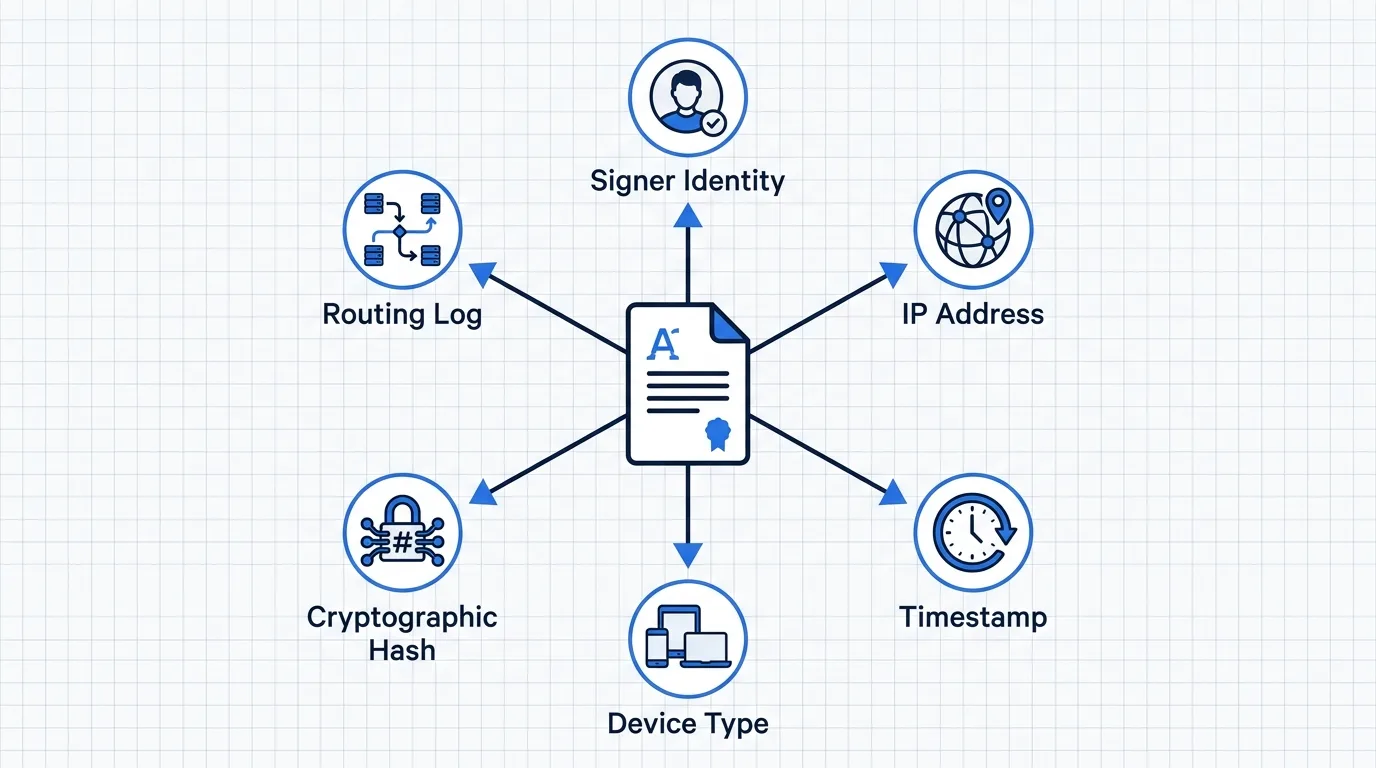
When a dispute arises, this log becomes the single source of truth. Courts and arbitrators rely on it to reconstruct the signing event exactly as it happened.
[Infographic 1]
Why Courts and Regulators Require It
Electronic signatures are legally binding under frameworks like ESIGN (US), eIDAS (EU), and UETA (US state level). But legality isn’t automatic. Regulators and judges require proof that the signature process met specific security and authentication standards.
Without an audit trail, you are left with a static PDF and a disputed “yes.” That shifts the burden of proof entirely to you. With a complete trail, you demonstrate:
- Intent: The signer actively opened and approved the document
- Authentication: Identity was verified before access was granted
- Integrity: The file matches the version presented at signing
- Non-repudiation: The signer cannot credibly claim they never saw or approved it
In contract disputes, this shifts the dynamic from “he said, she said” to documented fact.
The Difference Between a Timestamp and a Legal Audit Trail
Many business owners confuse a simple timestamp with a full audit trail. They are not the same. A timestamp only records when a file was created or modified. It tells you nothing about who accessed it, whether identity was verified, or if the content changed after signing. A legal audit trail is a structured, cryptographic record of the entire signing lifecycle. It ties each action to a verified identity and locks the document to a specific hash value. If even one character changes after signing, the hash breaks, and the trail flags the alteration immediately.
How to Verify a Document Hasn’t Been Altered
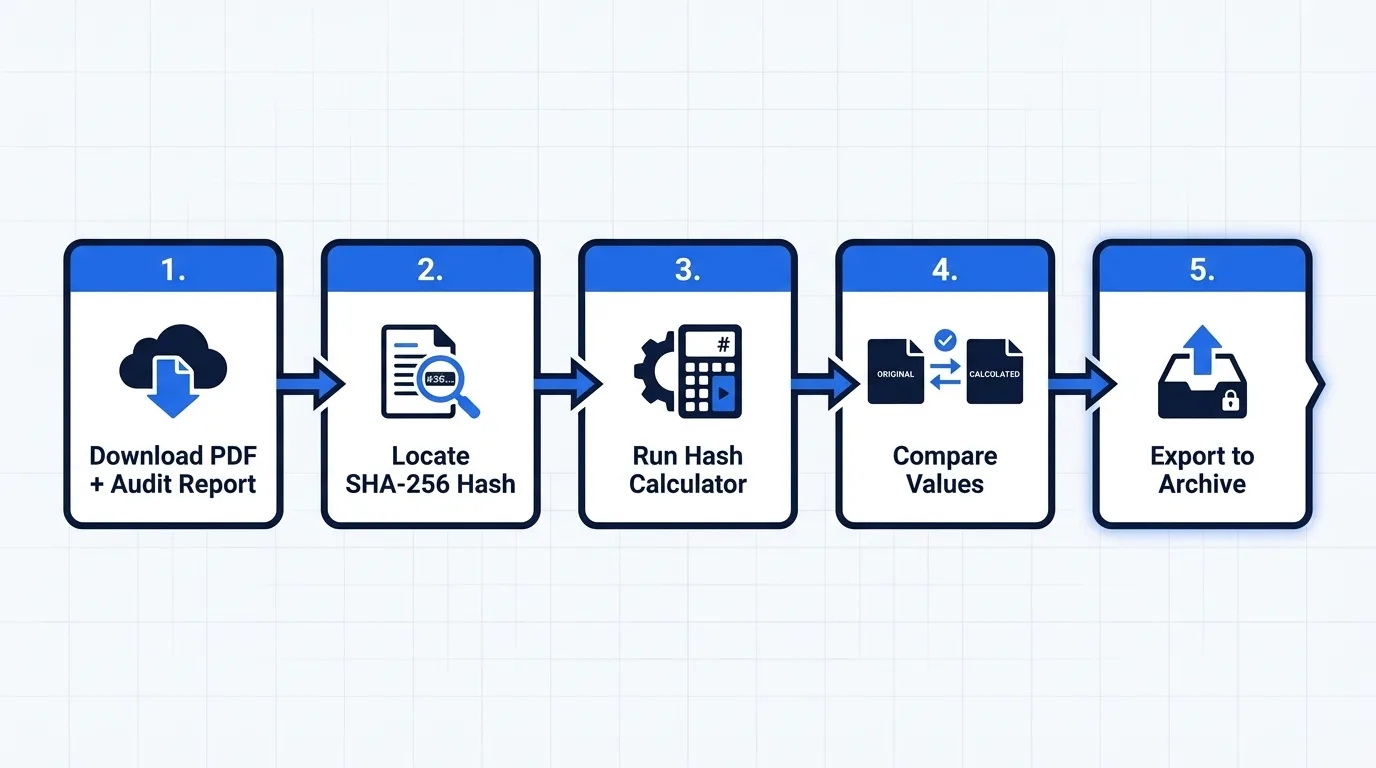
Verifying document integrity is straightforward when your platform generates a proper audit trail. Here is the practical process:
- Download the final PDF and audit report. Most compliant platforms bundle both. The audit report is usually a separate page or a downloadable JSON/PDF log.
- Check the cryptographic hash. Look for a SHA-256 or higher hash value printed at the bottom of the report.
- Run a hash verification. Use any free hash calculator to generate a new hash from the downloaded PDF. If it matches the original, the file is untouched.
- Review the signer verification method. Confirm that identity checks (email link, SMS code, or government ID) are logged.
- Export the full event log. Keep this separate from the contract itself. Store it in a read-only archive for the contract’s entire lifespan.
Every AiDocX signature includes a tamper-evident audit trail, so you never have to reconstruct the signing event from scratch.
[Infographic 2]
What to Look for in Your E-Signature Provider
Not all e-signature tools treat audit trails equally. Some store logs temporarily, others export them in formats that are difficult to parse, and a few don’t generate cryptographic hashes at all. Before you commit to a platform, verify these requirements:
- Long-term log retention: Logs must remain accessible for the full statute of limitations in your jurisdiction (often 6–10 years).
- Tamper-evident formatting: The audit report should be self-contained and impossible to edit without invalidating the hash.
- Third-party attestation: Look for SOC 2 Type II, ISO 27001, or eIDAS QES compliance. These certifications validate that your provider’s infrastructure actually matches what they claim.
- Clear chain of custody: The trail should show exactly who uploaded the document, who modified it, and who approved each version.
Your Pre-Signature Compliance Checklist
- Confirm the platform generates a standalone, tamper-evident audit report
- Verify that identity authentication is logged for every signer
- Ensure the document hash is printed and verifiable post-signing
- Set up automated, long-term archival for signed documents and logs
- Test the dispute response workflow with your legal team before a real conflict arises
When contract disputes happen, you will not have time to debug your signing process. Build the evidence layer now, while the relationship is still intact. If you want a platform that handles the legal heavy lifting automatically, AiDocX structures every contract with a complete, court-ready audit trail built in.
Ready to automate your documents with AI?
Start free with AiDocX — AI contract drafting, meeting minutes, consultation notes, e-signatures, and more in one platform.
Get Started FreeMore from AiDocX Blog
Machine Shop Job Traveler Template: Routing Sheet + Example
Copy a machine shop job traveler template for small job shops. Includes a routing sheet, filled example, traceability fields, sign-offs, and setup tips.
Weekly Status Report Template: 4 Formats + Examples
Copy one of four weekly status report templates for individual work, projects, leadership, or blockers. See a worked example and a practical review checklist.

How to Read a Business Contract: A Founder's Checklist (2026)
A practical way to review parties, scope, money, IP, liability, and exit terms before signing a business contract.
 MinjiLee October 7, 2026 9 min