How to Double Your Proposal Win Rate with Page-by-Page Drop-off Tracking (2026 Guide)
Learn how to analyze proposal drop-off data page by page, identify where prospects lose interest, and restructure proposals to double your win rate. Real case studies and actionable optimization checklist included.
 Anna · Sales Manager March 11, 2026 10 min read
Key takeaway: Stop guessing why proposals get rejected. Page-by-page tracking data shows you exactly where prospects lose interest. Fix those pages, and your win rate climbs — without changing your pricing or your product.
"We send 20 proposals a month and close 2 or 3. That's just how it works."
Sound familiar? Most sales teams accept a 10–15% win rate as normal and move on. When a deal falls through, it's "bad timing" or "budget constraints."
But what if the real problem is page 5 of your proposal? What if 8 out of 10 prospects drop off at the exact same page?
Contracts and investor decks shouldn't take days — AiDocx lets you go from draft to signed in minutes. And the tracking data generated along the way tells you exactly how to make your next proposal better.
Why Most Proposals Lose (and It's Not What You Think)
Most teams only look at outcomes: closed or lost. But outcomes don't tell you what went wrong. Tracking data does.
Proposal failures follow three patterns:
| Pattern | Symptom | Real Cause |
|---|---|---|
| Never opened | 0 views | Bad email subject or timing |
| Bounced immediately | <5 seconds on page 1 | Weak first impression (design, no summary) |
| Mid-document drop-off | Exits on a specific page | Structural issue (pricing, specs, terms) |
The first two are easy to diagnose. The third — mid-document drop-off — is invisible without tracking data. And it's the #1 silent killer of win rates.
What Is Page-by-Page Tracking?
Document tracking goes far beyond "did they open it." It measures behavior at every page:
- Time spent: How long someone stays on each page
- Drop-off rate: Which page they close the document on
- Revisits: Which pages they go back to re-read
- Completion rate: Percentage of viewers who reach the last page
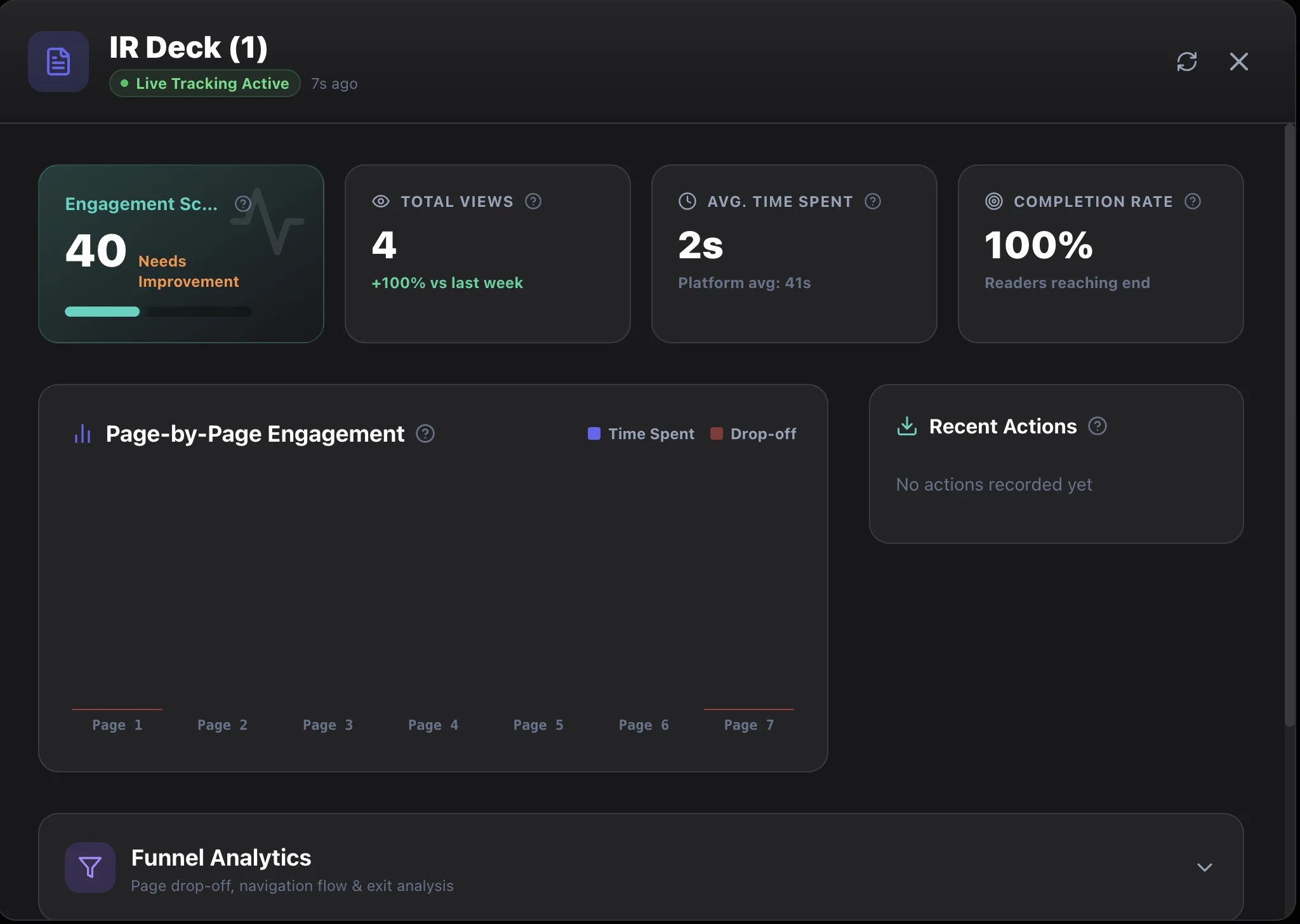
The screenshot above shows AiDocX's real-time tracking dashboard. At a glance, you see Engagement Score, Total Views, Average Time Spent, and Completion Rate. The Page-by-Page Engagement chart below visualizes time spent and drop-off for every page.
Once this data accumulates, you stop asking "why did we lose?" and start asking "where did we lose?"
Drop-off Funnel: Visualizing Where Prospects Leave
The most powerful tracking feature is the Drop-off Funnel.
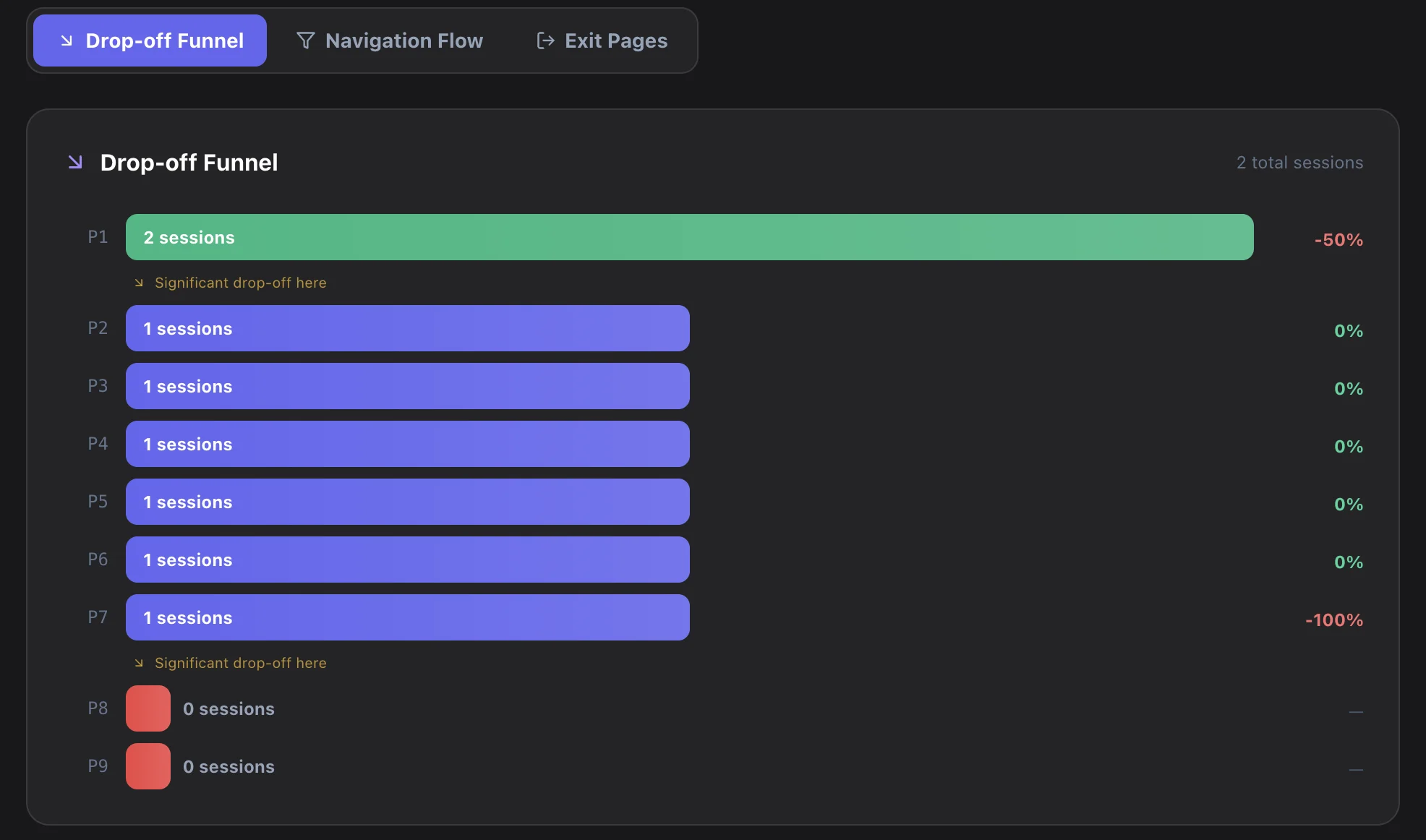
Here's what this funnel tells us:
- Page 1: 2 sessions → 50% drop-off going to Page 2 ("Significant drop-off here")
- Pages 2–7: 1 session continues through
- Page 7→8: 100% drop-off — nobody reaches page 8
The insight is clear:
- Half of viewers leave after page 1 → Your cover/summary page isn't compelling enough
- Nobody reads pages 8–9 → Either move that content earlier or remove it
You'd never get this insight from a "Sorry, we went another direction" email.
5 Common Drop-off Points (and How to Fix Them)
After analyzing hundreds of tracked proposals, these patterns emerge consistently:
1. Cover Page / Title Page
Problem: A cover with just your logo, client name, and date. The prospect can't tell in 1 second what value this proposal delivers.
Fix: Add a 3-line value summary to page 1.
- The client's problem (1 line)
- Your solution (1 line)
- Expected ROI or outcome (1 line)
Before: "Acme Corp / Website Redesign Proposal / March 2026"
After: "Your current site loses 35% of visitors at checkout → We'll redesign for 2x conversion / 8-week delivery / Projected 320% ROI"
2. Company Introduction Pages
Problem: 2–3 pages of company history, org charts, and awards. The client either already knows this or doesn't care.
Fix: Shrink to half a page. Include only experience relevant to this specific project. Move everything else to an appendix.
3. Technical Specs / Methodology
Problem: Decision-makers (CEO, VP) don't care about technical details. When tech specs sit in the decision-maker's reading path, they bounce.
Fix: Summary → Detail structure. One page of high-level approach in the main flow, detailed specs in the appendix.
4. Pricing Page
Problem: The most sensitive page. When numbers appear without context, the gut reaction is "too expensive" → exit.
Fix: Place an ROI/cost-savings page immediately before pricing. "This investment saves $500K annually" → then the price → anchoring effect.
| Structure | Drop-off Rate |
|---|---|
| Price alone | High (40%+) |
| ROI → Price | Medium (20%) |
| ROI → Price → Competitor comparison | Low (<10%) |
5. Terms & Conditions
Problem: Long or unfavorable-looking terms at the end sour the entire impression.
Fix: Separate full terms into a standalone document. In the proposal, include only a 5-line summary of key terms.
Real Case Studies: Data-Driven Proposal Optimization
Case 1: IT Solutions Sales Team (15 people)
Situation: 50 proposals/month, 12% win rate.
Tracking analysis:
- 30% drop-off at page 3 (company intro)
- 25% drop-off at page 7 (pricing)
- Only 40% of readers reached the last page
Changes made:
- Company intro: 3 pages → half a page
- Added ROI simulation before pricing
- Separated terms into a standalone document
- Added "Expected Outcomes Summary" to page 1
Result: Win rate went from 12% → 23% in 3 months. Nearly doubled.
They didn't change their pricing or their product. They changed structure and order.
Case 2: Design Agency
Situation: Portfolio-heavy proposals, 18% win rate.
Tracking analysis:
- Portfolio pages (4–8) had very long dwell times
- 40% dropped off before reaching the pricing page (page 9)
- Viewers who did reach pricing almost always converted
Changes made:
- Compressed portfolio to 2-page highlights + "Full portfolio link"
- Restructured to get readers to pricing faster
Result: Pricing page reach rate: 60% → 85%. Win rate: 18% → 31%.
Case 3: SaaS Startup (Fundraising)
Situation: IR deck sent to 30 VCs.
Tracking analysis:
- "Market Size" page had the longest dwell time
- "Team" page had high revisit rates
- 60% drop-off at "Financial Projections"
Changes made:
- Strengthened financial projections with conservative scenarios + supporting data
- Moved market size earlier in the deck
- Enhanced team page with LinkedIn links and key achievements
Result: VC meeting conversion: 15% → 28%. Financial projections completion rate: 40% → 78%.
Proposal Optimization Checklist
Use this checklist after reviewing your tracking data:
- Does page 1 have a value summary? (Problem → Solution → Expected outcome)
- Is the company intro under 1 page? (Project-relevant experience only)
- Is there an ROI/savings justification before pricing?
- Are technical details separated from the decision-maker flow?
- Are terms & conditions in a separate document?
- Is the total proposal under 10 pages? (Ideal: 7–8 pages)
- Does each page deliver exactly one message?
Tracking Tool Comparison
| Feature | DocSend | PandaDoc | AiDocX |
|---|---|---|---|
| Per-page time tracking | ✅ | ✅ | ✅ |
| Drop-off Funnel | ❌ | ❌ | ✅ |
| Drop-off alerts | ❌ | ❌ | ✅ |
| E-signature integration | ❌ | ✅ | ✅ |
| AI proposal generation | ❌ | ❌ | ✅ |
| Free plan | Limited | Limited | ✅ |
DocSend pioneered document tracking, but it lacks drop-off funnel analysis and AI features. PandaDoc is strong on e-signatures but its tracking analytics are basic. AiDocX combines AI document creation + tracking + e-signatures in one platform, so you can create, send, analyze, and sign — all in one place.
How to Start Tracking with AiDocX (5-Minute Setup)
Step 1: Upload Your Proposal
Upload existing PDF, Word, or PowerPoint files. Or let AI generate a proposal from scratch.
Step 2: Generate a Sharing Link
Click "Share" and a tracking-enabled link is created automatically. Paste it in your email and send.
Step 3: Monitor in Real Time
When someone opens your link, you get notified instantly. Check views, time spent, and completion rate on your dashboard.
Step 4: Analyze the Drop-off Funnel
Go to the Funnel Analytics tab to see page-by-page drop-off rates. Pages flagged with "Significant drop-off here" are your optimization targets.
Step 5: Improve and Resend
Use the data to revise your proposal. Send the improved version to the next prospect. Repeat this cycle, and your win rate climbs naturally.
FAQ
Q: Won't prospects feel uncomfortable being tracked?
Tracking works like email read receipts. It doesn't require any software installation from the viewer and doesn't collect personal information. It only measures behavioral data like "which pages were viewed and for how long."
Q: How many proposals do I need to send before the data is useful?
5–10 is usually enough to spot patterns. When the same proposal goes to multiple prospects, common drop-off pages become obvious.
Q: I already use DocSend. Should I switch?
DocSend's basic tracking is useful, but if you need drop-off funnel analysis and alerts, AiDocX is a better fit. Especially if you want e-signatures on the same platform.
Q: Can I use just the tracking feature without contracts/signatures?
Yes. AiDocX supports document sharing + tracking as a standalone use case. Basic tracking is available on the free plan.
Q: Does this work for documents other than proposals?
Absolutely. You can track IR decks, portfolios, manuals, contracts — any document. IR deck tracking is especially popular during fundraising.
The Bottom Line: Stop Guessing, Start Measuring
There are two ways to improve your proposal win rate:
- Send more proposals — labor-intensive, inefficient
- Make better proposals — data-driven, continuously improving
Tracking data is your compass for "making it better." When you know where prospects lose interest, you fix that specific page. You don't need to rewrite the whole proposal.
Turn on tracking for your next proposal. Within a month, you'll know exactly which pages win clients and which pages lose them.
Start tracking proposals with AiDocX →
Related articles:
Ready to automate your documents with AI?
Start free with AiDocX — AI contract drafting, meeting minutes, consultation notes, e-signatures, and more in one platform.
Get Started FreeMore from AiDocX Blog
Consulting Proposal Template (2026): 9 Sections + Example
Copy a consulting proposal template with nine sections, pricing options, and a filled example. Includes tips to make the proposal easy to approve.
 AiDocX Team October 24, 2026 11 min
Internship Agreement Template (2026): Paid & Unpaid Interns
Copy an internship agreement template for paid or unpaid interns. Covers U.S. and UK pay rules, duties, IP, confidentiality, and a filled example.
AiDocX Team October 24, 2026 12 min
Meeting Minutes Template (2026): 4 Formats + Filled Example
Copy a meeting minutes template in four formats: team, decision log, board, and client call. See a filled example and a 15-minute workflow.
AiDocX Team October 24, 2026 11 min