How to Sign Documents Online for Free — No Credit Card, No Tricks (2026)
Looking for a way to sign documents online for free? We tested 6 e-signature tools and found which ones are actually free — no hidden fees, no forced upgrades. Here's what works in 2026.
 Sophie · Product Marketing March 2, 2026 7 min read
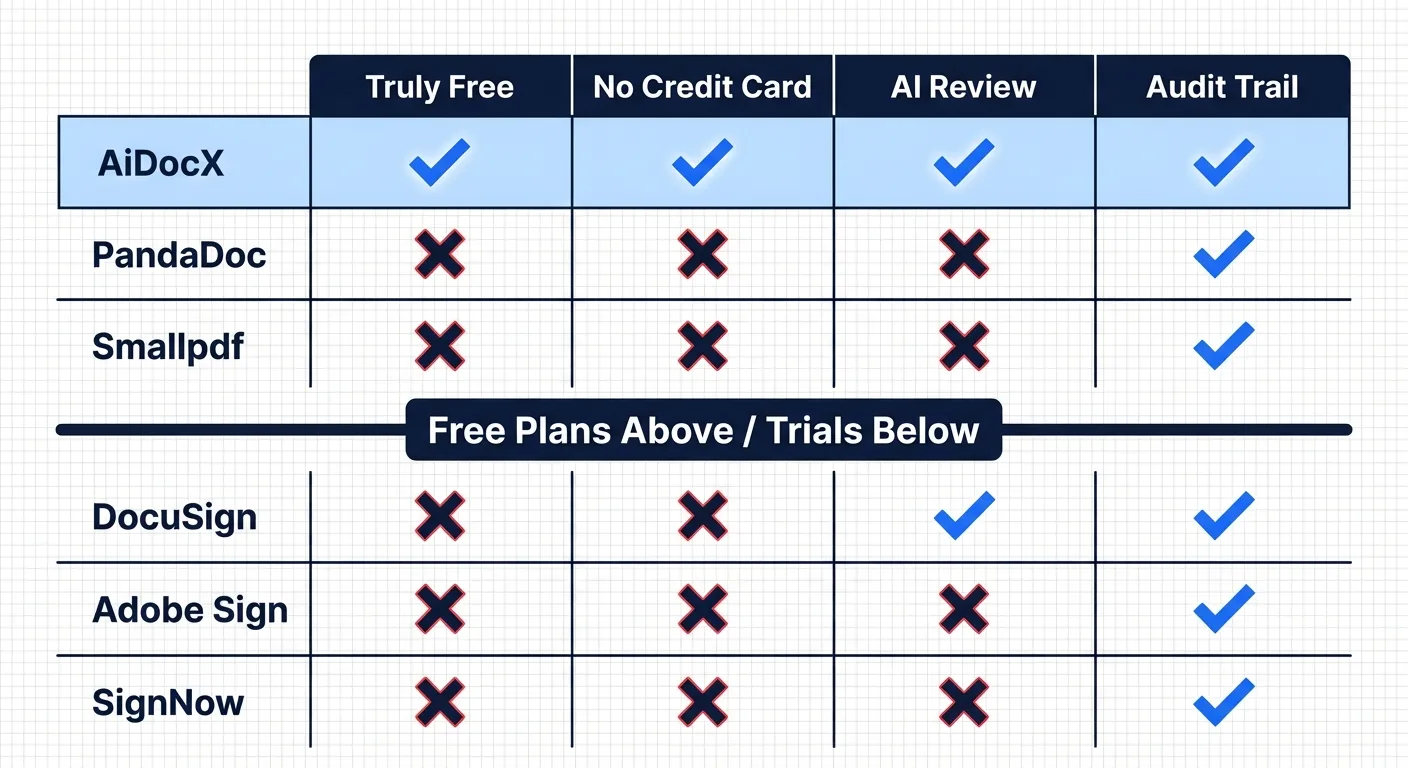
TL;DR: You can sign documents online for free without entering a credit card. The best options are AiDocX (5 docs/month + AI contract review), PandaDoc (unlimited signatures, no extras), and Smallpdf (2 docs/day). DocuSign and Adobe Sign require a credit card and are free trials, not free plans.
Here's a frustrating experience: you Google "sign documents online free," click the first result, and within 30 seconds you're staring at a credit card form. That's not free. That's a free trial with automatic billing.
I tested six popular e-signature tools to find out which ones let you sign documents online without paying, without entering payment info, and without a ticking clock. Here's what I found.
What "Free" Should Actually Mean
Before comparing tools, let's set the bar:
- No credit card required — If they ask for payment info, it's a trial
- No time limit — "14 days free" is a trial, not a free plan
- You can actually send documents — Just signing your own PDF isn't enough; you need to send it to someone else for their signature
These three criteria eliminate most "free" e-signature tools. Let's see who passes.
The 6 Tools We Tested
1. AiDocX — Free E-Signatures + AI Contract Review
This one surprised me. Most free e-signature tools give you signing and nothing else. AiDocX includes AI-powered contract analysis in the free plan.
What's free:
- 5 documents per month
- Send signature requests to others
- AI contract review (risk detection, missing clause alerts)
- Document tracking links (see when recipients open your doc)
- Audit trail certificates
- No credit card needed
Limitations:
- 5 documents/month (enough for freelancers and solopreneurs, tight for teams)
- AiDocX branding on shared documents
Why it stands out: It's the only free e-signature tool that also reviews your contracts with AI before you sign. If someone sends you a contract, you can upload it, let the AI flag risky clauses, and then sign — all without paying.
Paid upgrade: Basic plan starts at $6/month.
2. PandaDoc — Unlimited Free Signatures
If you need volume and don't care about extras, PandaDoc is generous.
What's free:
- Unlimited e-signatures
- Basic document editor
- Mobile signing
Limitations:
- No templates, analytics, or automation
- No AI review
- No document tracking
- Interface is English-only
Best for: Teams that send a high volume of simple documents and just need signatures.
3. Smallpdf eSign — Quick and Simple
Smallpdf is known for PDF tools, and their e-sign feature is clean and straightforward.
What's free:
- 2 documents per day
- Upload, sign, send
- Basic signature requests
Limitations:
- 2 per day is tight for regular use
- No contract analysis
- Audit trail certificates are paid
Best for: Occasional signers — one or two documents a week.
4. DocuSign — It's a Trial, Not Free
DocuSign is the biggest name in e-signatures, but let's be honest: there is no free plan.
What you get:
- 30-day free trial
- Full features during trial
The catch:
- Credit card required at signup
- Auto-charges after 30 days ($10/month)
- You have to remember to cancel
Best for: Testing DocuSign before committing. Not for ongoing free use.
5. Adobe Acrobat Sign — Also a Trial
Similar story to DocuSign.
What you get:
- 7-day or 30-day free trial (varies by promotion)
- Full features
The catch:
- Credit card required
- Auto-renewal at $12.99+/month
- Cancellation process is deliberately confusing
Best for: Existing Adobe Creative Cloud subscribers who might get a bundle deal.
6. SignNow — 7-Day Trial
What you get:
- 7 days of full access
- Unlimited documents during trial
The catch:
- Credit card required
- $8/month after trial
Best for: Short-term projects where you need to blast through a lot of signatures in a week.
Side-by-Side Comparison
| Tool | Free Docs | Credit Card | AI Review | Tracking | Mobile |
|---|---|---|---|---|---|
| AiDocX | 5/month | Not needed | ✅ | ✅ | ✅ |
| PandaDoc | Unlimited | Not needed | ❌ | ❌ | ✅ |
| Smallpdf | 2/day | Not needed | ❌ | ❌ | ✅ |
| DocuSign | 30-day trial | Required | ❌ | ✅ | ✅ |
| Adobe Sign | 7-30 day trial | Required | ❌ | ✅ | ✅ |
| SignNow | 7-day trial | Required | ❌ | ❌ | ✅ |
Are Free E-Signatures Legally Valid?
Yes. In nearly every major jurisdiction:
- United States: The ESIGN Act (2000) and UETA give electronic signatures the same legal standing as handwritten signatures for virtually all business transactions.
- European Union: The eIDAS Regulation recognizes three tiers of e-signatures, all legally valid. Simple electronic signatures (what free tools provide) are sufficient for most business contracts.
- United Kingdom: The Electronic Communications Act 2000 and subsequent case law confirm e-signatures are legally binding.
- Canada: PIPEDA and provincial electronic commerce acts recognize e-signatures.
The tool you use doesn't affect legal validity. What matters is:
- Intent to sign — both parties intended to enter into an agreement
- Consent to do business electronically — both parties agreed to use e-signatures
- Record retention — the signed document is preserved in its final form
An audit trail (which records who signed, when, from what IP address) strengthens enforceability if a dispute arises. This is why tools that generate audit trail certificates add real value.
How to Sign a Document Online (Step by Step)
- Prepare your document — Have it ready as a PDF, Word, or Google Doc
- Upload to your chosen tool — Create a free account (no credit card) and upload
- Place signature fields — Drag and drop where each party needs to sign
- Add recipient emails — Enter the signer's email address
- Send — They receive a link, open it in any browser, and sign
- Done — Both parties get the signed PDF + audit trail
The whole process takes 2-3 minutes once you're familiar with it.
When Free Isn't Enough
Free plans work great for:
- Freelancers signing client contracts
- Solopreneurs handling NDAs and agreements
- Small teams with fewer than 10 documents per month
You'll want a paid plan when:
- You need templates for recurring documents
- You send more than 10-15 documents per month
- You need team features (multiple users, shared templates)
- You require advanced authentication (ID verification, SMS codes)
Bottom Line
You can absolutely sign documents online for free in 2026. The key is avoiding "free trials" disguised as free plans.
- Need AI contract review + signing? → AiDocX
- Need unlimited simple signatures? → PandaDoc
- Just need to sign one thing today? → Smallpdf
Don't pay for something you can get for free. And don't hand over your credit card for a "free" tool.
Ready to automate your documents with AI?
Start free with AiDocX — AI contract drafting, meeting minutes, consultation notes, e-signatures, and more in one platform.
Get Started FreeMore from AiDocX Blog
Consulting Proposal Template (2026): 9 Sections + Example
Copy a consulting proposal template with nine sections, pricing options, and a filled example. Includes tips to make the proposal easy to approve.
 AiDocX Team October 24, 2026 11 min
Internship Agreement Template (2026): Paid & Unpaid Interns
Copy an internship agreement template for paid or unpaid interns. Covers U.S. and UK pay rules, duties, IP, confidentiality, and a filled example.
AiDocX Team October 24, 2026 12 min
Meeting Minutes Template (2026): 4 Formats + Filled Example
Copy a meeting minutes template in four formats: team, decision log, board, and client call. See a filled example and a 15-minute workflow.
AiDocX Team October 24, 2026 11 min