
Why Startups Are Ditching Their 6-Tool Document Stack in 2026
The average startup spends $500-1,200/month on document infrastructure across 4-6 separate tools. Here's why consolidation is becoming the default strategy — and how to evaluate whether it's right for you.
 Aria · Growth Hacker February 26, 2026 10 min read
The Hidden Cost of "Best of Breed"
There is a pervasive belief in startup culture that you should pick the best tool for each job. Best e-signature platform. Best deck-sharing tool. Best proposal builder. Best data room. Best contract drafter.
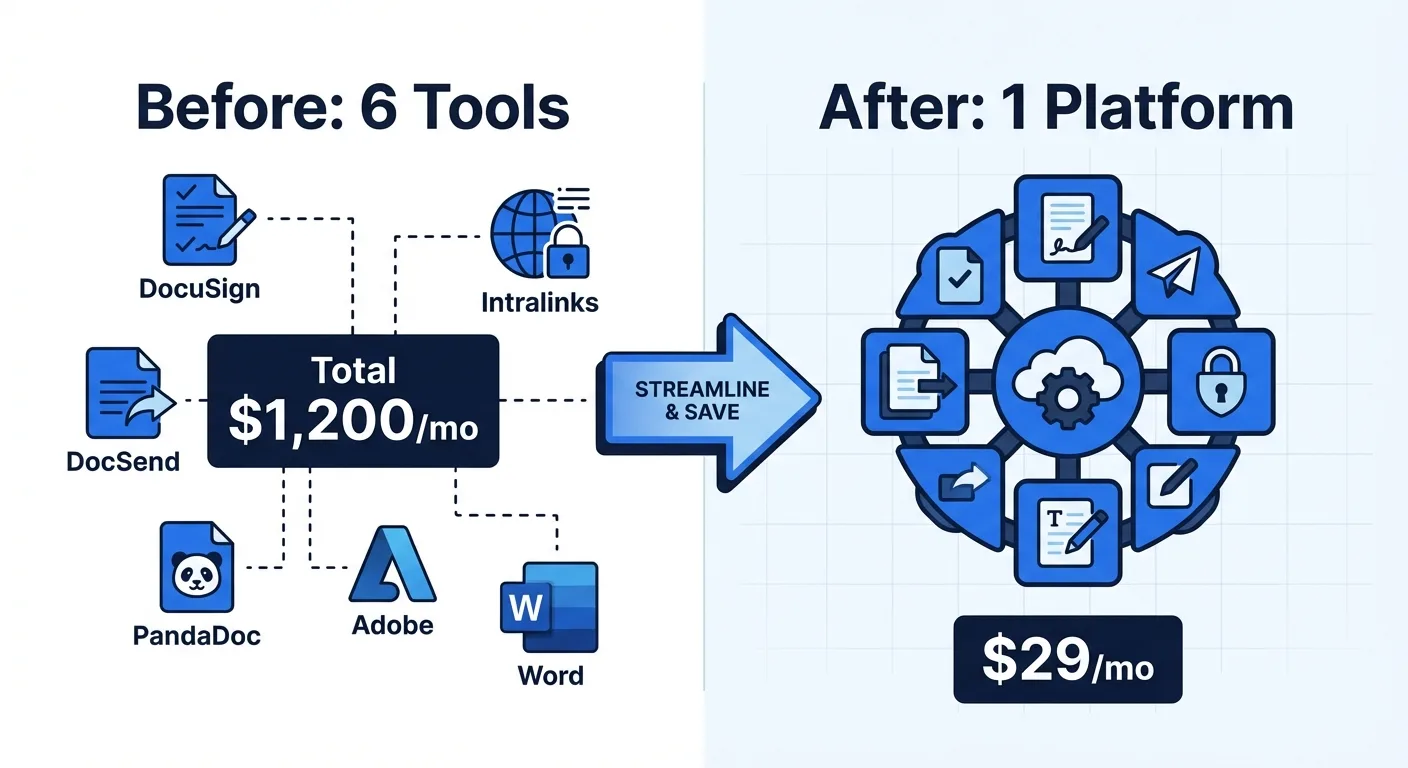
In theory, this makes sense. In practice, it creates a document infrastructure problem that quietly drains founder time and startup runway.
A typical early-stage startup's document tool stack looks something like this:
| Category | Common Tools | Typical Monthly Cost |
|---|---|---|
| E-signatures | DocuSign, HelloSign, PandaDoc | $10–50/user |
| Deck sharing & tracking | DocSend, Pitch, ClearSlide | $10–50/user |
| Contract drafting | Lawyer + Word/Google Docs | $200–500/contract |
| Proposal management | PandaDoc, Proposify, Qwilr | $19–49/user |
| Virtual data room | Intralinks, Datasite, Firmex | $100–400/month |
| PDF tools | Adobe Acrobat, Smallpdf | $13–22/month |
For a three-person founding team, the total runs $500 to $1,200 per month — before you count the lawyer's hourly rate for contract drafting. That is $6,000 to $14,400 per year on document infrastructure alone.
But the dollar cost is only half the problem. The other half is the operational tax.
The Operational Tax Nobody Talks About
Every additional tool in your stack creates friction:
Context switching. Moving between DocuSign, DocSend, Google Docs, and your data room provider means four different logins, four different UIs, four different notification systems. Research from the American Psychological Association suggests that task switching can consume up to 40% of productive time — and tool switching is a subset of that.
Data fragmentation. Your signed contracts are in DocuSign. Your deck analytics are in DocSend. Your proposals are in PandaDoc. Your due diligence documents are in Intralinks. When an investor asks "Can you send me that signed NDA along with the latest deck and financial model?", you are now pulling from three different systems.
Onboarding friction. Every new hire needs accounts on multiple platforms, each with its own permissions model, billing seat, and learning curve. For a 5-person team, managing access across 6 tools means 30 user accounts to provision and maintain.
Billing complexity. Six different invoices, six different renewal dates, six different pricing models (per-user, per-envelope, per-seat, storage-based). One SaaS audit of your startup's spending might reveal that you are paying for DocSend seats that nobody has logged into for three months.
These costs are invisible on a balance sheet but real in their impact on founder productivity.
Why Consolidation Is Accelerating in 2026
Three forces are driving startups toward consolidated document platforms:
1. AI Changed What's Possible in a Single Tool
Before 2024, the reason you needed separate tools was specialization. DocuSign was great at signatures but could not generate contracts. DocSend was great at tracking but could not collect signatures. Each tool did one thing well.
Large language models broke this constraint. AI can now generate contracts, analyze risk in uploaded documents, create presentation content, and power conversational document search — all within a single application layer. The technical barrier that justified six separate tools has largely disappeared.
2. Per-User Pricing Punishes Growth
Most document tools charge per user per month. When you are two founders, $25 per user for DocuSign is $50 per month. When you grow to 20 people, it is $500 per month — for the exact same product doing the exact same thing. Per-user pricing creates a perverse incentive to restrict access, which means your team shares passwords or routes all signatures through one person, creating bottlenecks.
Newer platforms have adopted flat-rate or usage-based pricing that does not punish you for hiring. This pricing model difference alone can save a 20-person team thousands of dollars annually.
3. Investors Expect Operational Efficiency
VCs in 2026 are scrutinizing burn rates more carefully than they did during the zero-interest-rate era. A founder who consolidates six tools into one is signaling fiscal discipline — and freeing up runway for product development and customer acquisition, the things that actually drive company value.
One Y Combinator partner recently noted that "the companies that survive are the ones that treat every dollar of burn as an investment decision." Document infrastructure is rarely an investment — it is overhead. Minimizing it makes strategic sense.
How to Evaluate Consolidation: A Framework
Not every startup should consolidate, and not every consolidated platform is right for every startup. Here is a practical framework for evaluating whether — and how — to make the switch.
Step 1: Audit Your Current Stack
List every document-related tool your team uses. For each one, note:
- Monthly cost (including per-user multiplier)
- How many team members actively use it
- What percentage of its features you actually use
- Whether it integrates with your other tools
Most startups discover that they use 20-30% of features in any given tool. You are paying for DocuSign's enterprise workflow engine when you need basic signatures.
Step 2: Identify Your Core Workflows
Map out the document workflows that matter most to your business. Common ones for startups:
- Fundraising flow: Create deck → Share with investors → Track engagement → Due diligence data room → Sign term sheet → Sign investment documents
- Sales flow: Create proposal → Track views → Negotiate → Sign contract
- Hiring flow: Draft offer letter → Sign employment agreement → Collect onboarding documents
- Partnership flow: Draft NDA → Review partner's contract → Negotiate terms → Sign agreement
Count how many different tools each workflow touches. If a single workflow requires three or more tool transitions, consolidation will meaningfully reduce friction.
Step 3: Evaluate Consolidated Options
When comparing all-in-one platforms, look beyond the feature checklist. Key questions:
Does it cover your primary workflows end to end? A platform that handles 80% of your needs in one place is better than six tools that each handle 100% of a narrow slice. The 20% gap is usually manageable; the integration overhead of six tools is not.
What is the pricing model? Flat-rate or usage-based pricing scales better than per-user pricing for growing teams. Calculate your total cost at 5, 10, and 20 users — not just your current team size.
Is the free tier genuine? Some platforms offer a "free plan" that is really a 14-day trial. Others offer a permanent free tier with meaningful functionality. If you are pre-revenue, a genuine free tier lets you defer spending until you have traction.
How mature is the product? Newer platforms may lack the polish and integration depth of established tools. Test the actual user experience, not just the feature list. Send a real contract for signature and see how the recipient experience compares.
What is the migration path? Can you export your data if the platform does not work out? Can you run the new tool alongside your existing stack during a transition period?
Step 4: Run a Parallel Trial
Do not rip and replace overnight. Run the consolidated platform alongside your existing tools for 2-4 weeks. Route a subset of workflows through the new platform and compare:
- Time to complete each workflow
- Team feedback on usability
- Any gaps that require workarounds
- Actual cost savings
If the consolidated platform covers your workflows with acceptable quality and meaningfully reduces cost and complexity, make the switch. If not, you have lost nothing but a few weeks of testing.
What to Watch Out For
Consolidation has downsides. Be aware of these before committing:
Vendor lock-in. Putting all your document workflows in one platform means depending on one vendor. Mitigate this by ensuring the platform supports standard export formats (PDF, DOCX) and has a functional API. If you can get your data out, lock-in risk is manageable.
Feature depth trade-offs. A platform that does six things will rarely do each one as deeply as a specialized tool. If your business depends on a specific advanced feature — say, DocuSign's qualified electronic signatures for EU regulatory compliance, or PandaDoc's deep Salesforce integration — a generalist platform may not be sufficient.
Maturity gaps. Newer platforms may have rougher edges. Signing UX might not be as polished as DocuSign's decade-old flow. Analytics might lack the granularity of DocSend's reports. These gaps tend to close over time, but evaluate whether they matter for your current needs.
Team resistance. People get comfortable with their tools. The "but I already know how DocuSign works" objection is real, even if the economic argument for switching is clear. Plan for a brief onboarding period and designate someone as the internal champion for the new platform.
The Broader Trend
The document tool consolidation happening in startups mirrors a pattern across all business software. Companies are moving from best-of-breed stacks (10+ specialized tools) to integrated platforms that trade some specialization depth for dramatically lower complexity and cost.
Notion replaced separate tools for notes, wikis, and project management. Linear replaced Jira for many engineering teams by being simpler and more opinionated. Rippling is consolidating HR, IT, and payroll. The same forces — AI capability expansion, pricing model evolution, and operational efficiency pressure — are now reshaping the document management space.
The startups that recognized this pattern early in other categories gained meaningful advantages in speed and cost efficiency. The same opportunity exists in document infrastructure today.
Making the Decision
Ask yourself three questions:
- Am I spending more than $200/month on document tools? If yes, consolidation likely saves you real money.
- Do my document workflows cross three or more separate tools? If yes, consolidation likely saves you real time.
- Am I planning to grow my team in the next 12 months? If yes, per-user pricing will hurt more over time, making consolidation more valuable.
If you answered yes to two or more, it is worth running a trial with a consolidated platform. The economics and operational benefits are significant enough to justify a few weeks of evaluation.
The document infrastructure that served you at two founders will not serve you at twenty employees. Better to make the switch deliberately than to accumulate tool sprawl by default.
Ready to automate your documents with AI?
Start free with AiDocX — AI contract drafting, meeting minutes, consultation notes, e-signatures, and more in one platform.
Get Started FreeMore from AiDocX Blog

Consulting Proposal Template (2026): 9 Sections + Example
Copy a consulting proposal template with nine sections, pricing options, and a filled example. Includes tips to make the proposal easy to approve.
 AiDocX Team October 24, 2026 11 min
Internship Agreement Template (2026): Paid & Unpaid Interns
Copy an internship agreement template for paid or unpaid interns. Covers U.S. and UK pay rules, duties, IP, confidentiality, and a filled example.
AiDocX Team October 24, 2026 12 min
Meeting Minutes Template (2026): 4 Formats + Filled Example
Copy a meeting minutes template in four formats: team, decision log, board, and client call. See a filled example and a 15-minute workflow.
AiDocX Team October 24, 2026 11 min