5 AI Tools Tested for Real Work in 2026: What Actually Saves Time (Honest Review)
We tested AI tools on real contracts, decks, and docs for 6 weeks. Rated by time saved, cost, and output quality. One tool saved 4+ hours/week.
 Aria · Growth Hacker February 24, 2026 11 min read
2026 AI Tools That Actually Save You Time at Work: An Honest Comparison
Every week there is a new AI tool claiming to 10x your productivity. Most of them waste more time than they save. You spend an afternoon setting them up, another afternoon learning the interface, and by Wednesday you are back in Google Docs doing things the old way because the AI output needed so many corrections that it would have been faster to just write the thing yourself.
That is not a knock on AI. It is a knock on the hype cycle that treats every chatbot wrapper as a revolution. The reality in 2026 is more nuanced. Some AI tools genuinely save hours of work per week. Others are solutions looking for a problem. And the difference usually comes down to one thing: whether the tool was built for a specific workflow or whether it is trying to be everything to everyone.
We spent six weeks testing five categories of AI tools on real business tasks — drafting contracts, writing project updates, building investor presentations, editing client-facing documents, and managing internal knowledge bases. Not synthetic benchmarks. Not cherry-picked demos. Actual work that actual people at small and mid-sized businesses need to do every day.
Here is what we found.
How We Evaluated
Before diving into the tools, here is how we measured them. Productivity tools live and die by four criteria, and no amount of marketing can paper over weakness in any of them.
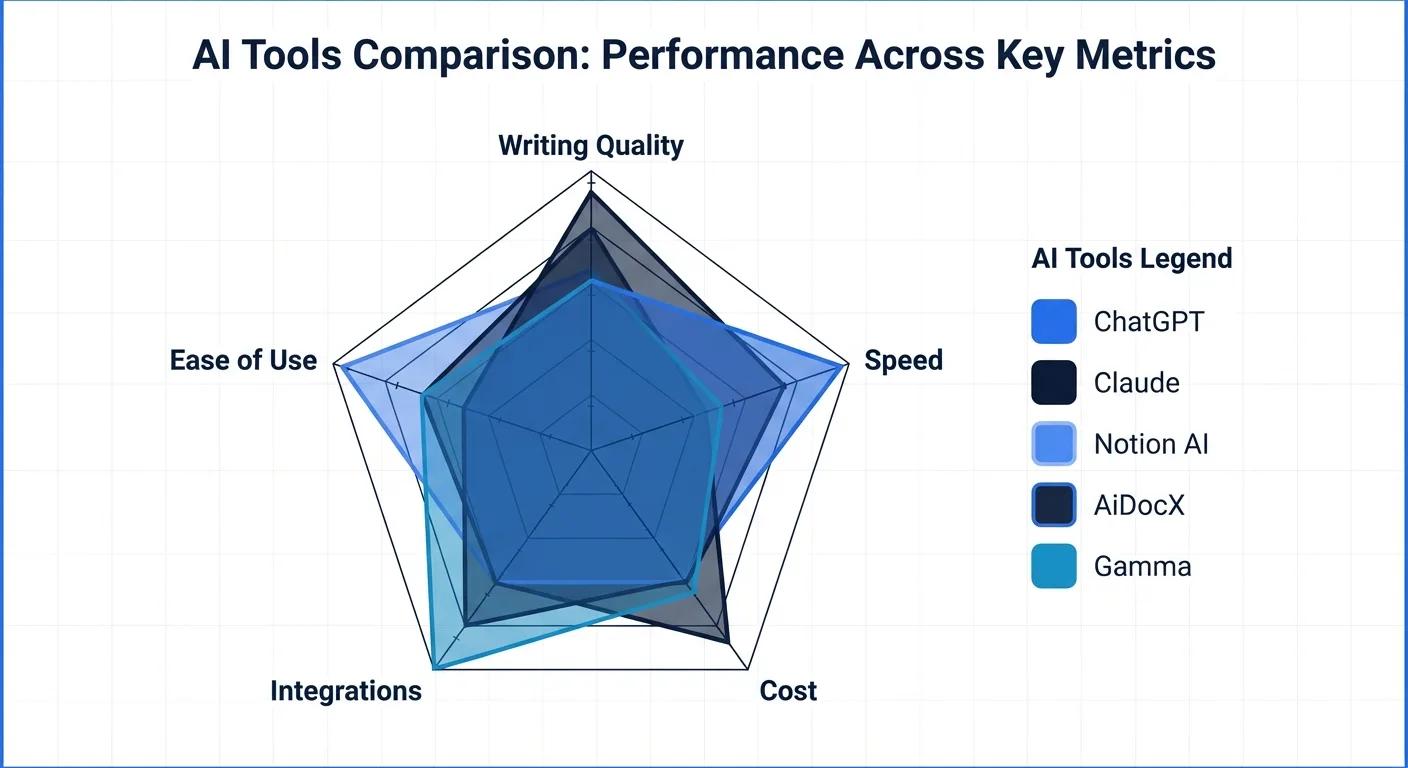
Actual time saved. We timed tasks with and without the tool. If a tool adds setup and correction overhead that cancels out the generation speed, the net savings is zero or negative. We only counted real end-to-end time, including the time spent fixing AI output before it was ready to send.
Learning curve. A tool that takes two weeks to master had better deliver massive ongoing returns. We noted how long it took to go from first login to producing usable output.
Cost. We compared free tiers where available and looked at what the cheapest paid plan actually unlocks. Some tools gate critical features behind enterprise pricing, which makes the free or starter plan misleading.
Output quality. This is subjective but important. We rated output on a simple scale: usable as-is, usable with minor edits, needs major rework, or not usable. A tool that consistently produces "needs major rework" output is not saving you time regardless of how fast it generates text.
With that framework in mind, let us look at the tools.
1. ChatGPT and Claude for General Writing
These are the Swiss army knives of the AI world. Both OpenAI's ChatGPT and Anthropic's Claude have evolved significantly, and in 2026 they remain the default starting point for most professionals experimenting with AI-assisted writing.
What they do well
General-purpose LLMs excel at brainstorming, first drafts, and email composition. Need five subject line options for a newsletter? Done in seconds. Want to rework a paragraph that is not landing? Paste it in and ask for three variations. Writing a cold outreach email and cannot find the right tone? These tools can shift between formal, conversational, and persuasive registers on command.
They are also remarkably good at summarizing long documents, extracting key points from meeting transcripts, and restructuring disorganized notes into coherent outlines. For pure ideation and rough drafting, nothing else comes close to the speed.
Where they fall short
The moment you need formatted, professional output — a contract with proper legal structure, a proposal with consistent styling, a document that needs to go directly to a client — general-purpose chatbots show their limitations. They generate plain text. You copy it out, paste it into your document editor, and then spend time on formatting, layout, and cleanup that often takes longer than the writing itself.
The other persistent issue is reliability. LLMs still fabricate details, and for business documents that require accuracy — financial figures, legal terms, compliance language — you need to verify everything. This verification step is where a lot of the theoretical time savings evaporates.
The verdict
Pros: Incredibly versatile. Low learning curve. Great for brainstorming, first drafts, email composition, and summarization. Free tiers are generous enough for daily use.
Cons: Output requires heavy editing for professional documents. No formatting control. Hallucination risk means you cannot trust output without verification. Not suitable for documents that need to go directly to clients or partners.
Best for: Brainstorming, internal emails, first drafts, summarization, and any task where rough text is the starting point and a human will refine it.
Cost: ChatGPT Free and Claude Free handle most casual use. ChatGPT Plus at $20/month and Claude Pro at $20/month unlock longer context and faster responses.
2. Notion AI for Project Documentation
Notion has become the de facto workspace for startups and small teams, and its integrated AI features have matured considerably. The pitch is compelling: AI that lives inside your existing workspace, understands your documents, and can generate, edit, and organize content without leaving the app.
What it does well
Notion AI is genuinely useful for internal documentation workflows. It can draft meeting notes from bullet points, generate project briefs from templates, and fill in standard operating procedures based on your existing documentation patterns. Because it operates within the Notion ecosystem, the output lands directly in your workspace with proper formatting, tags, and database connections intact.
The Q&A feature — where you ask questions about your entire workspace and get answers drawn from your own documents — is a legitimate time saver for teams with large knowledge bases. Instead of searching through hundreds of pages, you ask a question and get a sourced answer.
Where it falls short
The Notion lock-in is real. Everything lives in Notion's proprietary format. If you need to export a document to send to a client, a partner, or a lawyer, you are dealing with conversion friction. The AI is optimized for Notion's block-based structure, which means it is not particularly useful for generating documents that need to exist outside the Notion ecosystem.
The AI capabilities are also limited to text generation and editing within existing page types. It cannot generate contracts, handle e-signatures, or produce formatted PDFs. For teams that need to create client-facing documents, Notion AI handles the internal planning side but not the final deliverable.
The verdict
Pros: Deeply integrated with the Notion workspace. Good at drafting internal docs from templates. Q&A over your knowledge base is genuinely useful. Formatting is handled automatically within Notion.
Cons: Locked into the Notion ecosystem. Export and sharing options are limited. Not suited for client-facing or legally binding documents. AI features require the paid AI add-on ($10/member/month on top of Notion plans).
Best for: Internal wikis, meeting notes, project documentation, SOPs, and team knowledge bases. Works best for teams already committed to Notion as their workspace.
Cost: Notion AI add-on is $10 per member per month on top of the base Notion plan. For a team of 10, that is $100/month just for the AI features.
3. AiDocX for Contracts and Document Management
AiDocX occupies a different niche from the general-purpose tools above. It is built specifically for document workflows — creating contracts from AI-powered templates, reviewing documents for risk, sharing them with tracking analytics, and getting them signed electronically. It is not trying to replace your general-purpose writing assistant. It is trying to replace the four or five separate tools you currently use to go from "we need a contract" to "contract signed and filed."
What it does well
The AI contract generation is the standout feature. You describe what you need — an NDA for a potential partner, a freelancer agreement, a service contract — and the platform generates a structured, formatted contract with appropriate legal clauses. This is meaningfully different from asking ChatGPT to write a contract, because the output is already formatted as a proper document, not raw text you need to copy and massage.
The risk analysis feature is genuinely useful for people who are not lawyers. Before you sign or send a contract, the AI highlights clauses that could be problematic — unusual liability terms, broad non-compete language, ambiguous payment terms. It does not replace legal counsel, but it tells you which sections to pay extra attention to or ask your lawyer about. For a deeper look at how AI contract review compares to traditional methods, see our guide to AI contract review.
Document tracking is the feature that surprised us. When you share a document via AiDocX, you get analytics on whether the recipient opened it, how long they spent on each page, and whether they downloaded it. For sales proposals and investor decks, this information is genuinely valuable — it tells you whether someone actually read your document or just let it sit in their inbox.
Where it falls short
AiDocX is purpose-built for document and contract workflows. If you need a general-purpose AI writing assistant for blog posts, social media content, or brainstorming sessions, this is not the right tool. It does one category of work very well, but it does not pretend to do everything.
The free tier is functional but limited to 3 signature requests per month and a capped number of AI analysis credits. For freelancers sending one or two contracts a month, that is adequate. For a growing team with regular contract volume, you will hit the upgrade point relatively quickly.
The verdict
Pros: AI generates actual formatted contracts from templates, not just raw text. Risk analysis highlights problematic clauses before you sign. E-signatures, document tracking, and secure sharing are integrated in one platform. Free tier available without credit card. Supports 13 languages.
Cons: Focused specifically on document and contract workflows — not a general-purpose AI writing tool. Free tier limits signature requests and AI credits. Newer platform with a smaller user base compared to established e-signature tools.
Best for: Contract drafting and review, document sharing with read tracking, e-signatures, and any workflow where you need to go from document creation to signed agreement in one place.
Cost: Free tier covers basic use. Basic plan starts at $6/month, which undercuts most dedicated e-signature platforms significantly.
4. Gamma and Beautiful.ai for Presentations
AI presentation tools have improved dramatically, and Gamma in particular has emerged as the go-to option for people who need slides fast and do not want to spend hours in PowerPoint or Google Slides.
What they do well
The core promise delivers. You provide a topic, an outline, or even just a rough description, and these tools generate a complete slide deck with layout, visual hierarchy, and design consistency. For internal presentations — team updates, project proposals, quarterly reviews — the output is genuinely usable with minimal adjustment.
Gamma especially shines at converting written content into visual presentations. Paste in a document or a set of notes, and it produces slides that capture the key points with appropriate visual structure. The speed advantage is real: what used to take 2-3 hours in PowerPoint can be done in 15-20 minutes.
Where they fall short
Customization is the weak point. AI-generated presentations have a recognizable aesthetic — clean and professional, but also somewhat generic. If your company has strict brand guidelines, specific color palettes, or custom layouts, you will spend considerable time overriding the AI's design choices. For some teams, this rework negates the initial time savings.
The other limitation is that these tools optimize for a specific style of presentation. Data-heavy slides, complex diagrams, and detailed technical content do not translate well to the AI-generated format. The tools tend to simplify and summarize, which works for executive summaries but not for engineering reviews or financial deep-dives.
The verdict
Pros: Dramatically faster than building slides manually. Good visual design out of the box. Excellent at converting written content into slide format. Useful for quick internal presentations and pitch decks.
Cons: Limited customization for brand-specific design requirements. Generic aesthetic that may not suit client-facing or formal presentations. Struggles with data-heavy or technically complex content. Template lock-in makes it hard to switch platforms later.
Best for: Quick internal presentations, first drafts of pitch decks, and any situation where speed matters more than pixel-perfect design.
Cost: Gamma offers a free tier with Gamma branding on exports. Pro plans start around $10/month. Beautiful.ai starts at $12/month with no meaningful free tier.
5. Grammarly and Hemingway for Editing and Polish
These tools have been around longer than the current AI wave, but their latest iterations deserve inclusion because they solve a problem that generation tools create: cleaning up AI-drafted text so it sounds human and professional.
What they do well
Grammarly's real-time grammar, spelling, and tone suggestions remain best-in-class. The tone detection feature is particularly useful for business communication — it tells you when an email sounds too aggressive, too passive, or too casual for the context. The browser extension means it works across Gmail, Google Docs, Slack, and most web-based writing surfaces.
Hemingway takes a different approach, focusing on readability and conciseness. It highlights complex sentences, passive voice, and unnecessary adverbs. For people who tend to write verbose business documents, Hemingway is like having an editor who constantly reminds you to get to the point.
Where they fall short
These are editing tools, not generation tools. They will not write your contract, draft your proposal, or create your presentation. They make existing text better, which means they are a complement to the other tools on this list, not a replacement.
Grammarly's AI-powered rewriting suggestions have improved, but they still occasionally produce awkward phrasing or miss the intended meaning of a sentence. The premium features — tone adjustment, full-sentence rewrites, plagiarism detection — are locked behind a subscription that is not cheap for individual users.
The verdict
Pros: Best-in-class grammar and tone correction. Works across most writing surfaces via browser extension. Hemingway is excellent for improving readability. Catches errors that spell-check misses.
Cons: Editing only — no content generation. Grammarly Premium is expensive ($30/month for individuals). AI rewrite suggestions are hit-or-miss. Does not help with document formatting or structure.
Best for: Polishing final documents before sending. Catching tone and grammar issues in client-facing communication. Making AI-generated drafts sound more natural and professional.
Cost: Grammarly Free covers basic grammar. Grammarly Premium is $30/month (or $12/month billed annually). Hemingway Editor is free on the web, with a desktop app available for a one-time purchase.
The Real Productivity Hack: Use Specialized Tools for Specialized Tasks
After six weeks of testing, the clearest takeaway is this: the professionals who save the most time with AI are not the ones using a single do-everything tool. They are the ones who match the right tool to the right task.
A general-purpose LLM is excellent for brainstorming and rough drafts. It is terrible for producing a signed contract. A presentation generator can build slides in minutes, but it will not help you track whether an investor actually read the deck. An editing tool catches grammatical errors beautifully, but it cannot draft the document in the first place.
The temptation is to find one AI tool that handles everything. That tool does not exist in 2026, and frankly, it should not. Specialized tools produce better output because they are trained and designed for specific document types, specific workflows, and specific output formats. A contract generation tool understands legal clause structure in a way that a general chatbot never will. A presentation tool understands visual hierarchy in a way that a text generator cannot replicate.
The real productivity stack looks less like "one AI to rule them all" and more like a small set of purpose-built tools that each handle their domain well. Three or four specialized tools that save 30 minutes each per week add up to 2 hours saved — without the frustration of fighting a general-purpose tool to produce specialized output.
The Bottom Line: Which Tool for Which Task
Here is the practical mapping based on our testing:
| Task | Best Tool | Why |
|---|---|---|
| Brainstorming and first drafts | ChatGPT / Claude | Fastest ideation, broadest capability |
| Internal docs and knowledge bases | Notion AI | Integrated workspace, good for team documentation |
| Contracts, document sharing, e-signatures | AiDocX | End-to-end document workflow in one platform |
| Quick presentations and pitch decks | Gamma | Speed to finished slides, good default design |
| Final polish and grammar | Grammarly | Best-in-class editing across all writing surfaces |
No single tool wins across every category. That is not a failure of AI — it is how productive tools have always worked. You would not use a spreadsheet to write a novel or a word processor to build a database. The same principle applies to AI tools. Pick the right one for the job, learn it well enough to use it efficiently, and skip the tools that add complexity without adding value.
The AI hype cycle wants you to believe that productivity is one subscription away. The reality is more boring and more useful: small, targeted improvements in specific workflows, repeated consistently, compounding into genuine time savings over months. That is not a revolution. It is just good tooling. And in 2026, there is finally enough good tooling to make the investment worthwhile.
Ready to automate your documents with AI?
Start free with AiDocX — AI contract drafting, meeting minutes, consultation notes, e-signatures, and more in one platform.
Get Started FreeMore from AiDocX Blog

AI Addiction Counseling Notes: Templates & Automation Guide for 2026
Complete guide for addiction counselors on writing MI session records, relapse prevention plans, and CBT notes — with AI automation tips and HIPAA 42 CFR Part 2 compliance.
 SophieKim March 13, 2026 13 min
AI Counseling Notes Guide (2026): Free Templates + Auto-Generate in Minutes
Complete guide to writing counseling notes in 2026. Includes copy-paste templates for psychology, legal, sales, and general counseling, plus how to auto-generate structured records with AI.
SophieKim March 13, 2026 12 min
AI Domestic Violence Counseling Notes (2026): Templates + Safety Guide for DV Advocates
Complete guide to domestic violence counseling documentation in 2026. Includes intake records, danger assessment checklists, safety plan templates, and how to automate records with AI while protecting victim privacy.
SophieKim March 13, 2026 13 min