
Document Tracking Analytics in 2026: Know Exactly When Your Proposals Are Read
Master document tracking analytics to know when proposals are opened, which pages get attention, and how to follow up at the perfect moment. Comprehensive guide for sales, fundraising, and legal teams.
 Sophie · Content Planner January 27, 2026 8 min read
Document Tracking Analytics: Know Exactly When Your Proposals Are Read
You have spent three days crafting a proposal. The research is thorough, the pricing is competitive, the design is polished. You send it to the prospective client and then... silence. Did they open it? Did they read past page one? Did they share it with their decision-making team? You have no idea. So you wait two days and send a generic follow-up email that says "Just checking in to see if you had a chance to review the proposal."
This is how most businesses operate, and it is an enormous competitive disadvantage.
Document tracking analytics changes everything. By knowing exactly when your documents are opened, how long recipients spend on each page, and whether they forward the document to others, you can time your follow-ups perfectly, address specific concerns proactively, and close deals faster.
This guide covers how document tracking works, what metrics matter most, and how to use tracking intelligence to transform your sales, fundraising, and legal workflows.
Why Document Tracking Matters
The gap between sending a document and hearing back from the recipient is where deals go to die. Research from Gong.io shows that following up within one hour of a prospect engaging with your content makes you seven times more likely to have a meaningful conversation than waiting 24 hours. But you cannot follow up within an hour of engagement if you do not know when engagement happens.
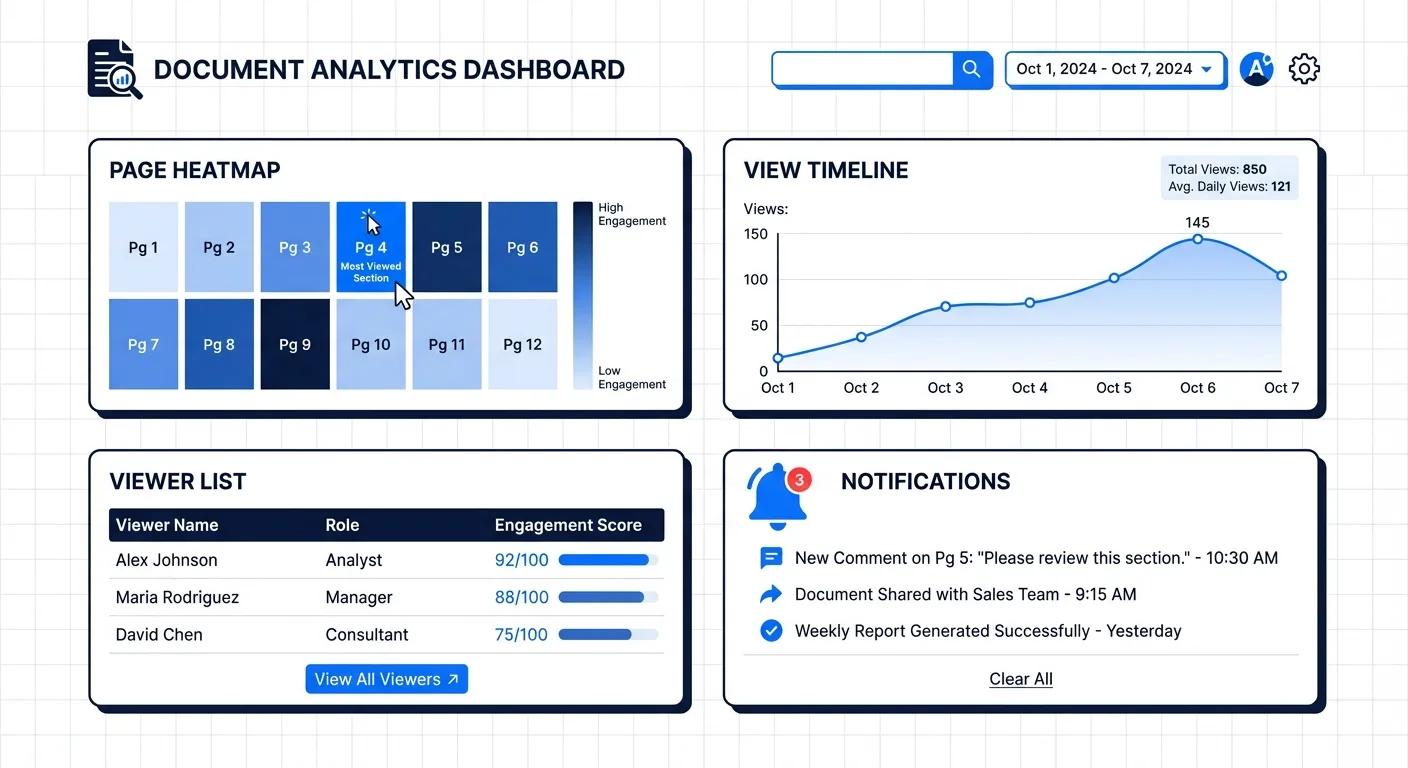
Document tracking closes this information gap across three critical business functions.
Sales Proposals and Quotes
Sales teams send dozens or hundreds of proposals per month. Without tracking, each proposal is a black box. With tracking, you can see that a prospect opened your proposal at 9:15 AM, spent four minutes on the pricing page, and then forwarded it to someone with a C-suite email address. That is not just data — that is an actionable signal that the deal is progressing and someone senior is evaluating your pricing.
Investor Decks and Fundraising Materials
Fundraising is a numbers game with high stakes. When you send your pitch deck to a venture capital firm, knowing whether the partner actually reviewed it (and which slides held their attention) helps you decide whether to follow up, what to emphasize in your next conversation, and whether to adjust your deck based on where readers drop off.
Contracts and Legal Documents
Contract negotiations stall for countless reasons. Document tracking tells you whether the delay is because the other party has not opened the document yet (in which case a gentle reminder is appropriate) or because they have reviewed it multiple times and are likely deliberating internally (in which case patience is the better strategy).
Key Metrics to Track
Not all engagement data is equally useful. Here are the metrics that actually drive better decisions.
Document Opens
The most basic metric: did the recipient open your document? This confirms receipt and initial interest. More importantly, tracking repeated opens tells a story. If someone opens your proposal five times over three days, they are seriously considering it. If they open it once for 30 seconds and never return, your document probably did not resonate.
Time Spent Per Page
Aggregate time spent is useful, but per-page analytics are transformative. If a prospect spends 45 seconds on your solution overview but three minutes on your pricing page, you know price is a significant factor in their decision. If they spend most of their time on your case studies page, they are looking for social proof and validation. This intelligence lets you tailor your follow-up conversation to their specific concerns.
Page-by-Page Engagement
Beyond time spent, understanding which pages get the most attention helps you optimize your documents. If every prospect skips past your company history section but lingers on your technical specifications, you should restructure your proposal to lead with technical detail. Document tracking essentially gives you A/B testing data for your sales collateral.
Downloads
When a recipient downloads your document (rather than just viewing it in the browser), it typically indicates a higher level of interest. They want to review it offline, annotate it, or share it internally. Download events are strong buying signals.
Forwarding and Sharing
The most powerful tracking signal is when your document gets shared with additional stakeholders. If a prospect forwards your proposal to three colleagues, that is a strong indication that they are building internal consensus. Tracking these events tells you how many people are involved in the decision, which suggests the size and complexity of the deal.
Geographic and Device Data
Knowing that your document was opened from New York at 8 AM on a desktop computer paints a different picture than an open from Tokyo at 11 PM on a mobile phone. This context helps you understand who is reviewing your document and when they prefer to work, allowing you to time your communications accordingly.
How Document Tracking Works
Modern document tracking operates through shareable links rather than email attachments. Instead of attaching a PDF to an email, you upload your document to a tracking platform and share a unique link. When the recipient clicks the link, they view the document in a web-based viewer that records their engagement.
The Tracking Link Model
The workflow is straightforward. You upload your document to the tracking platform. The platform generates a unique URL for sharing. You include this link in your email, message, or communication. When the recipient opens the link, they view the document in an embedded viewer. The platform records every interaction — opens, page views, time spent, downloads — and makes this data available to you in real time.
This model has several advantages over traditional email attachments. You can update the document after sharing without sending a new email. You can revoke access if needed. You can see engagement data in real time. And you can share different links with different recipients to track each person's engagement individually.
Email Notifications
Most tracking platforms send you real-time notifications when someone views your document. These notifications are the key to timely follow-up. When you receive an alert that a prospect is viewing your proposal right now, you can pick up the phone and call them while your document is fresh in their mind.
The Cost Problem: Why Most Teams Do Not Track Documents
Despite the clear benefits, most businesses do not use document tracking. The primary reason is cost. The dominant player in document tracking, DocSend, starts at $10 per user per month for its basic plan, and the features most teams need — like custom branding and advanced analytics — require the $18 per user per month Standard plan or higher.
For a sales team of ten people, that is $100 to $180 per month just for document tracking — on top of whatever they are already paying for e-signature tools, CRM software, and other sales infrastructure. For startups and small businesses operating on tight margins, this cost is difficult to justify, especially when document tracking is only one piece of their document management needs.
This is where the market is shifting. Platforms like AiDocX are bundling document tracking analytics into comprehensive document management solutions at dramatically lower price points. AiDocX includes full document tracking and analytics on its free tier — unlimited tracking links with real-time view notifications, page-level analytics, and download tracking at no cost. The Basic plan at $6 per month adds advanced features like AI document analysis and additional e-signatures, still less than what DocSend charges for tracking alone.
The economic argument for an all-in-one platform is compelling. Instead of paying separately for e-signatures (DocuSign at $10+ per month), document tracking (DocSend at $10+ per month), and AI document analysis (various tools at $20+ per month), you get all three capabilities in a single platform for $6 per month or less.
Using Tracking Analytics to Follow Up Effectively
Data without action is meaningless. Here is how to turn tracking analytics into effective follow-up strategies.
The Real-Time Follow-Up
When you receive a notification that a prospect is actively viewing your document, the window of opportunity is narrow but powerful. Within 15 to 30 minutes of the viewing session ending, send a personalized follow-up that references their engagement without being creepy.
Instead of saying "I saw you just read my proposal," say something like "Hi Sarah, I wanted to follow up on the proposal I sent over. I am available this afternoon if you would like to discuss the implementation timeline or pricing in more detail." The timing makes the message feel natural and responsive rather than surveillance-driven.
The Page-Specific Follow-Up
When tracking data shows a prospect spending significant time on a specific section — say, your pricing page — address that topic directly in your follow-up. "I wanted to share some additional context on our pricing structure, including the volume discounts available for teams of your size." This approach demonstrates attentiveness without revealing that you are tracking their behavior.
The Multi-Stakeholder Strategy
When you see your document being forwarded to additional people, adjust your strategy. Prepare materials that address different stakeholder perspectives. If the document was forwarded from a technical lead to a CFO, create a supplementary financial summary. If it went from a project manager to a legal team, have your contract terms ready for discussion.
The Re-Engagement Campaign
Documents that are opened once and never revisited represent a different challenge. These prospects showed initial interest but did not convert to action. Wait three to five business days, then send a follow-up with a new angle — updated data, a relevant case study, or a limited-time offer. Include a fresh tracking link so you can measure whether the re-engagement attempt generates new interest.
The Dead Lead Triage
If a document is never opened at all, the problem is not your proposal — it is your delivery. Check whether the email went to spam, whether you have the right contact information, or whether a different communication channel (LinkedIn, phone, text) would be more effective. Do not waste time refining a proposal that was never seen in the first place.
Privacy Considerations and Best Practices
Document tracking raises legitimate privacy questions that responsible businesses should address proactively.
Transparency
The most important principle is transparency. Most tracking platforms display documents in a branded viewer that implicitly signals tracking is occurring. Some organizations go further by including a brief note in their sharing message: "You can view the proposal at the link below. The document is hosted on our secure platform for easy access." This is honest without being alarming.
Data Minimization
Collect only the data you need. Page-level engagement data is genuinely useful for improving your documents and timing your follow-ups. Precise geolocation data is usually unnecessary and raises privacy concerns disproportionate to its value.
Compliance
Ensure your tracking practices comply with applicable privacy regulations. In GDPR jurisdictions, document tracking may constitute processing of personal data and require appropriate legal basis. Most business-to-business document sharing falls under the "legitimate interest" basis, but you should consult with legal counsel for your specific situation.
Respect Opt-Outs
If a recipient asks you to send a regular PDF instead of a tracking link, respect that request without hesitation. The relationship is more valuable than the data.
Real Use Cases: How Teams Use Document Tracking
Sales Team at a B2B SaaS Company
A 15-person sales team sends an average of 200 proposals per month. Before implementing document tracking, their follow-up strategy was to call every prospect two days after sending a proposal. After implementing tracking, they shifted to calling prospects within an hour of document engagement. Their response rate to follow-up calls increased by 40%, and their average deal cycle shortened by eight days.
Startup Fundraising
A Series A startup sent their pitch deck to 60 venture capital firms over two months. Document tracking revealed that only 35 firms actually opened the deck. Of those, 12 spent more than five minutes reviewing it, and 8 forwarded it to additional partners. The founders focused their follow-up energy on these 8 firms, ultimately closing their round with one of them. Without tracking data, they would have spent equal energy following up with all 60 firms.
Law Firm Client Proposals
A mid-sized law firm uses document tracking for their engagement letters and proposals. When a prospective client opens the engagement letter and spends time on the fee structure section, the partner responsible for the relationship calls to discuss flexible billing arrangements. This proactive approach has increased their client conversion rate by 25%.
Getting Started with Document Tracking
Implementing document tracking is straightforward with the right platform. Here is a practical starting path.
Day 1: Sign up for a platform that includes tracking in its free tier. AiDocX lets you create tracking links immediately upon registration, with no credit card required and no artificial limitations on tracking functionality.
Day 2-3: Upload your most important active documents — the proposal you sent last week, the pitch deck you are currently distributing, the contract you are waiting to hear back on. Generate tracking links and, where appropriate, re-share these documents using the trackable links.
Week 1-2: Monitor engagement data and practice timing your follow-ups based on tracking notifications. Note which approaches generate the best response rates.
Month 1 and beyond: Analyze your accumulated tracking data to identify patterns. Which pages do prospects spend the most time on? Where do they drop off? Use these insights to restructure your documents for maximum impact.
Document tracking is not about surveillance. It is about understanding. When you understand how your audience engages with your content, you can communicate more effectively, follow up more intelligently, and ultimately build better business relationships. In 2026, sending a document without tracking is like running a website without analytics — you are operating blind when you do not have to be.
Ready to automate your documents with AI?
Start free with AiDocX — AI contract drafting, meeting minutes, consultation notes, e-signatures, and more in one platform.
Get Started FreeMore from AiDocX Blog
AI Addiction Counseling Notes: Templates & Automation Guide for 2026
Complete guide for addiction counselors on writing MI session records, relapse prevention plans, and CBT notes — with AI automation tips and HIPAA 42 CFR Part 2 compliance.
SophieKim March 13, 2026 13 min
AI Counseling Notes Guide (2026): Free Templates + Auto-Generate in Minutes
Complete guide to writing counseling notes in 2026. Includes copy-paste templates for psychology, legal, sales, and general counseling, plus how to auto-generate structured records with AI.
SophieKim March 13, 2026 12 min
AI Domestic Violence Counseling Notes (2026): Templates + Safety Guide for DV Advocates
Complete guide to domestic violence counseling documentation in 2026. Includes intake records, danger assessment checklists, safety plan templates, and how to automate records with AI while protecting victim privacy.
SophieKim March 13, 2026 13 min