AI Meeting Minutes Guide (2026): Free Templates + Auto-Generate in 1 Minute
Complete guide to AI meeting minutes in 2026. Includes copy-paste meeting minutes templates for team meetings and board meetings, plus how to auto-generate structured minutes from a recording in under 1 minute.
 MinjiLee · Strategic Lead March 7, 2026 10 min read
Every meeting has the same unspoken question at the end: who's writing the minutes?
Usually it's whoever called the meeting, the most junior person in the room, or whoever made the mistake of making eye contact with the manager. They'll spend 30 to 60 minutes after the meeting — tired, context-switching — turning scattered notes into a document that often gets uploaded to a shared drive and never opened again.
Contracts and investor decks shouldn't take days — AiDocx lets you go from draft to signed in minutes. The same is true for meeting minutes: with the right setup, you can go from "meeting just ended" to "formatted document shared" in under 60 seconds.
This guide covers both paths: the free copy-paste templates you can use today, and the AI method that generates them automatically.
Why Meeting Minutes Matter More Than You Think
Memory is unreliable
"We agreed to do A." "No, we agreed on B." Without written minutes, this argument has no resolution. With them, it takes five seconds to check.
Legal requirements for board meetings
In most jurisdictions, board meeting minutes are a legal obligation. They must record: who attended, what was discussed, what was voted on, dissenting opinions, and resolutions passed. Directors and officers must sign. These documents must be retained — often for 7 to 10 years.
If your company is ever audited, acquired, or involved in a dispute, these records matter.
Execution follows documentation
Teams with written action items — who does what by when — execute at significantly higher rates than teams that leave meetings with verbal commitments. The document isn't bureaucracy. It's accountability infrastructure.
Meeting Minutes Template (Copy-Paste Ready)
Standard Team Meeting Minutes
MEETING MINUTES
Date: [Date] Time: [Start time] – [End time] Location / Platform: [In-person location or video platform] Meeting Type: [Weekly sync / Project kickoff / Review / etc.]
Attendees:
- [Name], [Title]
- [Name], [Title]
- [Name], [Title]
Absent: [Names if applicable]
Facilitator: [Name] Minutes Prepared By: [Name]
Agenda
- [Agenda item 1]
- [Agenda item 2]
- [Agenda item 3]
Discussion Summary
1. [Agenda item 1] [Summary of discussion. Key points raised. Who said what (optional).]
2. [Agenda item 2] [Summary.]
3. [Agenda item 3] [Summary.]
Decisions Made
| Decision | Made By | Date |
|---|---|---|
| [Decision 1] | [Name or group] | [Date] |
| [Decision 2] | [Name or group] | [Date] |
Action Items
| Task | Owner | Due Date | Status |
|---|---|---|---|
| [Task description] | [Name] | [Date] | Pending |
| [Task description] | [Name] | [Date] | Pending |
Next Meeting
Date: [Date] Time: [Time] Location / Platform: [Location] Agenda Items for Next Meeting: [If known]
Minutes approved by: _____________________ Date: ___________
Board Meeting Minutes Template
Board minutes require more formal language and specific legal elements.
MINUTES OF THE BOARD OF DIRECTORS MEETING [Company Name]
Date: [Date] Time: [Start] – [End] Location: [Address or video platform]
Directors Present:
- [Full name], [Title] — [Present in person / Remote]
- [Full name], [Title] — [Present in person / Remote]
Directors Absent: [Names] Others Present: [Advisors, legal counsel, observers — names and roles] Quorum: [Confirmed / Not met — if not met, note actions taken]
Presiding Officer: [Name] Secretary: [Name]
Call to Order The meeting was called to order at [time] by [name]. A quorum of directors was confirmed.
Approval of Previous Minutes The minutes of the [date] board meeting were reviewed. Motion to approve by [Name], seconded by [Name]. Approved unanimously / [note any dissent].
Agenda Items
1. [Item] [Name] presented [summary]. Discussion followed. Resolution: [Text of resolution, if any] Vote: [Yes: X, No: X, Abstain: X] — [Passed / Failed]
2. [Item] [Summary and resolution]
Announcements [Any additional items shared without requiring a vote]
Adjournment There being no further business, the meeting was adjourned at [time].
Respectfully submitted by:
Secretary Date
Approved by:
Chair / President Date
How AI Generates Meeting Minutes Automatically
The templates above work, but filling them in manually still takes 20 to 40 minutes. Here's the AI approach that brings that to under 5 minutes.
Step 1: Record your meeting
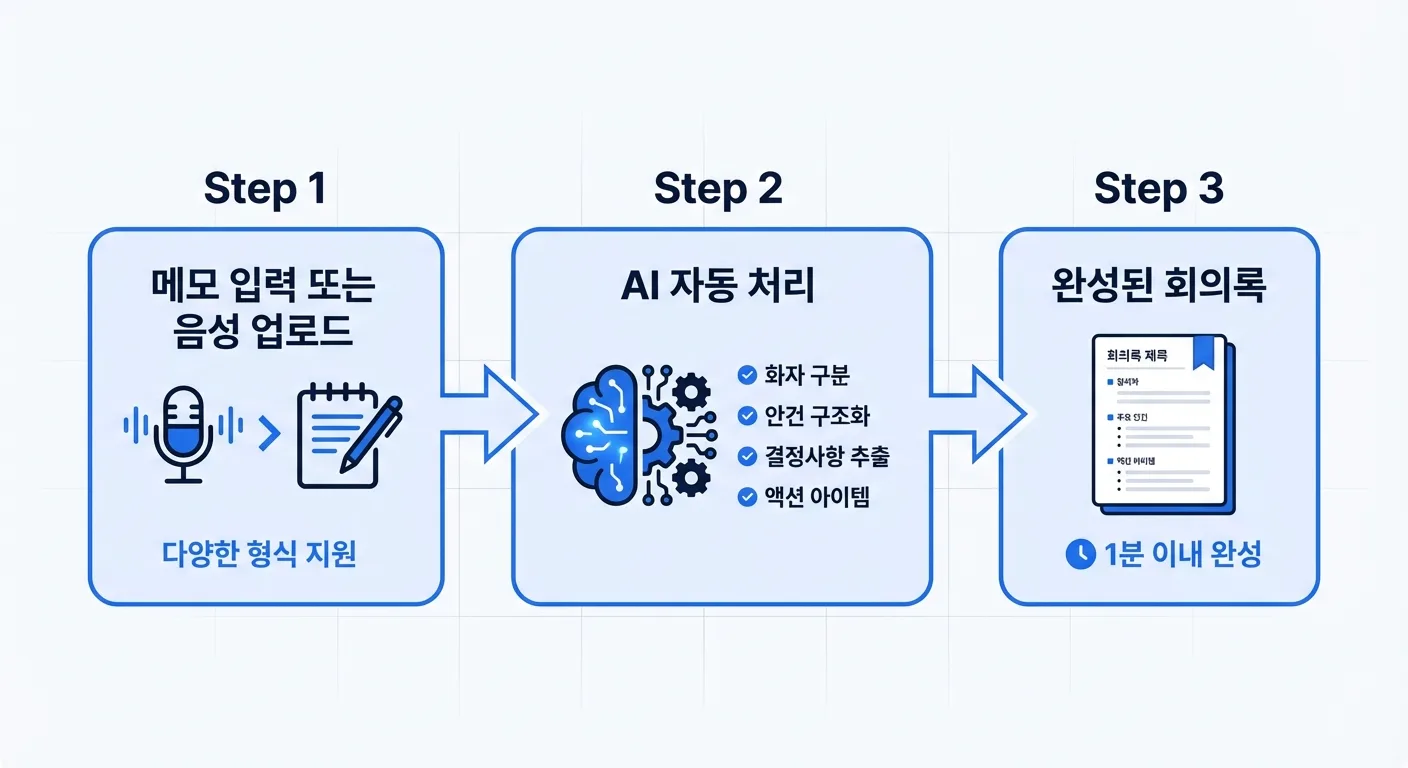
In AiDocX, open a new document and select Meeting Minutes. Click the record button — your browser starts capturing audio through the microphone. No app to install. No bot joining the call.
Step 2: Stop recording
When the meeting ends, stop the recording. AiDocX uploads the audio and sends it to AI for processing.
Step 3: AI structures the document
Within 30 to 60 seconds, the AI returns:
- Attendee list (identified from how participants introduced themselves)
- Agenda structure (topics discussed in order)
- Key decisions (extracted and highlighted)
- Action items (owner + deadline pulled from context)
- Executive summary (one paragraph for people who won't read the full document)
Step 4: Review, download, share
Review the output, make any edits needed, then:
- Download as formatted PDF
- Share via link (with read tracking — see who opened it)
- Request e-signatures if attendees need to sign off on decisions
Tips for Better AI Meeting Minutes
Start with a quick intro: At the beginning of the recording, say "Today's meeting is [topic], [date], with [names]." This gives the AI context to structure the document.
State decisions clearly: Instead of "I think we should go with option B," say "We've decided to go with option B." The AI is better at picking up declarative statements.
Name the action item owner: "John will handle the vendor outreach by Friday" generates a clean action item. "Someone should follow up on that" does not.
Use a good microphone: A laptop microphone works for rooms of 4 to 6 people. For larger rooms or noisy environments, an external USB mic improves accuracy significantly.
Record even informally: If the meeting has no formal agenda, still record it. The AI will structure what it finds. You can always clean up afterward.
AI Meeting Minutes vs. Manual: What's Actually Different
| Manual | AI-generated | |
|---|---|---|
| Time after meeting | 20–40 minutes | Under 5 minutes |
| Consistency | Varies by writer | Consistent format every time |
| Action item capture | What you remember | What was actually said |
| Speaker attribution | Your interpretation | Audio-based |
| PDF formatting | Manual | Built-in |
| Sharing | Email attachment | Link with read tracking |
| E-signature | Separate tool | Integrated |
Common Questions
Q. Do I need to tell people I'm recording? In most countries, one-party consent applies — meaning you can record a meeting you're participating in. Best practice is to inform all participants at the start. Some jurisdictions require all-party consent. Check your local regulations.
Q. How accurate is the transcription? For English, accuracy is typically 93–97% with a standard laptop microphone. Accuracy improves with clearer audio and slower speech. The AI focuses on meaning and structure rather than verbatim transcription — it captures decisions and action items even when phrasing is colloquial.
Q. Can I use this for Zoom or Google Meet? Yes. Record system audio from your computer during the virtual meeting. No bot is added to the call. The recording happens locally in your browser.
Q. What if I already have a recording? You can upload an existing audio file. AiDocX will generate structured minutes from whatever input you provide.
Q. Can the minutes be e-signed? Yes. Once the AI generates the minutes document, you can request e-signatures from attendees directly within AiDocX — useful for board resolutions or client meeting sign-offs.
The meeting itself is the hard part. The documentation shouldn't be. With AI, meeting minutes go from the thing everyone procrastinates on to the thing that's done before you close your laptop.
Generate AI Meeting Minutes with AiDocX — Free → No credit card · Works in English, Korean, Japanese, Thai, Vietnamese, and more
Ready to automate your documents with AI?
Start free with AiDocX — AI contract drafting, meeting minutes, consultation notes, e-signatures, and more in one platform.
Get Started FreeMore from AiDocX Blog
Consulting Proposal Template (2026): 9 Sections + Example
Copy a consulting proposal template with nine sections, pricing options, and a filled example. Includes tips to make the proposal easy to approve.
 AiDocX Team October 24, 2026 11 min
Internship Agreement Template (2026): Paid & Unpaid Interns
Copy an internship agreement template for paid or unpaid interns. Covers U.S. and UK pay rules, duties, IP, confidentiality, and a filled example.
AiDocX Team October 24, 2026 12 min
Meeting Minutes Template (2026): 4 Formats + Filled Example
Copy a meeting minutes template in four formats: team, decision log, board, and client call. See a filled example and a 15-minute workflow.
AiDocX Team October 24, 2026 11 min