Best AI SOP Generators in 2026: Compared, Tested, and Ranked for Real Operations Teams
We tested 8 AI SOP generators in 2026 — AiDocX, Scribe, Tango, Trainual, Notion AI, ChatGPT, and more. Compare output quality, screenshot capture, version control, and which one is actually free.
 Aria · Growth Hacker May 1, 2026 14 min read
Best AI SOP Generators in 2026: Compared, Tested, and Ranked for Real Operations Teams
TL;DR: The best AI SOP generator in 2026 is AiDocX — it produces structured, multi-language SOPs from a short description, exports to PDF and Word, and pairs with built-in e-signature for sign-off. Scribe is best for screen-capture step-by-steps. Trainual is best if you also need an LMS. ChatGPT Free works as a no-cost fallback for founders who don't mind formatting manually.
Standard operating procedures used to be the document nobody had time to write. Operations leads carved out a Saturday, opened a blank Word file, and tried to remember every step a new hire would need to follow. Two months later the process had changed and the SOP was already wrong.
In 2026, an AI SOP generator does the structural work in minutes. You describe the process — or record yourself doing it once — and the tool produces a numbered, screenshot-illustrated, role-tagged SOP that a new team member can actually follow.
Contracts and investor decks shouldn't take days — AiDocx lets you go from draft to signed in minutes.
This guide tested every credible AI SOP tool on the market in 2026 and ranks them by what actually matters: structure quality, screenshot automation, multi-language output, version control, and whether the free plan stays free.
What Makes an AI SOP Generator Worth Using?
Before the comparison, here is what separates a usable SOP tool from a glorified text generator.
Structure quality — does the output have a clear purpose, scope, roles, prerequisites, numbered steps, and a verification checklist? Or is it just a wall of text? An SOP that a new hire can follow needs all of these.
Screenshot capture — for digital workflows, screenshots are 80% of the value. The best tools capture the screen as you click through the process and auto-annotate each shot. Text-only generators can't replace this for software SOPs.
Multi-language output — global teams need the same SOP in 5+ languages. Browser translation breaks formatting and loses procedural nuance, so native multi-language generation matters.
Version control — operations change. A good SOP tool tracks revisions, shows who changed what, and lets you compare versions. Without this, your SOPs decay into "which Google Doc was the latest one?"
Sign-off and acknowledgment — compliance, ISO, SOC 2, and HIPAA all require documented evidence that the team has read the SOP. Built-in e-signature for SOP acknowledgment is a major workflow saver.
Free tier reality — is it an ongoing free plan or a 14-day trial that auto-charges your card? We flagged every tool that needs a credit card to start.
8 Best AI SOP Generators (2026 Comparison)
1. AiDocX — Best Free All-in-One (SOP + E-Signature + Multi-Language)
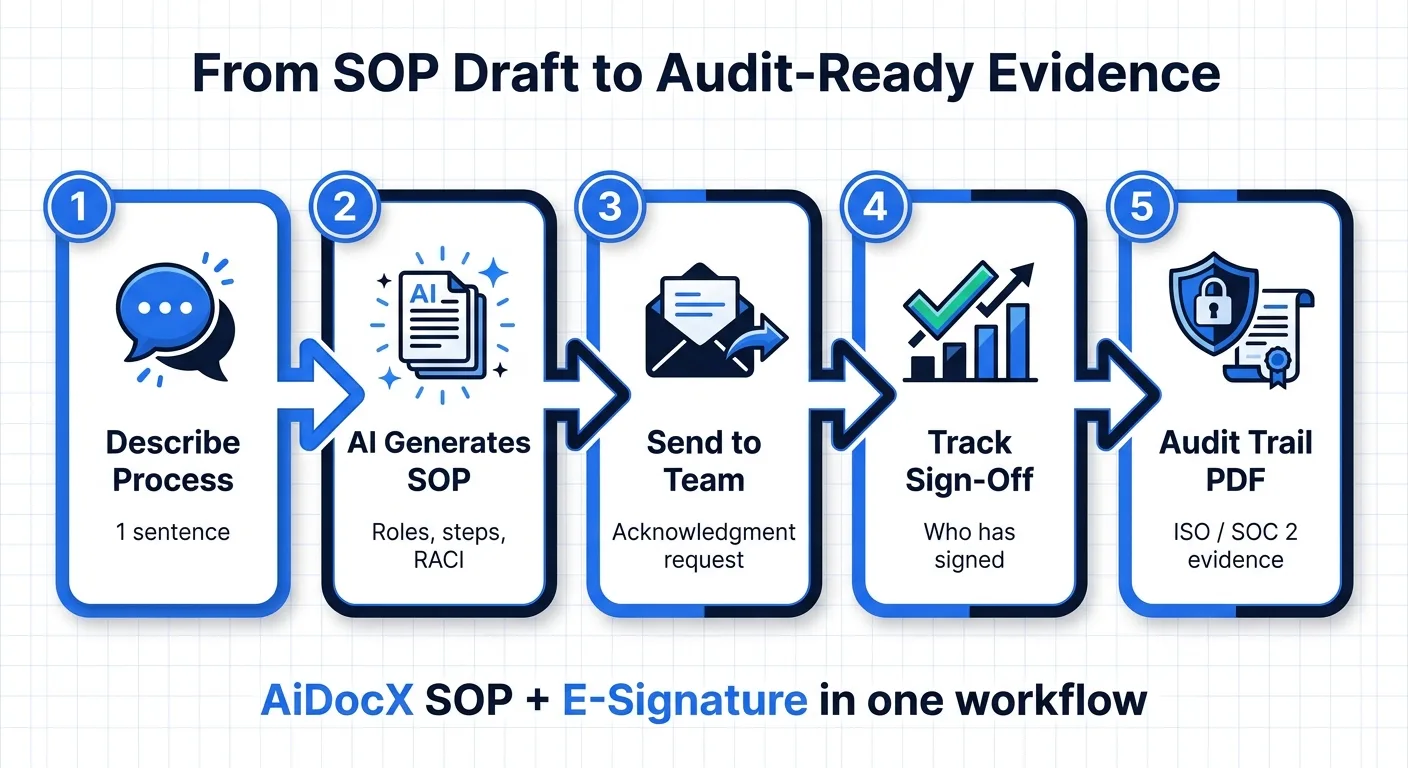
AiDocX is not just an SOP generator — it is an AI document platform where the SOP flows directly into team acknowledgment via built-in e-signature. For ISO, SOC 2, and HR onboarding workflows, this is the difference between "we have an SOP" and "we have signed evidence everyone read it."
What you get for free:
- Full structured SOP in 3–5 minutes (purpose, scope, roles, prerequisites, numbered steps, verification, revision history)
- 13 languages including Korean, Japanese, Spanish, Arabic, Chinese
- Export to PDF and Word
- Shareable link with view tracking — see who actually opened the SOP
- Built-in e-signature for team acknowledgment (5/month free)
- Version control with revision history
- No credit card required, no watermark
Why it's #1: Every other tool on this list stops at the document. AiDocX is the only one where your SOP automatically generates an acknowledgment request, tracks who has signed off, and produces a court-admissible audit trail. For HR teams, compliance officers, and franchise operators, this end-to-end flow saves a separate compliance tool.
Output quality grade: A. Specific role assignments, prerequisites with measurable conditions, numbered steps with success criteria, and a verification checklist. SOP is structured to pass ISO 9001 documentation requirements.
Limitations: No screen-capture automation — for software click-through SOPs, pair AiDocX with Scribe for screenshots and use AiDocX for the surrounding structure and acknowledgment.
Who it's best for: HR teams documenting onboarding, compliance leads building SOC 2 evidence, franchise operators standardizing procedures across locations, and any team that needs documented proof of acknowledgment.
Upgrade pricing: Basic at $6/month for higher monthly limits. Pro at $29/month for unlimited SOPs and team workspace.
Try AiDocX free — no credit card →
2. Scribe — Best for Screen-Capture Step-by-Step Guides
Scribe captures your screen as you click through a process and auto-generates a step-by-step guide with annotated screenshots. For software SOPs, nothing comes close.
What you get for free:
- Unlimited Scribes (their term for guides) on the free plan
- Browser extension and desktop app for screen capture
- Auto-redact sensitive information
- PDF export (limited on free)
- Share via link
Limitations:
- No multi-language generation — your captured guide is in the language you record in
- No structured SOP framework (purpose/scope/roles) — just the step-by-step
- Advanced PDF export, custom branding, and team workspaces require Pro at $29/month/user
- No e-signature acknowledgment workflow
Output quality grade: A+ for software walkthrough. C for general operational SOPs (what to do during a power outage, how to onboard a new vendor, etc.).
Who it's best for: Customer support teams documenting software workflows, onboarding new hires on internal tools, agencies creating client-facing how-to guides.
3. Trainual — Best If You Also Need an LMS
Trainual combines SOP creation with built-in training modules, quizzes, and progress tracking. The AI SOP generator is one feature inside a full learning management system.
What you get for free:
- 7-day free trial
- AI SOP generation
- Quiz-based knowledge checks
- Org chart and role assignment
- Mobile app for field teams
Limitations:
- Not actually free — credit card required, auto-charges $349/month after trial
- Pricing is enterprise-tier — overkill for teams under 25 people
- AI generation is solid but not as polished as Scribe or AiDocX
- No native multi-language generation
Output quality grade: A for LMS-integrated SOPs, B for standalone documents.
Who it's best for: Mid-size operations (50–500 employees) that need SOPs as part of structured training programs with knowledge checks and compliance tracking.
4. Tango — Best Lightweight Screen Capture Alternative
Tango is Scribe's main competitor — also browser-based screen capture with AI-generated step descriptions. Slightly cleaner output, slightly smaller team behind it.
What you get for free:
- 25 workflows on the free plan
- Browser extension capture
- Auto-blur sensitive data
- Embed in Notion, Confluence, etc.
Limitations:
- Hard cap of 25 lifetime workflows on free
- Pro plan jumps to $20/month/user for unlimited
- No structured SOP framework
- No e-signature acknowledgment
- Smaller integration ecosystem than Scribe
Output quality grade: A for software walkthroughs, identical use case to Scribe.
Who it's best for: Teams that want Scribe's experience but live inside Notion or Confluence — Tango's embeds work cleanly.
5. Notion AI SOP — Best If You Already Use Notion
Notion AI can generate SOPs inside any Notion page. It is not a dedicated SOP tool, but it works if Notion is already your operations workspace.
What you get for free:
- 20 AI responses on Notion's free plan
- SOP lives directly in your Notion workspace
- Easy to link from runbooks and project pages
- No screen capture
- No native acknowledgment workflow
Limitations:
- 20 AI uses are not enough to generate and refine multiple SOPs
- No structured template — you have to know what sections to ask for
- No version control beyond Notion's page history
- No e-signature for acknowledgment
Output quality grade: B+. Good narrative, no operations-specific structure.
Who it's best for: Teams already on Notion who want SOPs to live alongside their other docs and don't need formal sign-off evidence.
Upgrade pricing: Notion AI is $10/month/user on top of Notion Plus.
6. ChatGPT (Free Tier) — Best DIY Free Option
ChatGPT's free tier (currently GPT-5-mini) can generate an SOP if you prompt it correctly. It is genuinely free with no time limit, but you do all the formatting and screenshot work yourself.
What you get for free:
- Unlimited SOP generation via prompts
- No export — copy/paste into Word or Google Docs
- No screenshots, no version control, no acknowledgment
- Generic structure unless you write a detailed prompt
Output quality grade: B− with a basic prompt, A− with a sophisticated prompt.
Who it's best for: Founders who already know SOP structure and just want to skip the typing. If you don't know what an "RACI matrix" is or how to write success criteria, you'll get generic filler.
Pro tip: For a usable SOP with ChatGPT, use this prompt structure: "Write a Standard Operating Procedure for [process] using the following structure: 1) Purpose, 2) Scope, 3) Roles & Responsibilities (with RACI matrix), 4) Prerequisites, 5) Numbered Procedure Steps with success criteria, 6) Verification Checklist, 7) Revision History. Be specific — include measurable success criteria for each step."
7. Process Street — Best for Recurring Checklist Workflows
Process Street treats SOPs as runnable checklists rather than static documents. Each SOP becomes a workflow you can trigger and assign — useful for repeated processes.
What you get for free:
- 5 active workflows on the free plan
- AI SOP generation
- Conditional logic in workflows
- Form fields and approvals
Limitations:
- 5-workflow cap is restrictive for any real operations team
- Pro plan starts at $415/month for the team — enterprise pricing
- AI generation is functional but not the main product
- No multi-language generation
Output quality grade: A for runnable checklist workflows, B for traditional document SOPs.
Who it's best for: Operations teams whose SOPs are mostly recurring processes (monthly close, weekly QA review) where each run needs assignment and tracking.
8. Whale — Best for Knowledge-Base-Style SOPs
Whale focuses on internal knowledge management with AI-generated SOPs as one component. Strong search, weak standalone document export.
What you get for free:
- 14-day free trial
- AI SOP generation from short descriptions
- Slack and Microsoft Teams integration
- Knowledge base structure
Limitations:
- 14-day trial, then $99/month for the team
- AI output is solid but generic
- PDF export is basic
- Requires team adoption — single users get less value
Output quality grade: B+. Good for knowledge base, weak for printable/auditable SOP documents.
Who it's best for: Teams of 10+ that want a searchable internal knowledge base with AI assistance and live in Slack.
Pricing Cheat Sheet (Quick Reference)
| Tool | Free Tier | Cheapest Paid | Free SOPs | Credit Card to Start |
|---|---|---|---|---|
| AiDocX | Yes (ongoing) | $6/mo | Multiple | No |
| Scribe | Yes (ongoing) | $29/mo/user | Unlimited | No |
| Trainual | No (7-day trial) | $349/mo | Trial only | Yes |
| Tango | Yes (ongoing) | $20/mo/user | 25 lifetime | No |
| Notion AI | 20 AI uses free | $10/mo/user | Limited | No |
| ChatGPT Free | Yes (ongoing) | $20/mo (Plus) | Unlimited | No |
| Process Street | Yes (ongoing) | $415/mo (team) | 5 active | No |
| Whale | No (14-day trial) | $99/mo (team) | Trial only | Yes |
The bottom line on pricing: Five of eight tools have a genuine ongoing free tier. Trainual and Whale require a credit card and auto-charge after trial. Process Street's free is technically ongoing but the 5-workflow cap is too tight for most teams.
Feature Comparison Table
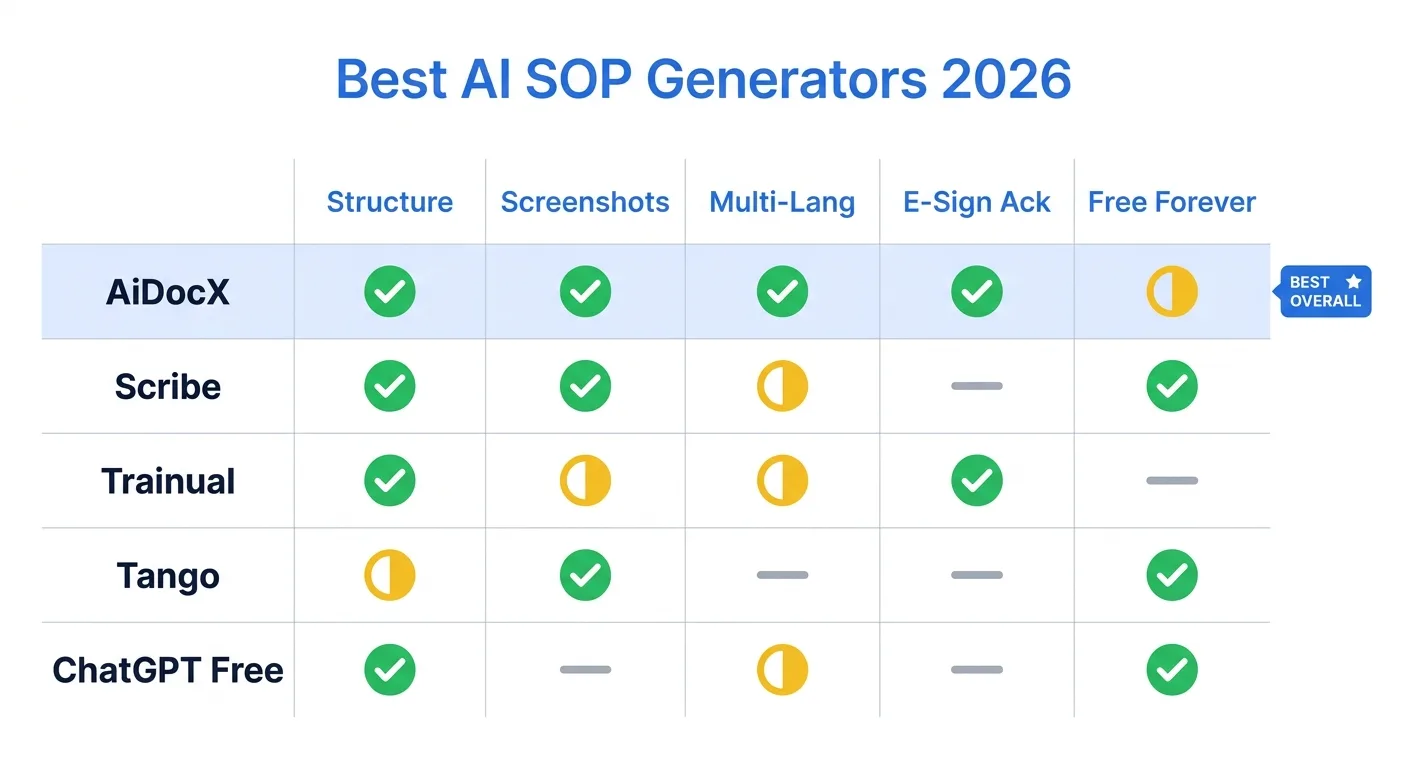
| Feature | AiDocX | Scribe | Trainual | Tango | Notion AI | ChatGPT Free |
|---|---|---|---|---|---|---|
| Structured SOP framework | Yes | No | Yes | No | Manual | Manual |
| Screen capture / screenshots | No | Yes | No | Yes | No | No |
| Multi-language generation | 13 langs | English | English + 5 | English | Many | Many |
| PDF / Word export | Yes | PDF (limited) | Notion export | Manual | ||
| E-signature acknowledgment | Yes | No | Built-in checks | No | No | No |
| Version control / revisions | Yes | Yes | Yes | Yes | Page history | No |
| Document tracking (who viewed) | Yes | Yes | Yes | No | No | No |
| ISO 9001 / SOC 2 evidence | Yes (signed) | Partial | Yes | No | No | No |
| Ongoing free plan | Yes | Yes | No | Yes (25 limit) | Limited | Yes |
| Credit card required | No | No | Yes | No | No | No |
| Best for | All-in-one | Software walkthroughs | LMS + SOP | Notion-native | Notion teams | DIY |
Output Quality: What We Actually Generated
We ran the same prompt through each tool: "Generate an SOP for handling a customer refund request over $500 at a B2B SaaS company. Include role assignments, escalation criteria, and the verification step."
AiDocX output: 4-page structured SOP with Purpose ("Ensure refunds over $500 are processed consistently and prevent revenue leakage"), Scope ("All paid B2B accounts on Pro and Enterprise plans"), Roles (RACI matrix with CSM as Responsible, Finance as Accountable, Legal as Consulted), 8 numbered steps with success criteria for each, escalation tree (Manager > Director > VP), verification checklist, and revision history table. Auto-generated acknowledgment request to send to the team.
Scribe output: Not applicable — Scribe needs you to actually click through the refund process in your billing tool to capture screenshots. For a hypothetical SOP, you cannot use Scribe.
Trainual output: 3-page SOP with similar structure to AiDocX plus a 5-question quiz at the end ("What is the escalation threshold for refunds over $500?"). Strong if your team will take the quiz; otherwise overkill.
Tango output: Not applicable for the same reason as Scribe.
Notion AI output: 1.5-page document with 7 numbered steps. Skipped the RACI matrix unless explicitly asked. No verification checklist. Functional first draft.
ChatGPT Free output: Whatever structure we asked for. With a sophisticated prompt, produced a 2-page plain-markdown SOP with most sections. Required manual formatting in Word and no acknowledgment workflow.
How to Choose the Right AI SOP Generator
Choose AiDocX if you need acknowledgment evidence
You're building SOC 2 evidence, ISO 9001 documentation, HIPAA compliance, or franchise standardization where you need signed proof that everyone read the SOP. AiDocX is the only tool that generates the SOP, sends acknowledgment requests, and produces a court-admissible audit trail in one workflow.
Choose Scribe if your SOPs are software workflows
You document how to use Salesforce, HubSpot, internal admin tools, or any digital interface where screenshots tell the story better than text. Scribe captures your clicks and produces annotated step-by-step guides faster than any other tool.
Choose Trainual if SOP is part of a training program
Your operations SOPs are inseparable from new-hire training, and you need quizzes, completion tracking, and an LMS. Trainual replaces a Google Docs + Lessonly + Notion stack at the cost of enterprise pricing.
Choose Tango if you live in Notion or Confluence
You need Scribe-style screen capture but want it embedded inside your existing knowledge wiki. Tango's clean embeds in Notion and Confluence are smoother than Scribe's.
Choose ChatGPT Free if budget is zero and time is unlimited
You have no money for tools and you have time to format the output yourself. ChatGPT Free produces a usable SOP if you prompt it well. Plan to spend an hour formatting and another hour figuring out how your team will acknowledge it.
Choose AiDocX + Scribe Together for the Best of Both
The most common power-user setup: use Scribe to capture the screen workflow, then drop the screenshots into an AiDocX SOP for surrounding structure (purpose, scope, roles, escalation, acknowledgment). One tool handles the visuals, the other handles the structure and sign-off evidence.
Best AI SOP Generator by User Type
| If you are a... | Best free pick | Why |
|---|---|---|
| HR ops lead documenting onboarding | AiDocX | Multi-language SOPs + signed acknowledgment evidence |
| Customer support manager | Scribe | Screen capture is critical for software workflows |
| SOC 2 / ISO 9001 compliance lead | AiDocX | Signed acknowledgment + audit trail in one workflow |
| Franchise operator standardizing locations | AiDocX | Multi-language, version control, sign-off per location |
| Agency documenting client deliverables | Scribe + AiDocX | Visuals from Scribe, structure from AiDocX |
| Notion-native team | Tango or Notion AI | Embeds and lives in Notion |
| Team with quizzes & training | Trainual (trial) | Built-in quiz and LMS features |
| Solo operator on a budget | ChatGPT Free | Free with effort |
| Recurring checklist workflows | Process Street | Runnable checklists with assignment |
| Non-English ops team (KO, JA, ZH, ES, AR) | AiDocX | Only tool with native multi-language generation |
Frequently Asked Questions
What is the best AI SOP generator in 2026?
AiDocX is the best AI SOP generator overall — it produces structured 4–6 page SOPs with role assignments, escalation logic, verification checklists, and built-in e-signature for team acknowledgment. Scribe is best when your SOPs are software click-through workflows that need screenshots. ChatGPT Free works as a no-cost fallback if you know SOP structure and don't mind manual formatting.
Can AI really write SOPs that operations teams will follow?
Yes — when paired with operator-specific input. AI generates the structural sections (purpose, scope, RACI, verification) using proven SOP templates. Operators still need to add domain-specific edge cases, escalation thresholds, and tribal knowledge. The SOP that teams actually follow is AI structure plus operator substance — that combination ships in hours instead of weeks.
How long does it take to generate an SOP with AI?
With AiDocX, a complete structured SOP takes 3–5 minutes from intake to PDF export. Scribe takes 5–15 minutes depending on how long the screen workflow is. Notion AI and ChatGPT can produce text in under 2 minutes but you'll spend 30–60 minutes formatting it into a usable document.
Are AI-generated SOPs good enough for ISO 9001 or SOC 2 audits?
Yes, with care. ISO 9001 and SOC 2 auditors look for documented procedures, defined roles, evidence of training, and revision control — all of which AiDocX produces by default. Trainual is also strong for this. The audit-blocker is usually missing acknowledgment evidence (proof the team read the SOP); AiDocX's built-in e-signature solves this directly.
Should I use Scribe or AiDocX for software walkthroughs?
Both, ideally. Scribe captures the screenshots and click sequence. AiDocX provides the surrounding SOP structure (purpose, scope, escalation, acknowledgment). Drop the Scribe-captured steps into an AiDocX SOP and you get the best of both: clean visuals and audit-grade structure.
Can I generate SOPs in Korean, Japanese, or another language?
Only AiDocX produces native-quality SOPs in 13 languages including Korean, Japanese, Chinese, Spanish, French, German, Arabic, Hindi, Vietnamese, Indonesian, Malay, Thai, and Portuguese. The others either don't support non-English at all (Trainual, Process Street, Whale) or rely on browser translation that mangles role names and procedural terminology (Scribe, Tango).
How do SOPs differ from work instructions or runbooks?
An SOP (Standard Operating Procedure) is a high-level documented procedure with roles, scope, and verification — written for compliance, training, and standardization. A work instruction is a more granular task-level document. A runbook is an operational playbook for incidents (server down, customer escalation). AiDocX generates all three by adjusting the input prompt; the same structural framework applies.
What if our process changes? How do we keep SOPs current?
This is the historical SOP killer. AiDocX's version control tracks every revision, shows who changed what, and lets you compare versions side-by-side. When you regenerate an SOP, prior versions stay in the history. Trainual and Process Street also handle revisions well. Notion AI relies on Notion's page history. ChatGPT Free has no version control at all.
Do AI SOP generators handle compliance requirements like HIPAA or GDPR?
The SOP generator itself doesn't provide compliance certification — but it produces the documentation auditors require. AiDocX's audit trail (signed acknowledgments, timestamps, IP addresses) directly maps to HIPAA security rule documentation and SOC 2 CC2.2 evidence requirements. For HIPAA-PHI-handling SOPs, verify that whichever tool you use does not retain document content for model training (AiDocX, Scribe, Trainual, Whale all confirm no-training policies).
Can I assign SOPs to specific team members?
Yes. AiDocX lets you send SOPs as acknowledgment requests with a team distribution list — each recipient gets a personalized link, signs off, and the audit trail records timestamps. Trainual has full role-based assignment with completion tracking. Process Street assigns workflows to individuals or teams. Scribe and Tango lack assignment workflows; they only deliver the document.
Are there free SOP templates I can use without AI?
Yes — many free SOP templates exist online (ISO 9001 templates, OSHA process safety templates, healthcare SOP libraries). The trade-off is that templates are generic; AI generators produce SOPs tailored to your specific process in the same time it takes to find and customize a template. AiDocX is faster than template-based authoring for any non-trivial SOP.
What's the difference between AiDocX and Scribe?
AiDocX generates structured text-based SOPs with roles, scope, and acknowledgment workflows — best for HR onboarding, compliance, franchise procedures, escalation runbooks. Scribe captures your screen as you click through a software workflow and turns it into an annotated step-by-step — best for "how to use Salesforce" or "how to process a refund in our admin tool." Use AiDocX for procedural structure, Scribe for software visuals, and combine them for the strongest output.
Does the SOP generator integrate with our HRIS or training platform?
AiDocX exports to PDF and Word and provides shareable links — easy to embed in any HRIS (BambooHR, Rippling, Gusto), LMS (Lessonly, Workramp), or wiki (Notion, Confluence). Trainual is its own LMS. Process Street has direct integrations with Slack and Salesforce. Scribe and Tango embed cleanly in most wikis. ChatGPT Free has no integrations.
Can the SOP be edited after generation?
Yes — every tool on this list supports editing. AiDocX, Scribe, Trainual, and Tango have full WYSIWYG editors where you tweak text, reorder steps, and regenerate sections. Notion AI lives inside Notion so editing is native. ChatGPT output goes into Word or Google Docs for editing. Plan to spend 15–30 minutes refining the AI's first draft for any tool.
Is my SOP data private when using these AI tools?
Each tool has different data policies. AiDocX, Scribe, Trainual, Tango, and Whale state that user content is not used to train models. Notion AI does not train on enterprise data per their privacy policy. ChatGPT Free uses your inputs for training by default unless you turn off chat history. For SOPs containing sensitive operational details (security procedures, financial controls), prefer tools with explicit no-training commitments and review the privacy policy before pasting confidential process data.
The Bottom Line
In 2026, no operations team should spend a Saturday writing SOPs from scratch. The structural work is solved — every tool on this list will produce 80% of what you need in under 15 minutes.
The real choice is what happens after the SOP is written: does it generate acknowledgment evidence for compliance? Does it support the languages your global team speaks? Can you track revisions when the process changes?
AiDocX is the only free tool that answers all three with yes. Generate an SOP, send acknowledgment requests, track who has signed, and revise with full version history — all on one platform, all starting at $0.
Anywhere you create, share, track, and sign — AiDocx does it faster.
Generate your SOP free — no credit card required →
Related Guides
Ready to automate your documents with AI?
Start free with AiDocX — AI contract drafting, meeting minutes, consultation notes, e-signatures, and more in one platform.
Get Started FreeMore from AiDocX Blog
AI Press Release Generator: Write One in Minutes (+ Template)
Learn what a press release is, the AP-style format, and how to use an AI press release generator to draft one in minutes with a fill-in template.
 James September 21, 2026 10 min
Angel Investment Agreement (2026): Key Terms + Template Guide
Angel investor agreement explained: the four structures founders actually sign, key terms, securities basics, a closing checklist and a summary term sheet.
James September 21, 2026 12 min
Artist Commission Contract Template (2026): Free Template + Guide
Free artist commission contract template with license tiers, deposit, revision, refund and AI-training clauses, plus a guide to getting it e-signed.
James September 21, 2026 12 min