
Contract Redlining Etiquette: A 2026 Guide for Freelancers
Master contract redlining without losing the deal. Learn standard etiquette, common mistakes, and how to respond to tracked changes confidently as a freelancer.
 James · Content Manager August 14, 2026 10 min read
Contract Redlining Etiquette: A 2026 Guide for Freelancers
You sent a clean contract. They sent it back covered in red strikethroughs, green highlights, and comments that seem to rewrite your entire scope of work. Panic sets in. You’re not a lawyer, but you need to get paid. This is the moment where most small business operators and freelancers either sign blindly out of fear or push back so aggressively that the client walks away.
Contract redlining is simply the process of negotiating terms by marking up a document. It is the standard language of business negotiation. Understanding the etiquette behind these marks—what to accept, what to ignore, and what to fight for—can mean the difference between a smooth payment and a legal dispute. This guide breaks down exactly how to handle those tracked changes with confidence.
What Is Contract Redlining?
At its core, redlining is a collaborative editing process. When a counterparty returns a contract with "Track Changes" enabled, they are inviting you to negotiate. The document is no longer static; it is a living draft.
For freelancers and small business owners, the term "redlining" can feel intimidating, implying a high-stakes legal battle. In reality, it is often just a business discussion translated into document format. The counterparty has reviewed your terms, identified points of friction, and proposed alternatives.
Think of redlining as a dialogue. Every change they make is a question: "Can we do it this way instead?" Your response—whether you accept, reject, or counter that change—is your answer. The goal is not to "win" the argument, but to reach a mutually acceptable agreement that protects your interests while allowing the project to proceed.
In 2026, with AI tools becoming ubiquitous, the pressure to respond quickly is higher. However, speed should never compromise clarity. Understanding the mechanics of redlining ensures you respond thoughtfully rather than reactively.
The Anatomy of a Redlined Contract
Before you can negotiate, you must understand the language of the markup. Most modern word processors (Microsoft Word, Google Docs) use a standardized color scheme, though it can vary slightly by software version. Here is what you are looking at when you open that returned PDF or DOCX file.
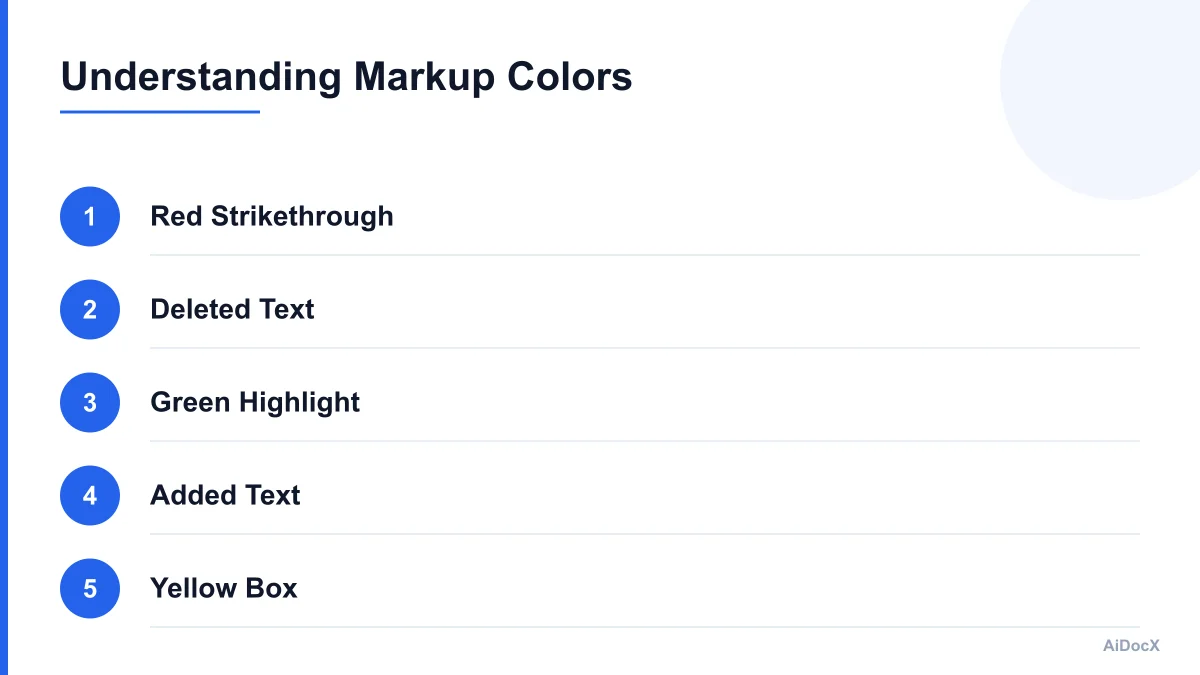
Strikethrough (Red)
Text with a line through it indicates a deletion. The counterparty wants this clause removed entirely.
- Example: "The Client shall pay a late fee of 5% per month" is struck through.
- Implication: They do not want to pay late fees. This is a common point of negotiation.
Underlining or Highlighting (Green/Blue)
New text is usually underlined or highlighted in green. This is what they are adding to the agreement.
- Example: "Payment is due within 15 days" is added.
- Implication: They have tightened their payment terms from your original 30 days.
Comments (Yellow Boxes)
These are marginal notes. The counterparty is asking a question, providing context, or explaining a change.
- Example: A comment next to a liability clause might say, "Legal requires this to protect our IP."
- Implication: This is an invitation to discuss. You should respond directly in the comment thread.
The "Clean" Version
After negotiations are complete, one party must create a "Clean Version" with all changes accepted or rejected. Never sign a document that still has tracked changes. It creates ambiguity about what was actually agreed upon. Always ensure you are signing the final, clean PDF.
Why Redlining Happens: Client Motives
Not all redlines are created equal. Understanding why a client is making changes helps you determine how much effort to invest in pushing back.
1. Legal Compliance (The Non-Negotiables)
Large corporations have legal departments that enforce strict boilerplate language. If a client’s legal team redlines a confidentiality clause or an indemnification section, they are often following a mandatory corporate policy.
- Strategy: Do not fight these unless the change fundamentally breaks your business model. If you reject a standard NDA clause, you risk delaying the deal for no reason. Accept it.
2. Risk Mitigation (The Protective Clauses)
Clients may redline clauses that expose them to excessive liability or operational risk. For example, they might change a "net 30" payment term to "net 15" to align with their cash flow cycles.
- Strategy: These are business decisions, not legal mandates. You can push back here if the change impacts your working capital.
3. Scope Clarification (The Ambiguity Fixes)
Sometimes, a client redlines your scope of work because they misunderstood it or want to narrow it down to reduce cost.
- Strategy: This is a critical moment. If you accept a narrowed scope without adjusting your price, you are working for free. Use redlining to clarify deliverables and adjust compensation.
4. Habitual Process (The "Copy-Paste" Errors)
Many clients use old templates that haven’t been updated in five years. They may include clauses that are irrelevant to your specific engagement (e.g., a non-compete clause for a simple graphic design job).
- Strategy: Politely point out that the clause is unnecessary for this type of work. Most reasonable clients will remove it without a fight.
Common Etiquette Mistakes to Avoid
Even seasoned professionals make mistakes when redlining. These errors can signal unprofessionalism or inexperience, potentially costing you the deal.
Mistake 1: Accepting Everything (The "Yes" Man)
The biggest mistake freelancers make is accepting every change without review. You might miss a clause that gives the client ownership of your pre-existing intellectual property, or one that allows them to terminate the contract without notice.
- Fix: Read every change. If you are unsure, ask. Ignorance is not a legal defense.
Mistake 2: Over-Redlining (The "War Zone")
Conversely, some freelancers respond with a "counter-redline" that changes 50% of the document, including minor punctuation and formatting. This signals that you are difficult to work with and may delay the deal indefinitely.
- Fix: Only redline terms that materially affect your risk, payment, or scope. Ignore minor stylistic changes.
Mistake 3: Ignoring Comments
If a client leaves a comment asking, "Can we move the delivery date to Q3?" and you just change the date without acknowledging their query, you leave them confused.
- Fix: Always respond to comments. Accept the change and reply to the comment thread with, "Agreed, moved to Q3 as requested."
Mistake 4: Emotional Rebuttals
Never write an emotional rebuttal in the contract. Avoid phrases like "This is ridiculous" or "We discussed this already."
- Fix: Keep the tone professional and factual. Use language like, "Our standard policy requires..." or "To ensure project quality, we recommend..."
Mistake 5: Sending Multiple Versions
Do not send a redlined version, then a clean version, then another redlined version in separate emails. This creates version control chaos.
- Fix: Use a single email thread. Clearly label your attachment: "Final Redlined Version - [Date]".
How to Redline Without Losing the Deal
The goal is to protect your interests while maintaining a positive relationship. Here is a step-by-step framework for handling redlines professionally.
Step 1: Triage the Changes
When you open the document, do not start editing immediately. First, scan the document and categorize the changes:
- Green Flags: Minor administrative changes, typo fixes, formatting updates. Action: Accept.
- Yellow Flags: Changes to payment terms, scope, or timeline. Action: Review carefully. Decide if you can accept or need to negotiate.
- Red Flags: Clauses that give away IP, unlimited liability, or non-standard termination rights. Action: Push back immediately.
Step 2: Decide Your Stance
For each "Yellow" or "Red" flag, decide your position:
- Accept: You agree with the change.
- Reject: You disagree and want your original text.
- Counter: You propose a compromise.
Step 3: Craft Your Response
When you reject or counter a clause, provide a brief, professional reason. This is not just about the contract; it’s about building trust.
- Weak Response: "No. We keep our original clause."
- Strong Response: "We are unable to accept the unlimited liability clause. As a small business, our insurance coverage is capped at $1M. We propose adding a liability cap to protect both parties."
Step 4: Use AI to Assist (But Don’t Rely on It Blindly)
This is where technology can save you time. Platforms like AiDocX allow you to upload a contract and receive an AI-powered review that flags risky clauses and suggests redlines inline. For a non-lawyer, this acts as a second pair of eyes, helping you identify standard vs. non-standard terms quickly.
- Note: AI should never replace your judgment. Always review the AI’s suggestions to ensure they align with your specific business context and negotiation strategy.
Step 5: Send the Clean Version
Once both parties agree, one of you must create the final clean version. Usually, the party who initiated the redline (the client) provides the clean version, but you can offer to do it as a courtesy.
- Pro Tip: Add a line in your email: "Attached is the clean, final version for your signature. Please let me know if you have any last-minute questions."
When to Consult a Lawyer
While you can handle most freelance contracts independently, there are situations where professional legal advice is essential. Do not attempt to redline these scenarios alone:
- High-Value Contracts: If the contract value exceeds your annual revenue, the risk of a poorly drafted clause is too high.
- Complex IP Ownership: If the client claims ownership of all work product, including your pre-existing tools or code, this can cripple your future business.
- Indemnification Clauses: These require one party to pay for the other’s legal losses. Broad indemnification clauses can bankrupt a small business.
- Governing Law Jurisdictions: If the contract specifies a court location in another country or state, you may face significant legal costs if a dispute arises.
If you are unsure, spend $200-$500 on a lawyer to review the contract. It is cheaper than losing a $10,000 client due to a breach of contract.
The Final Checklist: Before You Sign
Before you click "Accept All Changes" and sign, run through this quick checklist to ensure you are protected and professional.
- Read Every Change: Did you miss a subtle addition in a paragraph?
- Check Dates: Are the start and end dates correct? Are payment milestones aligned with your cash flow?
- Verify Scope: Does the deliverables list match what you quoted?
- Review Termination: Can either party cancel? What is the notice period?
- IP Ownership: Do you retain ownership of your background IP?
- Liability Cap: Is there a limit on how much you can be sued for?
- Comment Threads: Are all client queries resolved and acknowledged?
- Clean Version: Is the final document free of tracked changes?
- Professional Tone: Have you removed any emotional language from comments?
Conclusion: Confidence Through Preparation
Contract redlining is not a test of your legal knowledge; it is a test of your business acumen. By understanding the etiquette, avoiding common mistakes, and using tools like AiDocX to flag risks, you can respond to counterparty markups with confidence. Remember, redlining is a conversation. Be polite, be clear, and be firm about your boundaries.
The goal is not to win every argument, but to close a deal that is fair, clear, and sustainable. With the right approach, you can turn a messy redlined document into a solid foundation for a successful business relationship.
Disclaimer: This article is for informational purposes only and does not constitute legal advice. Always consult with a qualified attorney for specific legal concerns.
Ready to automate your documents with AI?
Start free with AiDocX — AI contract drafting, meeting minutes, consultation notes, e-signatures, and more in one platform.
Get Started FreeMore from AiDocX Blog
Buy Sell Agreement Template (2026): Triggers, Valuation and Funding for Co-Owners
A free buy sell agreement template for co-owners, with triggering events, valuation methods, insurance funding and cross-purchase vs. redemption structures.
James September 26, 2026 12 min
Consignment Agreement Template (2026): Commission, Title, Risk of Loss and Unsold Goods
Free consignment agreement template for makers, artists and boutiques: commission split, title, insurance and how to protect consigned inventory.
James September 26, 2026 9 min
Distribution Agreement Template (2026): Territory, Exclusivity, Minimums and Reseller Terms
Free distribution agreement template (works as a reseller agreement template too): territory, exclusivity, minimums, pricing, IP and termination.
James September 26, 2026 13 min