Otter.ai vs Fireflies.ai vs AiDocX — AI Meeting Minutes Tools Compared for Startups (2026)
Comparing the top AI meeting minutes tools in 2026: Otter.ai, Fireflies.ai, and AiDocX. Pricing, features, language support, and which one fits startups who need more than just transcription.
 MinjiLee · Strategic Lead March 7, 2026 9 min read
TL;DR: Otter.ai and Fireflies.ai are excellent transcription tools. But if your startup needs more than a transcript — if you need structured minutes, follow-up contracts, e-signatures, and document sharing — AiDocX handles the entire workflow in one place.
Every meeting ends with the same problem: someone has to turn 45 minutes of conversation into a document everyone can actually use.
Contracts and investor decks shouldn't take days — AiDocx lets you go from draft to signed in minutes. The same logic applies to meeting minutes. The question is which tool gets you there.
In 2026, three tools dominate this space: Otter.ai, Fireflies.ai, and AiDocX. They solve different problems, and choosing the wrong one costs you time every single week.
Otter.ai — The Gold Standard for Real-Time Transcription
What it does
Otter.ai has been the benchmark for live meeting transcription since 2016. It connects directly to Zoom, Google Meet, and Microsoft Teams — a bot joins your call, transcribes in real time, and delivers a searchable, highlighted transcript when the meeting ends.
Strengths:
- Best-in-class real-time transcription accuracy (English)
- Automated bot joins Zoom/Meet/Teams — nothing to remember
- Speaker identification
- Keyword search and highlight tools
Weaknesses:
- English and Spanish only — no multilingual support
- No structured meeting minutes output — you get a transcript, not a formatted document
- No document workflow after the meeting (contracts, signatures, sharing)
- Free plan capped at 300 minutes/month as of 2026
Pricing (2026)
| Plan | Monthly | Key limits |
|---|---|---|
| Free | $0 | 300 min/month, 30 AI summaries |
| Pro | $16.99/mo | 1,200 min/month, advanced features |
| Business | $30/mo/seat | Unlimited transcription, team admin |
| Enterprise | Custom | SSO, advanced security |
Fireflies.ai — The Searchable Meeting Database
What it does
Fireflies.ai positions itself as a meeting intelligence platform. Every call gets transcribed, tagged, and indexed — so you can search across months of meetings to find what a specific client said in a specific call. The value is cumulative: the more meetings you capture, the more valuable the database becomes.
Strengths:
- Full-text search across all meeting recordings
- Integrates with 100+ tools (Salesforce, HubSpot, Slack, Notion)
- Multilingual transcription including partial support for non-English languages
- Automatic topic tagging
Weaknesses:
- Transcription quality drops significantly for non-English speakers
- Limited formatting customization for meeting minutes
- No document generation, e-signatures, or contract workflow
- Storage capped at 800 minutes on free plan
Pricing (2026)
| Plan | Monthly | Key limits |
|---|---|---|
| Free | $0 | 800 min storage, 3 AI summaries/month |
| Pro | $10/mo/seat | Unlimited transcription + summaries |
| Business | $19/mo/seat | Advanced analytics, CRM integration |
| Enterprise | Custom | Security, SSO |
AiDocX — From Recording to Signed Document in One Workflow
What it does
AiDocX is not a transcription tool — it's an AI document automation platform that includes meeting minutes as one of its core outputs. Record directly in your browser, and AI converts the audio into a structured PDF meeting document: agenda, attendees, key decisions, action items, and a summary.
What happens next is where AiDocX separates itself: from that meeting document, you can generate a contract draft, request e-signatures, and share a trackable link — all without leaving the platform.
Strengths:
- Browser-based recording — no app install, no bot joining your call
- AI generates formatted PDF meeting minutes (not just a transcript)
- Full multilingual support — English, Korean, Japanese, Thai, Vietnamese, and more
- Meeting minutes → contract draft → e-signature in a single workflow
- Document link sharing with read tracking (see who opened it and when)
- Folder organization for all meeting documents
Weaknesses:
- No real-time transcription during the meeting
- No Zoom/Meet auto-join bot
- Searching across large meeting archives is better in Fireflies
Pricing (2026)
| Plan | Monthly | Includes |
|---|---|---|
| Free | $0 | 3 documents/month, AI minutes + contracts + signatures |
| Starter | $6/mo | 20 documents/month |
| Pro | $15/mo | Unlimited, team collaboration |
| Business | $30/mo | Advanced analytics, VDR |
Head-to-Head Comparison
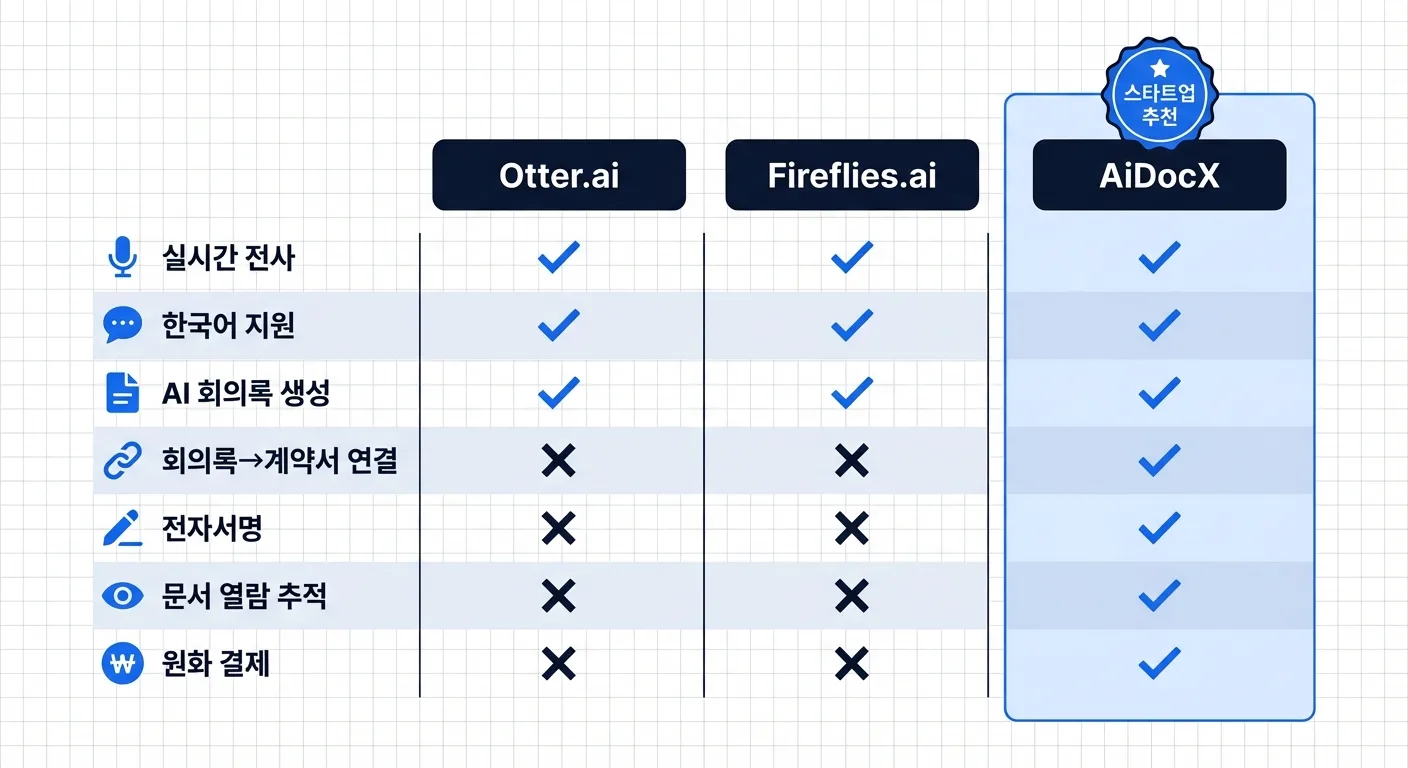
| Feature | Otter.ai | Fireflies.ai | AiDocX |
|---|---|---|---|
| Real-time transcription | Best-in-class | Good | Not available |
| Auto-join bot (Zoom/Meet) | Yes | Yes | No |
| Multilingual support | English/Spanish only | Partial | Full (12+ languages) |
| Structured PDF minutes | No (transcript only) | No (transcript only) | Yes |
| Minutes → Contract | No | No | Yes |
| E-signature integration | No | No | Yes |
| Document link tracking | No | No | Yes |
| Meeting archive search | Good | Excellent | Basic |
| Free plan | 300 min/month | 800 min storage | 3 documents/month |
| Starting paid price | $16.99/mo | $10/seat/mo | $6/mo |
Which Tool Is Right for Your Situation?
Choose Otter.ai if:
- Your meetings are in English
- Real-time transcription during the meeting is essential (lectures, interviews, panels)
- You just need a clean text record — no downstream document work required
- You're an individual contributor or small English-speaking team
Choose Fireflies.ai if:
- You need to search across a large history of meetings
- CRM integration is critical (you want meeting notes to sync into Salesforce or HubSpot automatically)
- Your sales or customer success team runs a high volume of calls
Choose AiDocX if:
- You need structured meeting minutes as a document (not just a transcript)
- After the meeting comes the work: NDA, contract, investor update, action items with owners
- Your team operates in multiple languages
- You want one platform for recording, minutes, contracts, and e-signatures
- You're a startup that closes deals after meetings — not just talks about them
Real-World Startup Scenarios
After an investor pitch meeting
With Otter.ai or Fireflies.ai:
- Get a transcript of the conversation
- Manually write up the meeting summary
- Draft follow-up NDA in a separate tool
- Request signatures through DocuSign
- Send IR deck by email (no visibility into whether it was opened)
With AiDocX:
- Upload audio → AI generates structured meeting minutes
- Click through to draft NDA or follow-up contract from the minutes
- Request e-signature in the same platform
- Share IR deck link → see when the investor opens it and how long they spend on each slide
After a client kickoff call
Traditional transcription workflow: Transcript → manual minutes → contract in a separate tool → signature request in another tool → email attachment
AiDocX: Record → AI minutes → service agreement draft → e-signature → share link → done
Can You Use Multiple Tools Together?
Yes — and this is often the right answer. Many teams use Otter.ai or Fireflies.ai during the meeting for live transcription, then paste the transcript into AiDocX to generate a formatted document and handle the downstream workflow.
Real-time transcription during the call → structured document and signing after the call. Each tool does what it's best at.
Frequently Asked Questions
Q. Does Otter.ai support languages other than English? Otter.ai supports English and Spanish. For meetings in other languages (Korean, Japanese, Thai, Vietnamese, French, etc.), you'll need a different tool.
Q. Can Fireflies.ai handle non-English meetings accurately? Fireflies supports multiple languages, but transcription accuracy is noticeably lower for non-English meetings — particularly for technical vocabulary and fast speech.
Q. Does AiDocX have a live transcription bot? No. AiDocX records audio through your browser after the meeting starts, then processes it when you stop recording. There's no bot that joins your Zoom or Teams call. If you need live captioning during the meeting, pair Otter.ai with AiDocX for post-meeting document work.
Q. What other documents can AiDocX generate from meeting content? From meeting notes or a recording, AiDocX can generate contracts, NDAs, proposals, quotations, business plans, IR decks, employment contracts, and more.
Q. Is AiDocX free to try? The free plan includes 3 documents per month — AI meeting minutes, contract generation, and e-signature included. No credit card required to start.
If you only need a transcript, Otter.ai or Fireflies.ai will serve you well. But if the real work starts after the meeting ends — if someone needs to sign something, review a contract, or receive structured minutes they can reference — the right tool is one that handles the whole workflow.
Start AI Meeting Minutes with AiDocX — Free → No credit card · 3-minute setup · Minutes + Contracts + E-signatures in one platform
Ready to automate your documents with AI?
Start free with AiDocX — AI contract drafting, meeting minutes, consultation notes, e-signatures, and more in one platform.
Get Started FreeMore from AiDocX Blog
Consulting Proposal Template (2026): 9 Sections + Example
Copy a consulting proposal template with nine sections, pricing options, and a filled example. Includes tips to make the proposal easy to approve.
 AiDocX Team October 24, 2026 11 min
Internship Agreement Template (2026): Paid & Unpaid Interns
Copy an internship agreement template for paid or unpaid interns. Covers U.S. and UK pay rules, duties, IP, confidentiality, and a filled example.
AiDocX Team October 24, 2026 12 min
Meeting Minutes Template (2026): 4 Formats + Filled Example
Copy a meeting minutes template in four formats: team, decision log, board, and client call. See a filled example and a 15-minute workflow.
AiDocX Team October 24, 2026 11 min