Purchase Order Template Generator 2026: Formalize Buying
Stop email chaos. Use a 2026 purchase order template generator to formalize supplier orders, ensure clear terms, and streamline procurement for small businesses.
 James · Content Manager August 2, 2026 10 min read
Buying inventory or services shouldn’t feel like playing telephone tag with your vendors. In 2026, the gap between informal requests and formal procurement is where small businesses lose money, time, and clarity. A standardized purchase order (PO) isn’t just paperwork; it’s a legal shield and an operational anchor. This guide shows you how to formalize your buying process using modern templates and digital tools to eliminate confusion and keep your supply chain moving smoothly.
Why Your Current Buying Process Is Broken
Most small business owners start without a formal procurement process. You have a need, you email a vendor, they reply with a quote, you reply with approval, and then you hope an invoice matches what was agreed upon. This "back-and-forth" email chain is the enemy of efficiency. It creates a fragmented paper trail that is nearly impossible to audit.
When orders are communicated via email, several things go wrong:
- Ambiguity: "Send me the usual" can mean different things to you and the supplier.
- Version Control: Did they send the updated price list or the old one?
- Approval Gaps: Did your operations manager actually approve this $5,000 order?
- Lost Context: Three months later, when a dispute arises, finding that specific email thread takes hours.
Formalizing your buying process doesn’t require an enterprise resource planning (ERP) system. It requires a consistent, documented method of ordering. A purchase order template generator provides that consistency, turning a casual request into a binding business document.
The Anatomy of a Bulletproof Purchase Order
A purchase order is a commercial document issued by a buyer to a seller, indicating types, quantities, and agreed prices for products or services. To be effective, it must contain specific data points that leave no room for interpretation. Whether you are using a simple spreadsheet or a dedicated template generator, these elements are non-negotiable.
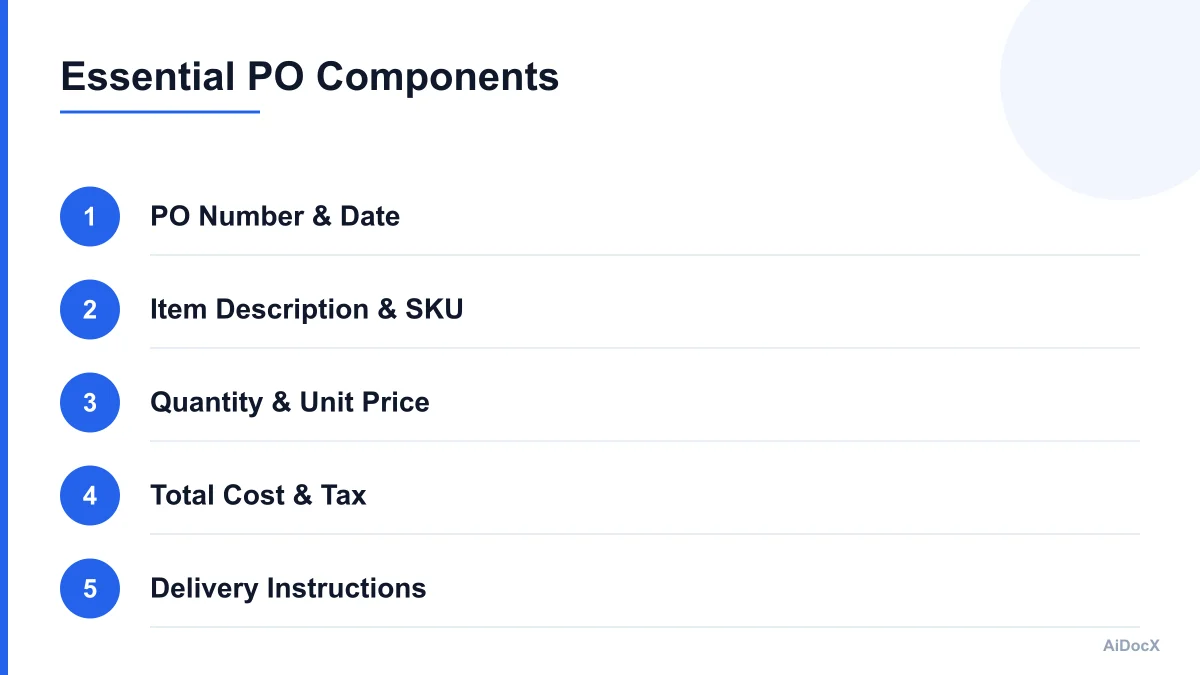
1. Unique PO Number Every PO must have a unique identifier. This allows you to track the order through your accounting software and allows the vendor to reference it in their invoice. Without this, matching invoices to orders becomes a nightmare.
2. Date and Delivery Requirements Include the date of issuance and the required delivery date. If you need items by a specific deadline, state it clearly in the "Delivery Instructions" section. Include the delivery address, contact person, and any special handling instructions (e.g., "fragile," "keep refrigerated").
3. Itemized List with SKUs Never rely on generic descriptions. Include the product name, manufacturer, and SKU (Stock Keeping Unit) for every item. This ensures that when the warehouse receives the goods, they know exactly what they are looking for.
4. Quantities and Unit Prices Clearly state the quantity ordered and the agreed-upon unit price. This prevents surprise markups upon delivery. If the price has changed since your last order, highlight the new price prominently.
5. Total Cost and Tax Information Provide a subtotal, applicable tax rates, shipping costs, and the grand total. This helps your accounting team reconcile the invoice quickly without having to calculate it themselves.
6. Payment Terms Specify your payment terms (e.g., Net 30, Net 60). This manages cash flow expectations for both parties.
7. Signatures or Digital Confirmation In 2026, physical signatures are less common for routine orders. However, some form of acceptance is crucial. This could be a digital signature, an email reply confirming the order, or an automated acknowledgment from the supplier’s system.
Why Email Attachments Are Costing You Money
Many small businesses still send POs as PDF attachments in email. While better than a text message, this method introduces significant friction. It relies on the recipient to open the file, read it, verify it, and reply. It also lacks integration with your accounting or inventory systems.
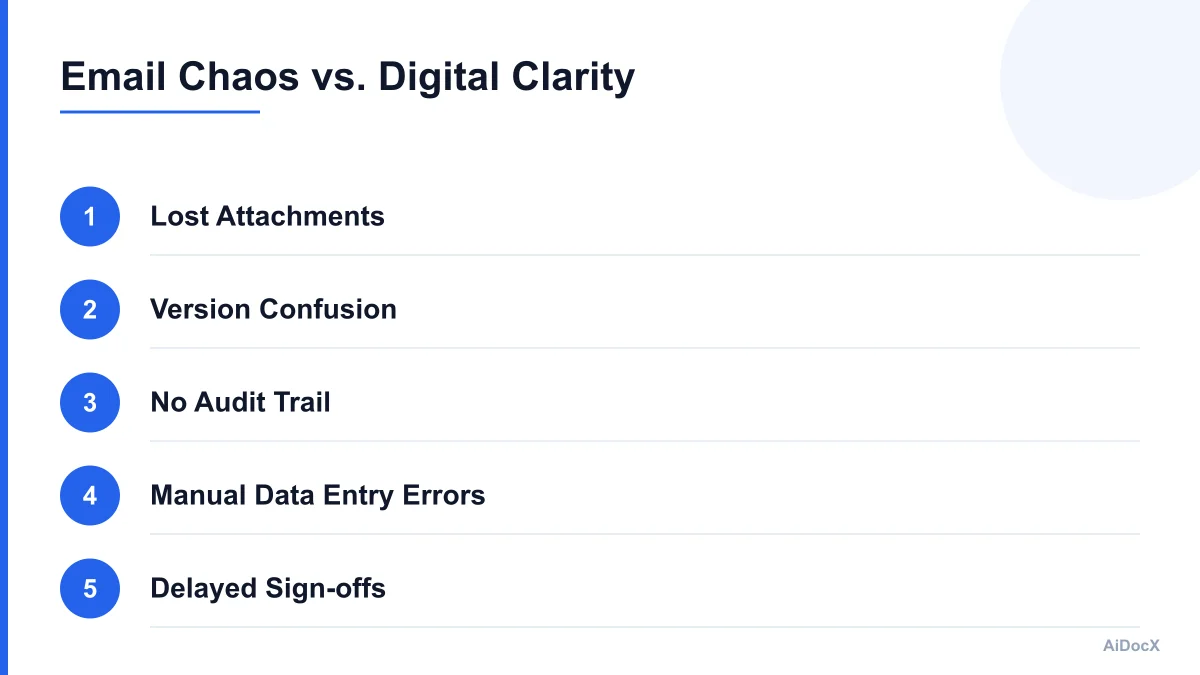
The Hidden Costs of Email-Based POs:
- Time Wasted on Clarifications: If a number is smudged or a term is unclear, you spend 15 minutes on the phone explaining it. Multiply that by 50 orders a month.
- Manual Data Entry: When the invoice arrives, your accountant must manually type the PO details into your accounting software. This is prone to human error.
- Lack of Real-Time Status: You don’t know if the vendor has seen, accepted, or processed the PO until they tell you. This leaves you in the dark about your supply chain status.
- Security Risks: Email attachments can be intercepted or lost. Digital platforms often offer better encryption and access controls.
By moving to a digital purchase order template generator, you automate the routing, tracking, and storage of your POs. Tools like AiDocX draft a clear purchase order with terms, quantities, and pricing, then route it to the supplier for e-signed confirmation, removing the guesswork from the process.
How to Choose the Right Purchase Order Template
Not all templates are created equal. When selecting a template for your small business, consider the following criteria:
1. Customizability Can you easily add your logo, company details, and specific terms? The template should be easy to edit without needing advanced software skills.
2. Integration Capabilities Does the template integrate with your existing tools? If you use QuickBooks, Xero, or Shopify, look for a generator that can push data directly into these platforms. This reduces manual entry and ensures your inventory and accounting records are always up to date.
3. Automation Features Look for features that allow you to set up recurring orders, auto-approve orders under a certain amount, or send automatic reminders for pending approvals.
4. Mobile Accessibility Your operations staff might be on the floor or on the go. A template generator that works well on mobile devices allows for quick ordering and approval from anywhere.
5. Audit Trail Ensure the system keeps a complete history of all POs, including who created them, who approved them, and when the vendor accepted them. This is critical for compliance and dispute resolution.
Step-by-Step: Implementing a Digital PO Workflow
Transitioning from email chaos to a structured PO workflow doesn’t have to be difficult. Here is a practical step-by-step guide to implementing this change in your small business.
Step 1: Define Your Approval Hierarchy Decide who can approve orders and up to what amount. For example, department heads might approve orders up to $1,000, while anything above that requires owner approval. Configure your template generator to enforce these rules automatically.
Step 2: Standardize Your Vendor List Create a master list of approved vendors with their contact information, payment terms, and preferred PO formats. This ensures that you are ordering from reliable sources and that the information is consistent across all POs.
Step 3: Set Up Your Template Choose a purchase order template generator that fits your needs. Input your company details, logo, and standard terms and conditions. Create line item templates for your most frequently ordered products to speed up the ordering process.
Step 4: Train Your Team Educate your staff on the new workflow. Show them how to create a PO, how to select vendors, and how to track the status of their orders. Emphasize the importance of using the PO number in all communications with the vendor.
Step 5: Communicate with Your Suppliers Inform your key suppliers that you are moving to a digital PO system. Provide them with instructions on how to receive and accept POs through your platform. Most modern suppliers are familiar with digital POs and will appreciate the clarity and speed.
Step 6: Monitor and Refine After implementing the new system, monitor its performance. Look for bottlenecks, errors, or feedback from your team and suppliers. Adjust the workflow as needed to improve efficiency.
Common Mistakes to Avoid When Ordering
Even with the best tools, human error can still slip in. Here are common mistakes small businesses make when using purchase orders, and how to avoid them.
1. Vague Descriptions Avoid descriptions like "office supplies" or "marketing materials." Be specific. Instead of "marketing materials," use "500 brochures, 8.5x11, full color, glossy finish." Specificity prevents receiving the wrong items.
2. Ignoring Delivery Dates Assuming a vendor will deliver on time is a risky strategy. Always specify the required delivery date and time. If the order is urgent, mark it as such and confirm with the vendor.
3. Not Matching POs to Invoices Never pay an invoice that doesn’t match the PO. If the invoice amount differs from the PO, or if items are missing, hold payment until the issue is resolved. This protects you from overpaying or paying for undelivered goods.
4. Failing to Update Terms If your payment terms or shipping instructions change, update your template generator. Relying on outdated terms can lead to disputes or unexpected costs.
5. Not Archiving POs Keep a digital archive of all POs. This makes it easy to reference past orders for reordering, price comparisons, or resolving disputes. Many template generators offer automatic archiving features.
The Role of E-Signatures in Modern Procurement
In 2026, e-signatures are the standard for business transactions. They provide a secure, legally binding way to confirm agreements without the need for physical paper. For purchase orders, e-signatures offer several advantages:
- Speed: Orders can be approved and accepted in minutes, not days.
- Security: E-signature platforms provide detailed audit trails, including IP addresses and timestamps, proving who signed what and when.
- Convenience: Suppliers can sign POs from their mobile devices, anywhere, at any time.
- Integration: E-signatures can be integrated directly into your PO workflow, automating the approval and acceptance process.
When using a purchase order template generator, ensure it supports e-signatures. This allows you to draft a PO, send it to the supplier, and receive their digital signature automatically, closing the loop on the transaction.
Benefits of Formalizing Your Buying Process
Adopting a formal purchase order system yields tangible benefits for small businesses:
1. Improved Cash Flow Management By clearly defining payment terms and tracking due dates, you can better manage your cash flow. You avoid early payments and ensure you pay only for what you have received and approved.
2. Better Vendor Relationships Suppliers appreciate clear, accurate, and timely POs. It makes their lives easier and reduces the likelihood of errors. This can lead to better pricing, priority service, and stronger partnerships.
3. Enhanced Inventory Control With accurate POs, you can better predict inventory levels and avoid stockouts or overstocking. This leads to more efficient use of storage space and capital.
4. Data-Driven Decision Making A digital PO system generates data that you can analyze. You can track spending by vendor, category, or project, identifying opportunities for cost savings and process improvements.
5. Compliance and Audit Readiness A formal PO process ensures that all purchases are documented and approved. This is crucial for audits, tax purposes, and internal controls.
Checklist: Is Your PO Process Ready for 2026?
Use this checklist to evaluate your current procurement process and identify areas for improvement.
- Do you have a unique PO number for every order?
- Are your POs itemized with specific SKUs and descriptions?
- Do you clearly state delivery dates and instructions?
- Is there an approval workflow for orders over a certain amount?
- Do you match POs to invoices before payment?
- Are you using a digital template generator or e-signature tool?
- Do you archive all POs for easy retrieval?
- Have you communicated your PO process to your key suppliers?
Once the purchase order is agreed and goods ship across a border, the seller issues a proforma and then a commercial invoice.
Conclusion: Streamline Your Procurement Today
Formalizing your buying process with a purchase order template generator is one of the most effective ways to improve efficiency and reduce risk in your small business. It eliminates the chaos of email back-and-forth, ensures accuracy, and provides a clear audit trail. By adopting modern tools and best practices, you can focus on growing your business rather than managing administrative headaches.
Start by evaluating your current process and identifying the pain points. Then, choose a solution that integrates with your existing tools and meets your specific needs. With a little effort upfront, you can create a streamlined, professional procurement workflow that serves your business well into 2026 and beyond.
When the goods ship, the supplier sends a delivery note that you check against the purchase order.
Ready to automate your documents with AI?
Start free with AiDocX — AI contract drafting, meeting minutes, consultation notes, e-signatures, and more in one platform.
Get Started FreeMore from AiDocX Blog
Korea's AI Basic Act: 9 Contract Checks for AI Vendors and Buyers (2026)
A practical checklist for AI contracts connected to Korea: supplier roles, training data, user notices, high-impact AI, model changes, incident response, and exit terms.
Consulting Proposal Template (2026): 9 Sections + Example
Copy a consulting proposal template with nine sections, pricing options, and a filled example. Includes tips to make the proposal easy to approve.
 AiDocX Team October 24, 2026 11 min
Internship Agreement Template (2026): Paid & Unpaid Interns
Copy an internship agreement template for paid or unpaid interns. Covers U.S. and UK pay rules, duties, IP, confidentiality, and a filled example.
AiDocX Team October 24, 2026 12 min