AI Social Worker Case Notes Guide (2026): Automate Case Management Records & ISPs
Copy-paste ready templates for intake forms, case management logs, and Individual Service Plans (ISPs). AI auto-generates SOAP-format case notes from your field notes. Verified by practicing social workers.
 SarahKim · Content Strategist March 27, 2026 13 min read
AI Social Worker Case Notes Guide (2026): From Case Management to ISPs — Automated
Social workers are documentation professionals by necessity.
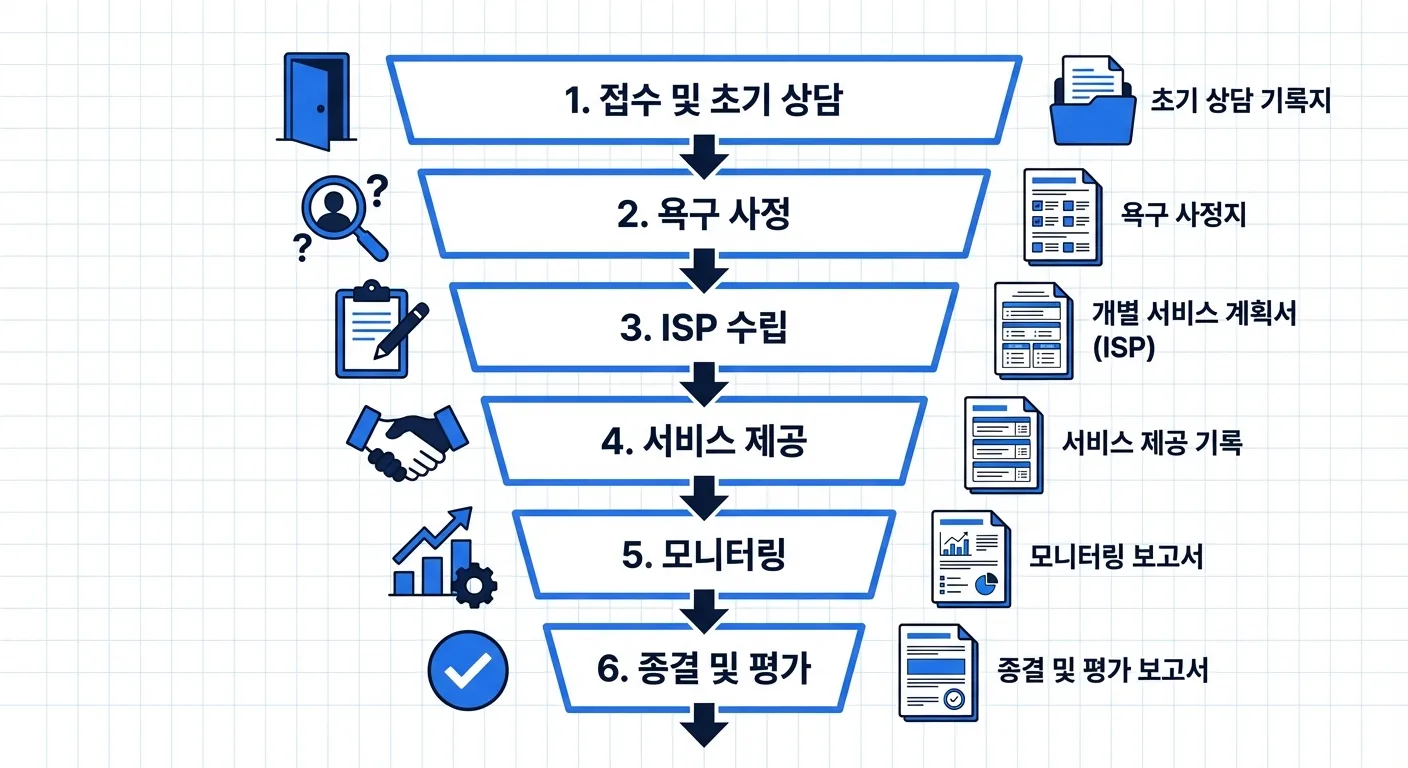
From the first intake interview through needs assessment, Individual Service Plan (ISP) development, monthly monitoring, and case closure — a single client can generate dozens of documents. Add service applications, government grant reports, and internal agency reporting, and documentation alone can consume an entire workday.
Contracts and case records shouldn't take hours — AiDocx lets you go from field notes to polished documentation in minutes.
This guide is a practical AI documentation guide for social workers, welfare agency counselors, and case managers. It includes copy-paste ready templates and step-by-step AI workflows you can use in the field today.
Why Social Work Documentation Matters
Social work records are not just notes. They are legal documents that establish the basis for services, demonstrate professional competence, and protect client rights.
Core functions of documentation:
- Continuity of care: Service continues uninterrupted when caseloads transfer
- Accountability: Prove service delivery and outcomes to funders and oversight bodies
- Collaboration: Share case details with medical, legal, and educational professionals
- Rights protection: Protect both client and agency in disputes or complaints
- Supervision: Provide evidence for case review and professional development
Legal and regulatory requirements:
- NASW Code of Ethics: Documentation standards for competent practice
- HIPAA: Privacy and security requirements for protected health information
- State licensing boards: Record retention and documentation standards
- Federal/state grant reporting: Service delivery records and outcome documentation
Case Management Record Templates (Copy-Paste Ready)
Intake Assessment Form
INTAKE ASSESSMENT RECORD
| Field | Information |
|---|---|
| Date of Intake | |
| Referral Source | Self-referral / Family / Agency / Government / Court |
| Client Name | |
| Date of Birth / Age | |
| Gender Identity | |
| Phone / Email | |
| Address | |
| Household Composition | Single / Couple / Couple + Children / Single Parent / Multigenerational / Other: |
| Assigned Social Worker |
Presenting Problems & Needs
| Domain | Description | Priority |
|---|---|---|
| Financial | ||
| Housing | ||
| Health / Medical | ||
| Mental Health / Emotional | ||
| Family Relationships | ||
| Social Participation | ||
| Legal Issues |
Current Service Utilization
| Service Name | Provider | Duration |
|---|---|---|
Strengths & Resources
| Category | Details |
|---|---|
| Personal Strengths | |
| Family / Social Support | |
| Community Resources |
Case Management Determination
- Accepted for case management (Reason: )
- Simple service linkage (Service: )
- Referred to another agency (Agency: )
Social Worker Signature: ___________________ Date: ___________________
Case Management Activity Log (Visit / Phone / In-Person)
CASE MANAGEMENT ACTIVITY LOG
| Field | Information |
|---|---|
| Client Name | |
| Case Number | |
| Date / Time | |
| Activity Type | Home Visit / Phone Contact / Office Interview / Collateral Contact / Agency Visit |
| Duration | __ minutes |
| Social Worker |
Status Assessment
| Domain | Change Since Last Contact | Current Status |
|---|---|---|
| Financial Situation | ||
| Physical Health | ||
| Family Relationships | ||
| Mental / Emotional | ||
| Housing |
Activity Summary
| Item | Details |
|---|---|
| Topics Discussed | |
| Services / Information Provided | |
| Client Response | |
| Newly Identified Needs |
Follow-Up Actions
| Action Item | Responsible | Due Date |
|---|---|---|
Next Contact Planned: ___________________ (Method: _______________)
Individual Service Plan (ISP)
The ISP is the central document of case management. It must capture specific client goals and the plan for achieving them.
INDIVIDUAL SERVICE PLAN
| Field | Information |
|---|---|
| Client Name | |
| Case Number | |
| Date Developed | |
| Plan Period | ___ / ___ / 2026 through ___ / ___ / 2026 |
| Assigned Social Worker | |
| Supervisor |
Needs Assessment Summary
| Need Area | Current Status | Target Level | Priority |
|---|---|---|---|
| Financial | High / Med / Low | ||
| Medical / Health | High / Med / Low | ||
| Housing | High / Med / Low | ||
| Mental / Emotional | High / Med / Low | ||
| Family / Social | High / Med / Low |
Service Plan
| Goal | Action Steps | Responsible Party | Timeline | Success Indicator |
|---|---|---|---|---|
Crisis Response Plan (if applicable)
| Crisis Scenario | Response Protocol | Emergency Contact |
|---|---|---|
Client Agreement
I have been fully informed of the contents of this Individual Service Plan, I understand it, and I participated in its development.
Client Signature: ___________________ Date: ___________________ Guardian Signature (if applicable): ___________________ Relationship: ___________________ Social Worker Signature: ___________________
Case Closure Record
CASE CLOSURE SUMMARY
| Field | Information |
|---|---|
| Client Name | |
| Case Number | |
| Date Case Opened | |
| Date of Closure | |
| Total Service Duration | |
| Total Contacts |
Reason for Closure
- Goals achieved — All planned service goals met
- Service transfer — Client linked to ongoing services at another agency
- Client request — Client or family requested closure
- Relocation / Lost to contact
- Death
- Other: ___________
Goal Achievement Summary
| Goal | Achievement Level | Notes |
|---|---|---|
| Full / Partial / Not Achieved |
Client Status at Closure (vs. Intake)
| Domain | At Intake | At Closure | Change |
|---|---|---|---|
| Financial | |||
| Health | |||
| Mental / Emotional |
Aftercare Plan (if applicable)
How to Automate Case Notes with AI
Method 1: Field Notes → Case Management Log (Fastest)
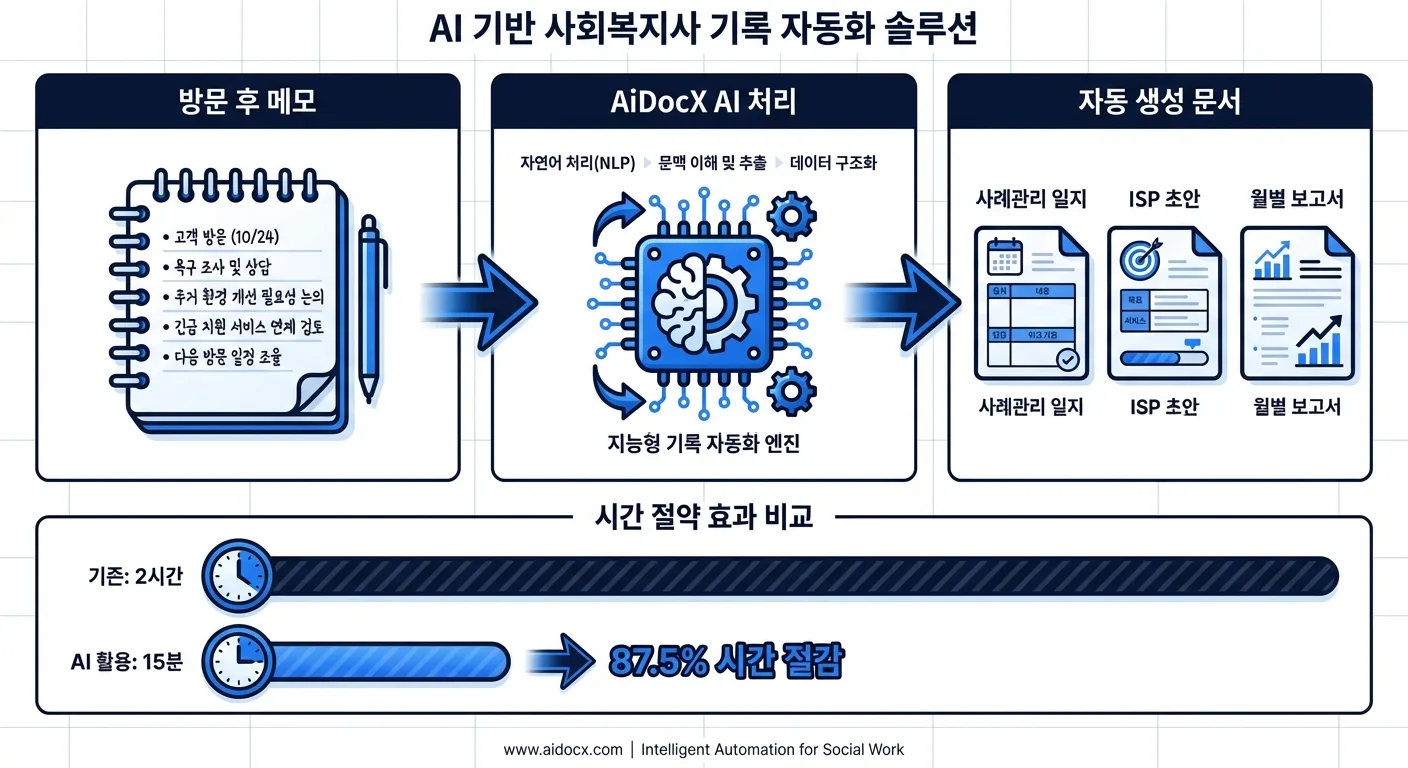
After a home visit or phone contact, paste your rough notes into AiDocX and it will generate a structured case management log in SOAP or DAP format.
Example prompt:
Please convert the following field notes into a case management activity log.
- Mrs. A (80s, female), 5th home visit
- BP today: 160/100, not taking medications
- Refrigerator almost empty, eating irregularly
- Daughter not reachable — client also avoiding contact
- Need to extend home care services
- Will refer to visiting nurse through county health department
- Follow-up visit scheduled for next week
Method 2: Assessment Notes → ISP Draft
Input your needs assessment results and AiDocX will generate a complete ISP draft including goals, action steps, and measurable indicators. Case conference notes also work — just describe the key decisions.
Method 3: Monthly Contacts → Progress Report
AiDocX aggregates your monthly contact logs by client and auto-summarizes progress by need domain. For grant-funded programs, this data can automatically populate required reporting templates.
Documentation Standards by Setting
Community Mental Health Centers
| Record Type | Key Requirements |
|---|---|
| Psychosocial Assessment | DSM diagnosis, level of care determination, treatment history |
| Treatment Plan | Measurable goals, evidence-based interventions, review frequency |
| Progress Notes | SOAP or DAP format, response to treatment, risk level |
| Crisis Documentation | Incident details, safety planning steps, supervisor notification |
Child Welfare / CPS
| Record Type | Key Requirements |
|---|---|
| Safety Assessment | Risk factors, protective factors, safety decision |
| Case Plan | Family functioning goals, visitation plan, concurrent planning |
| Court Reports | Factual narrative, service compliance, reunification readiness |
| Removal Documentation | Immediate safety threat, attempts to prevent removal |
Aging Services / Senior Care
| Record Type | Key Requirements |
|---|---|
| Functional Assessment | ADL/IADL scores, cognitive status, fall risk, caregiver capacity |
| Care Plan | Service hours, provider assignments, emergency contacts |
| Incident Reports | Event description, immediate response, notification to family |
| APS Documentation | Abuse/neglect indicators, investigation steps, outcome |
Privacy, Security & Compliance
Social work records contain some of the most sensitive personal information: mental health history, substance use, domestic violence, financial hardship, and legal history.
Documentation Security Checklist
- Are client files stored in a locked, access-controlled location?
- Are digital records encrypted with role-based access permissions?
- Have you reviewed the data processing policy of any AI tool you use?
- When sharing with partner agencies, do you have client consent and share only the minimum necessary?
- Are record retention periods and destruction procedures documented?
Responsible AI Use in Social Work
| Appropriate Use | Use with Caution |
|---|---|
| De-identified information for template creation | Full names, SSNs, addresses entered directly |
| Structure and organize field notes | Sensitive diagnoses or legal history entered verbatim |
| Generate draft reports for supervisor review | AI-generated records used without human review |
Frequently Asked Questions
Q. Can I use AI-generated documentation as the official record?
AI-generated notes should always be reviewed, edited, and signed off by the responsible social worker before becoming part of the official record. AI serves as a documentation assistant — the professional judgment in the record must come from the worker. This is especially important for risk assessments, safety determinations, and any documentation that may be reviewed by courts or licensing boards.
Q. Is it ethical to use AI for social work documentation?
Yes, with appropriate safeguards. The NASW Code of Ethics encourages use of technology that improves service delivery. Using AI to reduce documentation burden — while keeping humans responsible for content and judgment — is consistent with ethical practice. Always disclose AI use to supervisors per agency policy.
Q. How long do I need to retain case records?
Retention requirements vary by setting and state, but general guidelines are:
- Adult social services: 7 years after case closure
- Child welfare: Until the youngest child in the case turns 28 (varies by state)
- Mental health records: 7–10 years (longer if minors involved)
- Grant-funded programs: Follow funder requirements (typically 3–7 years)
Always consult your state licensing board and agency policy for binding requirements.
Q. What if I missed documenting a contact?
Document it as soon as possible, clearly noting it as a late entry: "Documented [date], contact occurred on [original date]." Avoid backdating. For memory-based entries, note that they are recalled notes. AiDocX's keyword-to-note feature can help reconstruct contacts from brief reminders.
Conclusion
Social workers carry the dual responsibility of serving people and creating the records that make that service accountable and sustainable. When documentation becomes overwhelming, service quality suffers.
AI-powered documentation tools reduce the burden of note-taking so social workers can focus on what matters: the client relationship and professional intervention.
AiDocX handles case notes, ISPs, reports, and secure storage — all in one place. Start free today
Ready to automate your documents with AI?
Start free with AiDocX — AI contract drafting, meeting minutes, consultation notes, e-signatures, and more in one platform.
Get Started FreeMore from AiDocX Blog
Buy Sell Agreement Template (2026): Triggers, Valuation and Funding for Co-Owners
A free buy sell agreement template for co-owners, with triggering events, valuation methods, insurance funding and cross-purchase vs. redemption structures.
 James September 26, 2026 12 min
Consignment Agreement Template (2026): Commission, Title, Risk of Loss and Unsold Goods
Free consignment agreement template for makers, artists and boutiques: commission split, title, insurance and how to protect consigned inventory.
James September 26, 2026 9 min
Distribution Agreement Template (2026): Territory, Exclusivity, Minimums and Reseller Terms
Free distribution agreement template (works as a reseller agreement template too): territory, exclusivity, minimums, pricing, IP and termination.
James September 26, 2026 13 min