AiDocX vs PandaDoc vs DocuSign vs HelloSign (Dropbox Sign) in 2026: A Founder's Honest 4-Way Comparison
Direct head-to-head: AiDocX vs PandaDoc vs DocuSign vs HelloSign (Dropbox Sign) across pricing, AI features, e-signature, document tracking, and free plans. Tested side-by-side in 2026.
 Aria · Growth Hacker May 1, 2026 15 min read
AiDocX vs PandaDoc vs DocuSign vs HelloSign (Dropbox Sign) in 2026: A Founder's Honest 4-Way Comparison
TL;DR: AiDocX is the best all-in-one (AI document generation + e-signature + tracking) and the only one with a real free plan covering all three. PandaDoc is best for sales teams that need CPQ and proposal templates. DocuSign is the safest choice for enterprise procurement and regulated industries. HelloSign / Dropbox Sign is the cheapest pure e-signature for teams already in the Dropbox ecosystem. None of the others ship AI document generation, AI risk review, and document tracking together — only AiDocX does.
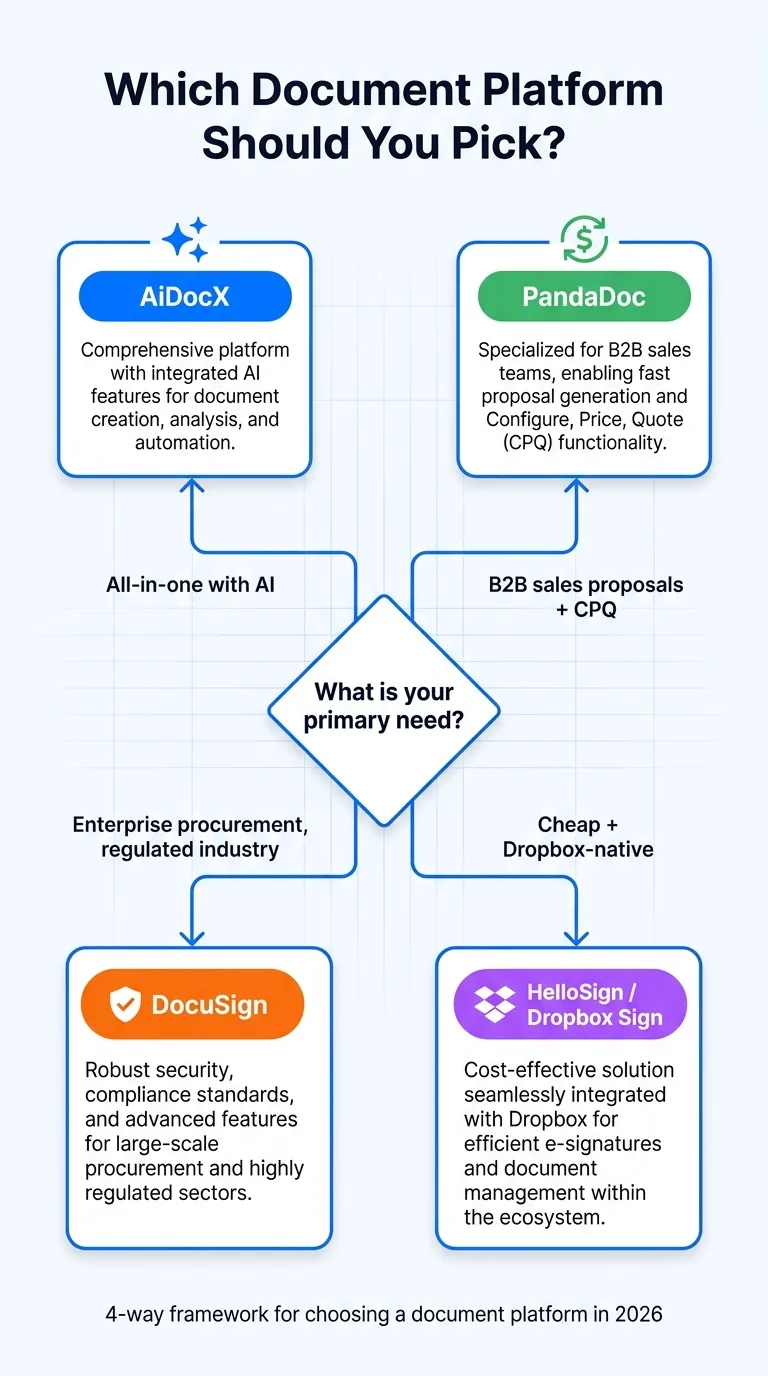
If you're choosing a document platform in 2026, you're really choosing among four philosophies:
- AiDocX — AI generates the document, you sign it, you track who reads it. One tool, full lifecycle.
- PandaDoc — proposal-first sales workflow with CPQ and payment collection.
- DocuSign — the e-signature standard for enterprise, with the broadest legal certifications.
- HelloSign / Dropbox Sign — the simple cheap e-signature that lives inside Dropbox.
This guide compares all four head-to-head on the criteria that actually decide a renewal: free-tier reality, AI features, document tracking, multi-signer workflows, integrations, and total cost.
Contracts and investor decks shouldn't take days — AiDocx lets you go from draft to signed in minutes.
Quick Answer: Which Should You Pick?
| If you are... | Pick | Why |
|---|---|---|
| A startup founder sending NDAs, proposals, and IR docs | AiDocX | Only tool that generates, sends, signs, and tracks — free |
| A B2B sales team managing complex proposals with CPQ | PandaDoc | Best proposal templates and payment collection |
| An enterprise procurement team with compliance requirements | DocuSign | Most certifications (SOC 2, HIPAA, eIDAS QES) |
| A team already using Dropbox for storage | HelloSign / Dropbox Sign | Native Dropbox integration, cheap |
| A founder on a zero budget | AiDocX | Real free plan with AI + signatures + tracking |
| An agency sending repeated client docs | PandaDoc or AiDocX | Templates + branding |
| A solo consultant signing 2–5 docs/month | AiDocX | Free tier covers full needs |
| A real estate or finance team | DocuSign | Industry-standard, expected by counterparties |
At-a-Glance Comparison Table
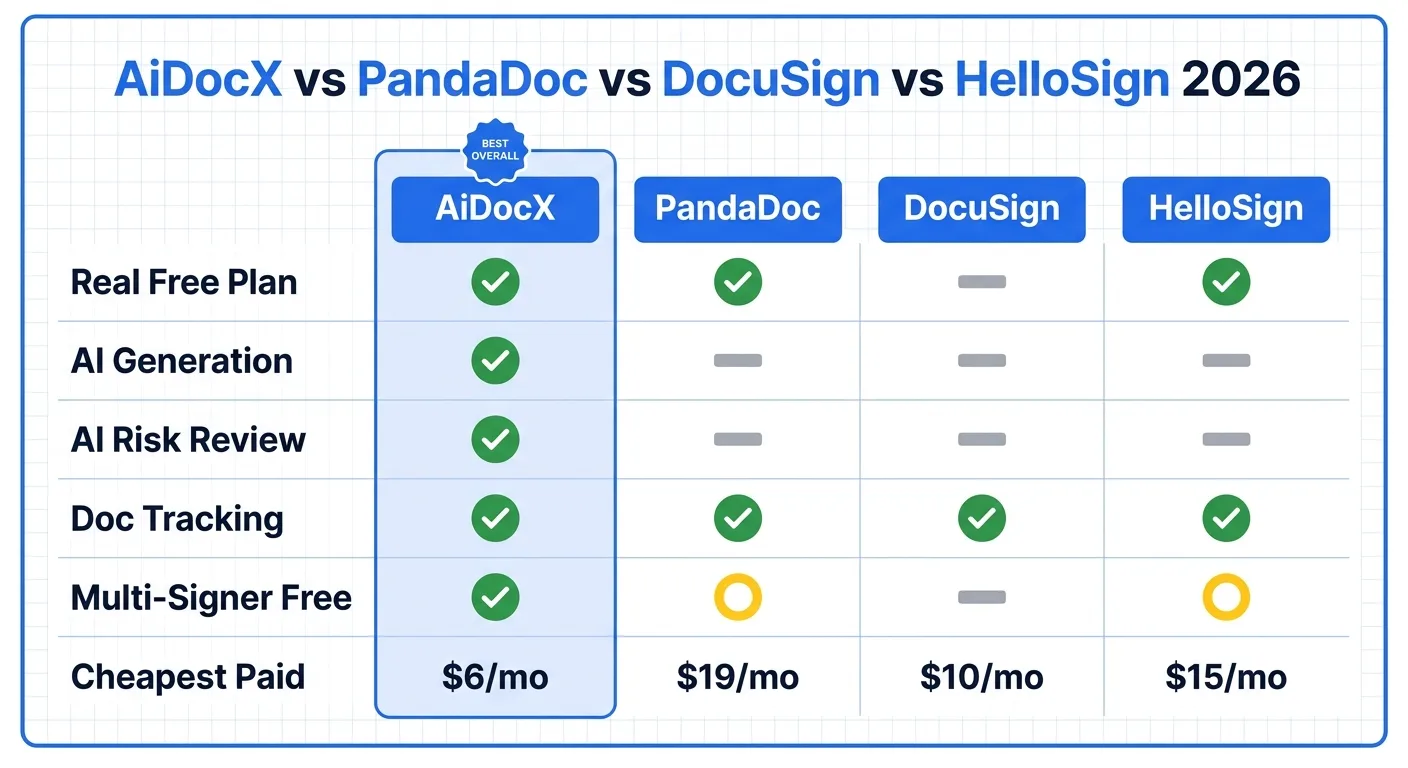
| Feature | AiDocX | PandaDoc | DocuSign | HelloSign / Dropbox Sign |
|---|---|---|---|---|
| Real free plan | Yes (ongoing) | Yes (eSign only) | No (30-day trial) | Yes (3 docs/month) |
| Free signatures/month | 5 | Unlimited (eSign) | Trial only | 3 |
| AI document generation | Yes | Limited | No | No |
| AI contract risk review | Yes | No | No | No |
| Document tracking (who viewed) | Yes | Yes (Pro) | Pro+ tier | No |
| Multi-signer support | Yes | Yes | Yes | Pro tier (free = 1 signer) |
| Templates | Yes (AI-generated) | 1,000+ pre-built | Limited library | Pro tier |
| CPQ / Pricing tables | No | Yes | No | No |
| Payment collection | Coming Q3 2026 | Yes (Stripe) | Yes (Pro) | No |
| Languages | 13 native | 11 | 14 | 22 |
| Cheapest paid | $6/mo | $19/mo/user | $10/mo | $15/mo/user |
| Credit card to start | No | No | Yes | No |
| Best known for | All-in-one AI docs | Sales proposals | E-signature standard | Simple cheap e-sign |
1. AiDocX — Best All-in-One AI Document Platform
AiDocX is the only platform on this list that combines AI document generation, AI contract review, e-signatures, and document tracking in a single workflow — and the only one with a real free plan covering all four.
What it does well:
- AI document generation — describe what you need ("NDA for a software consulting engagement"), AiDocX produces a complete signable document in minutes
- AI risk review — automatically flags risky clauses before you sign
- Built-in e-signature — 5 free signatures/month, no credit card, court-admissible audit trail
- Real-time tracking — see who opened your document, which pages, how long they spent
- 13 native languages — Korean, Japanese, Chinese, Spanish, Arabic, and more, not browser translation
- All in one workflow — generate → review → send → sign → track without tool-switching
Where it's weak:
- No CPQ or pricing tables yet (PandaDoc wins for sales-heavy use cases)
- Brand recognition with enterprise procurement is lower than DocuSign
- Payment collection is Q3 2026 roadmap, not yet shipped
Pricing: Free Starter (5 signatures/month, AI gen, tracking), Basic $6/month, Pro $29/month for unlimited.
Best for: Founders, agencies, consultants, HR teams, and anyone who needs to create documents and sign them, not just sign documents someone else created.
Try AiDocX free — no credit card required →
2. PandaDoc — Best for B2B Sales Proposals
PandaDoc is the proposal-first platform. If your team builds quotes with line items, configures pricing tables, collects payments, and tracks deal pipeline, PandaDoc is purpose-built for that workflow.
What it does well:
- CPQ (Configure, Price, Quote) — line items, pricing tiers, conditional logic
- 1,000+ pre-built templates — the largest template library in the category
- Payment collection — Stripe and ACH integration, sign-and-pay in one flow
- Strong CRM integrations — HubSpot, Salesforce, Pipedrive native
- Free eSign tier — unlimited free signatures (no document tracking on free)
Where it's weak:
- No AI document generation — templates only, you fill in the blanks
- No AI contract review — risk analysis is not part of the product
- Free tier is signature-only — proposals, tracking, and templates require paid ($19/month/user)
- No native multi-language generation — translation only
Pricing: Free eSign (unlimited signatures, no tracking), Essentials $19/month/user, Business $49/month/user.
Best for: Sales teams sending complex proposals with line items, pricing tables, and integrated payment collection. Less compelling for non-sales document workflows.
3. DocuSign — Best Enterprise Standard for E-Signature
DocuSign is the e-signature standard. If your counterparty is a Fortune 500 procurement team, a regulated bank, or a government agency, DocuSign is the safest choice — they will recognize the brand and accept the audit trail without question.
What it does well:
- Most legal certifications — SOC 2 Type II, HIPAA, FedRAMP, eIDAS QES (advanced/qualified e-signatures), 21 CFR Part 11
- Broadest country coverage — recognized in 180+ countries with country-specific compliance modules
- Enterprise integrations — Salesforce, SAP, Oracle, Workday, Microsoft 365 deep integration
- Mature API and developer ecosystem — strong for custom integrations
- Brand recognition — your enterprise counterparties already use it
Where it's weak:
- No real free plan — 30-day trial requires credit card and auto-charges $10/month
- No AI document generation — DocuSign IQ adds analytics on existing docs but doesn't create documents from prompts
- Most expensive at scale — Business Pro at $40/month/user for features competitors include cheaper
- Slow innovation cycle — most AI document features in 2026 came from competitors first
- Document tracking gated behind Pro+ tiers
Pricing: No real free plan. Personal $10/month, Standard $25/month/user, Business Pro $40/month/user.
Best for: Enterprise procurement, regulated industries (healthcare, banking, real estate, life sciences), and any deal where the counterparty expects DocuSign by name.
4. HelloSign / Dropbox Sign — Best Cheap Pure E-Signature for Dropbox Teams
HelloSign was renamed Dropbox Sign after Dropbox acquired it. It is the simplest, cheapest pure e-signature tool — and it integrates natively with Dropbox storage. If you live in Dropbox and just need to sign things, this is the path.
What it does well:
- Dropbox-native — sign documents directly in Dropbox, no separate upload
- Cheapest paid tier — Essentials at $15/month/user is competitive
- 22 languages — broadest signer language support on this list
- Simple UX — fewer features mean less learning curve
- Genuine free tier — 3 documents/month for one signer (no credit card)
Where it's weak:
- Free tier is single-signer only — most business contracts need 2+ signers, gating you to Pro
- No AI features at all — no generation, no review, no analytics
- No document tracking on any tier — you do not see when recipients viewed
- No templates on free — Pro required for even basic templates
- 3-doc/month free cap — lower than AiDocX (5) and well below PandaDoc Free eSign (unlimited)
Pricing: Free (3 docs/month, 1 signer), Essentials $15/month/user, Standard $25/month/user.
Best for: Solo Dropbox users signing fewer than 3 documents per month, or small teams already invested in the Dropbox ecosystem who need pure e-signature without ancillary features.
Detailed Feature Comparison
AI Capabilities
| AI Feature | AiDocX | PandaDoc | DocuSign | HelloSign |
|---|---|---|---|---|
| Generate document from prompt | Yes | No | No | No |
| Suggest contract clauses | Yes | Limited | No | No |
| Risk analysis on uploaded contract | Yes | No | DocuSign IQ (paid) | No |
| AI-summarize signed documents | Yes | No | DocuSign IQ (paid) | No |
| Multi-language native generation | 13 langs | No | No | No |
Verdict: AiDocX is the only tool that ships AI generation and review on a free plan. DocuSign IQ adds AI on top of paid plans but does not generate documents.
E-Signature Capabilities
| E-Sign Feature | AiDocX | PandaDoc | DocuSign | HelloSign |
|---|---|---|---|---|
| Free monthly signatures | 5 | Unlimited | Trial only | 3 |
| Multi-signer | Yes | Yes | Yes | Pro tier |
| Sequential signing order | Yes | Yes | Yes | Pro tier |
| Audit trail PDF | Yes | Yes | Yes | Yes |
| Court-admissible | Yes | Yes | Yes | Yes |
| Advanced electronic signature (AES) | Yes | Pro | Pro+ | Pro |
| Qualified electronic signature (QES, eIDAS) | Roadmap | Yes | Yes | No |
| In-person signing | Yes | Yes | Yes | Pro |
Verdict: All four produce legally binding signatures. DocuSign is unique in offering qualified electronic signatures (QES) for EU regulated industries. HelloSign's free tier is the most restrictive (single-signer only).
Document Tracking & Analytics
| Tracking Feature | AiDocX | PandaDoc | DocuSign | HelloSign |
|---|---|---|---|---|
| See who opened the document | Free | Pro | Pro+ | No |
| See which pages were viewed | Free | Pro | No | No |
| Time spent per page | Free | Pro | No | No |
| Email gating before viewing | Free | Pro | No | No |
| NDA before viewing | Free | No | No | No |
| Real-time notifications | Free | Pro | Pro+ | No |
Verdict: AiDocX is the only tool that includes document tracking (DocSend-style) on the free plan. PandaDoc gates this at $19/month/user. DocuSign's tracking is shallow and Pro-tier only. HelloSign has no tracking at all.
Templates and Document Library
| Templates | AiDocX | PandaDoc | DocuSign | HelloSign |
|---|---|---|---|---|
| AI-generated from description | Yes | No | No | No |
| Pre-built template count | 50+ | 1,000+ | 100+ | Pro tier |
| Custom template creation | Free | Free | Free | Pro |
| Template library by industry | Yes | Yes | Yes | No |
| Multi-language templates | 13 langs | English | 14 langs | 22 langs |
Verdict: PandaDoc wins on template volume. AiDocX wins on AI generation and multi-language. HelloSign is the weakest for template-driven workflows.
Integrations
| Integration | AiDocX | PandaDoc | DocuSign | HelloSign |
|---|---|---|---|---|
| Salesforce | Yes | Yes | Yes (deep) | Yes |
| HubSpot | Yes | Yes (deep) | Yes | Yes |
| Slack | Yes | Yes | Yes | Yes |
| Google Workspace | Yes | Yes | Yes | Yes |
| Microsoft 365 | Yes | Yes | Yes (deep) | Yes |
| Notion | Yes | No | No | No |
| Dropbox | Yes | Yes | Yes | Yes (native) |
| Stripe payments | Roadmap Q3 | Yes | Yes (Pro) | No |
| Zapier | Yes | Yes | Yes | Yes |
| Public REST API | Yes | Yes | Yes (mature) | Yes |
Verdict: DocuSign has the deepest enterprise integrations. PandaDoc has the deepest sales-stack integrations. AiDocX covers the essentials plus Notion. HelloSign relies on Dropbox-centric workflows.
Total Cost of Ownership: 12-Month Scenario
We modeled the same usage pattern across all four tools: a 5-person startup sending 30 documents per month, needing AI generation, e-signatures, multi-signer support, document tracking, and templates.
| Tool | Best-fit plan | Annual cost (5 users) | What you get |
|---|---|---|---|
| AiDocX | Pro $29/month | $1,740 | Unlimited AI gen, signatures, tracking, branding |
| PandaDoc | Business $49/month/user | $2,940 | Templates, CPQ, payments, signatures |
| DocuSign | Business Pro $40/month/user | $2,400 | Signatures, tracking (Pro+), enterprise features. AI generation NOT included. |
| HelloSign | Standard $25/month/user | $1,500 | Signatures, templates. No AI, no tracking. |
Cost note: HelloSign appears cheapest but you'd still need a separate AI tool ($20–40/month) and DocSend ($45/month) to match AiDocX's feature set — pushing real TCO above AiDocX. DocuSign is the most expensive for what it delivers because it lacks AI generation entirely.
Use-Case Decision Tree
"I'm a startup founder building from zero"
→ AiDocX. The free plan covers AI document generation, e-signatures, and document tracking — replacing what would be Notion AI ($10/mo) + DocuSign ($25/mo) + DocSend ($45/mo) = $80/month at minimum.
"I'm a B2B sales rep sending 30+ proposals/month with line items"
→ PandaDoc. The CPQ engine and template library are purpose-built for this workflow. AiDocX is catching up but doesn't yet ship CPQ.
"I'm enterprise procurement and my counterparty expects a specific brand"
→ DocuSign. When the other side specifies "DocuSign envelope," using anything else creates friction. Pay the premium for the brand.
"We just need to sign things and we already use Dropbox"
→ HelloSign / Dropbox Sign. Native Dropbox integration is genuinely smooth. Don't pay for AI features you won't use.
"I'm an HR ops lead onboarding 5 hires/month"
→ AiDocX. AI-generated offer letters + NDA + handbook acknowledgment with signed audit trail beats stitching together 3 separate tools.
"I'm a solo consultant signing 2–4 contracts/month"
→ AiDocX. Free tier covers all needs. HelloSign Free is single-signer only, which fails most consulting agreements.
"We're an agency creating client deliverables with branded templates"
→ PandaDoc or AiDocX. PandaDoc wins if you need 1,000+ template starting points; AiDocX wins if you need AI to draft new documents from scratch.
Frequently Asked Questions
Which is the best alternative to DocuSign in 2026?
For founders and small businesses: AiDocX — it includes AI document generation, e-signatures, and tracking on a real free plan, replacing 3 separate tools. For sales teams with CPQ needs: PandaDoc. For enterprise teams that just need to leave DocuSign without losing features: any of the three depending on use case. See best DocuSign alternatives 2026 for a fuller breakdown.
Which is the best alternative to PandaDoc in 2026?
AiDocX for AI-first document generation and tracking on a free plan. DocuSign if you need enterprise-grade e-signature without proposal-specific features. See best PandaDoc alternatives 2026 for a fuller comparison.
Is HelloSign the same as Dropbox Sign?
Yes. Dropbox acquired HelloSign in 2019 and rebranded it to Dropbox Sign in 2024. The product is the same, with deeper Dropbox integration over time. Most search engines and users still use both names interchangeably.
Which platform has the best free plan?
AiDocX has the best free plan on a feature-per-dollar basis: AI document generation, AI risk review, 5 e-signatures/month, multi-signer support, document tracking, and 13 languages — none of which DocuSign includes for free, and only the signatures of which HelloSign includes for free. PandaDoc Free eSign offers unlimited signatures but no tracking, AI, or templates. DocuSign has no real free plan — only a 30-day trial requiring a credit card.
Which is best for legal compliance and audit trails?
All four produce court-admissible audit trails compliant with the US ESIGN Act and EU eIDAS regulation. DocuSign has the most certifications (SOC 2 Type II, HIPAA BAA, FedRAMP, eIDAS QES, 21 CFR Part 11) and is the safest choice for highly regulated industries. AiDocX and PandaDoc meet standard SOC 2 and GDPR requirements. HelloSign is SOC 2 compliant via Dropbox infrastructure.
Which is best for international or multilingual contracts?
AiDocX for native multi-language document generation in 13 languages. HelloSign for the broadest signer-language support (22 languages), but signers translate, not the AI generates. DocuSign supports 14 signer languages with strong country-specific compliance. PandaDoc is weakest for non-English use cases.
Can I use AiDocX, PandaDoc, DocuSign, or HelloSign for binding contracts?
Yes — all four produce legally binding electronic signatures recognized in 180+ countries under the US ESIGN Act, EU eIDAS Regulation, UK Electronic Communications Act, and equivalent laws worldwide. The audit trail PDF (signer identity, IP address, timestamp, document hash) is admissible in court. For advanced (AES) or qualified (QES) signatures required in regulated EU contexts, DocuSign and PandaDoc currently lead; AiDocX has QES on its 2026 roadmap.
Which integrates best with Salesforce?
DocuSign has the deepest Salesforce integration (DocuSign for Salesforce is the longest-standing integration in the category). PandaDoc is a close second with strong CPQ-Salesforce flows. AiDocX and HelloSign offer functional Salesforce integrations but are less feature-rich.
Does AiDocX really replace DocuSign + DocSend + a contract drafting tool?
Functionally, yes — AiDocX combines AI document generation (replacing manual drafting or Notion AI), e-signatures (replacing DocuSign), and document tracking with email gating (replacing DocSend). For founders, agencies, and small teams, this consolidation is real and saves $50–80/month. For enterprise procurement teams that must use DocuSign because counterparties expect it, AiDocX serves as the document creation and tracking layer alongside DocuSign for the actual signatures.
Which has the best mobile app for signing?
All four support mobile signing on any modern smartphone browser without an app install. DocuSign and HelloSign have dedicated native apps with offline capability. AiDocX and PandaDoc rely on responsive web (which works fine for signing but no offline support).
Can I send a contract for signature to someone in another country?
Yes, with all four tools. Recipients in 180+ countries can sign without an account using any of these platforms. Verify the legal framework of the destination country recognizes electronic signatures (most do — eIDAS in the EU, ESIGN in the US, Electronic Transactions Act in Singapore, Electronic Signatures Act in South Korea, etc.). For high-value cross-border contracts in regulated EU sectors, DocuSign's qualified electronic signature (QES) is the strongest legal posture.
What about pricing for nonprofits, students, or open-source projects?
DocuSign offers nonprofit pricing and limited free tiers for verified 501(c)(3) organizations. HelloSign / Dropbox Sign offers educational pricing through Dropbox for Education. AiDocX offers 50% off Pro for verified nonprofits and free Pro for accelerator-backed pre-seed startups. PandaDoc does not publish nonprofit-specific pricing.
Which is best for AI contract review?
AiDocX is the only tool on this list with built-in AI contract risk analysis on the free plan — upload a contract and get a flagged list of risky clauses, missing protections, and suggested rewrites. DocuSign IQ adds AI on Pro+ tiers but is more analytics-oriented than risk-flagging. PandaDoc and HelloSign do not offer AI contract review.
Will my data be used to train AI models?
AiDocX: No, customer documents are never used to train models. DocuSign: No, per their published data policy. PandaDoc: No for paid tiers; free tier subject to terms. HelloSign / Dropbox Sign: No, per Dropbox's enterprise data policy. For sensitive contracts, always review the current data policy before pasting confidential text.
Which has the best customer support?
DocuSign offers 24/7 phone support on Standard and above. PandaDoc has 24/5 chat and phone on Business tier. AiDocX offers 24/5 chat on Pro and email on free. HelloSign / Dropbox Sign offers email support on free with chat added at Standard tier.
Can I switch from DocuSign or PandaDoc to AiDocX easily?
Yes. AiDocX accepts uploaded PDFs, Word docs, and templates from any platform. Imported documents can be sent for e-signature immediately. There is no proprietary template format that locks you in. Bulk migration of historical signed documents is supported via the Pro plan API.
The Bottom Line
In 2026, choosing a document platform is really choosing what kind of document tool you need:
- AiDocX if you want one tool that creates, sends, signs, and tracks — with AI from end to end and a real free plan.
- PandaDoc if you live in B2B sales and need CPQ, proposal templates, and integrated payments.
- DocuSign if you need the e-signature standard recognized by enterprise procurement and regulated industries.
- HelloSign / Dropbox Sign if you live in Dropbox and just need cheap, simple signatures.
For most founders, agencies, consultants, and small teams, AiDocX is the most cost-effective choice — the free plan replaces what would otherwise be three separate tools, and the paid plans stay competitive with single-purpose alternatives.
Anywhere you create, share, track, and sign — AiDocx does it faster.
Start free with AiDocX — no credit card required →
Related Guides
- DocuSign vs PandaDoc vs AiDocX (3-way Deep Dive)
- Best DocuSign Alternatives Free 2026
- Best PandaDoc Alternatives 2026
- Best Free E-Signature Software 2026
- DocuSign Pricing 2026 — Honest Breakdown
- Replace DocuSign and DocSend with One Tool
- Best AI Document Automation Tools 2026
- E-Signature Legal Validity Explained
Ready to automate your documents with AI?
Start free with AiDocX — AI contract drafting, meeting minutes, consultation notes, e-signatures, and more in one platform.
Get Started FreeMore from AiDocX Blog
AI Press Release Generator: Write One in Minutes (+ Template)
Learn what a press release is, the AP-style format, and how to use an AI press release generator to draft one in minutes with a fill-in template.
 James September 21, 2026 10 min
Angel Investment Agreement (2026): Key Terms + Template Guide
Angel investor agreement explained: the four structures founders actually sign, key terms, securities basics, a closing checklist and a summary term sheet.
James September 21, 2026 12 min
Artist Commission Contract Template (2026): Free Template + Guide
Free artist commission contract template with license tiers, deposit, revision, refund and AI-training clauses, plus a guide to getting it e-signed.
James September 21, 2026 12 min