Axios NPM Supply Chain Attack 2026: What Happened and How to Protect Your Code
The axios npm package was compromised on March 31, 2026. Here's the full attack timeline, how the RAT payload works, and what developers must do now to secure their projects.
 James · Security Research March 31, 2026 12 min read
Axios NPM Supply Chain Attack 2026: What Happened and How to Protect Your Code
On March 31, 2026, one of the most widely used JavaScript libraries in the world was silently weaponized. In just 89 seconds, the first machine was compromised.
The axios npm package — with over 100 million weekly downloads — was hijacked through a maintainer account takeover. Malicious versions 1.14.1 and 0.30.4 were pushed to npm, injecting a cross-platform Remote Access Trojan (RAT) into every developer machine, CI/CD pipeline, and production server that ran npm install during the 3-hour window.
Contracts and investor decks shouldn't take days — AiDocx lets you go from draft to signed in minutes, with security you don't have to think about. But first, let's understand exactly what happened and why it matters for every team that handles sensitive documents.
What Is Axios and Why Does This Matter?
Axios is a promise-based HTTP client used by millions of JavaScript applications. React, Vue, Node.js backends, enterprise apps, CI/CD pipelines — it's embedded everywhere. Think of it as the bloodstream of the modern web.
When a package this foundational is compromised, the blast radius is staggering. Every app that auto-updates dependencies, every pipeline that runs npm install without lockfile pinning, every developer who happened to start a project that morning — all potential victims.
With over 100 million weekly downloads, axios sits in the top 10 most-installed npm packages globally. A single compromised version can cascade through thousands of organizations within minutes.
Full Attack Timeline: 18 Hours of Preparation, 89 Seconds to First Infection
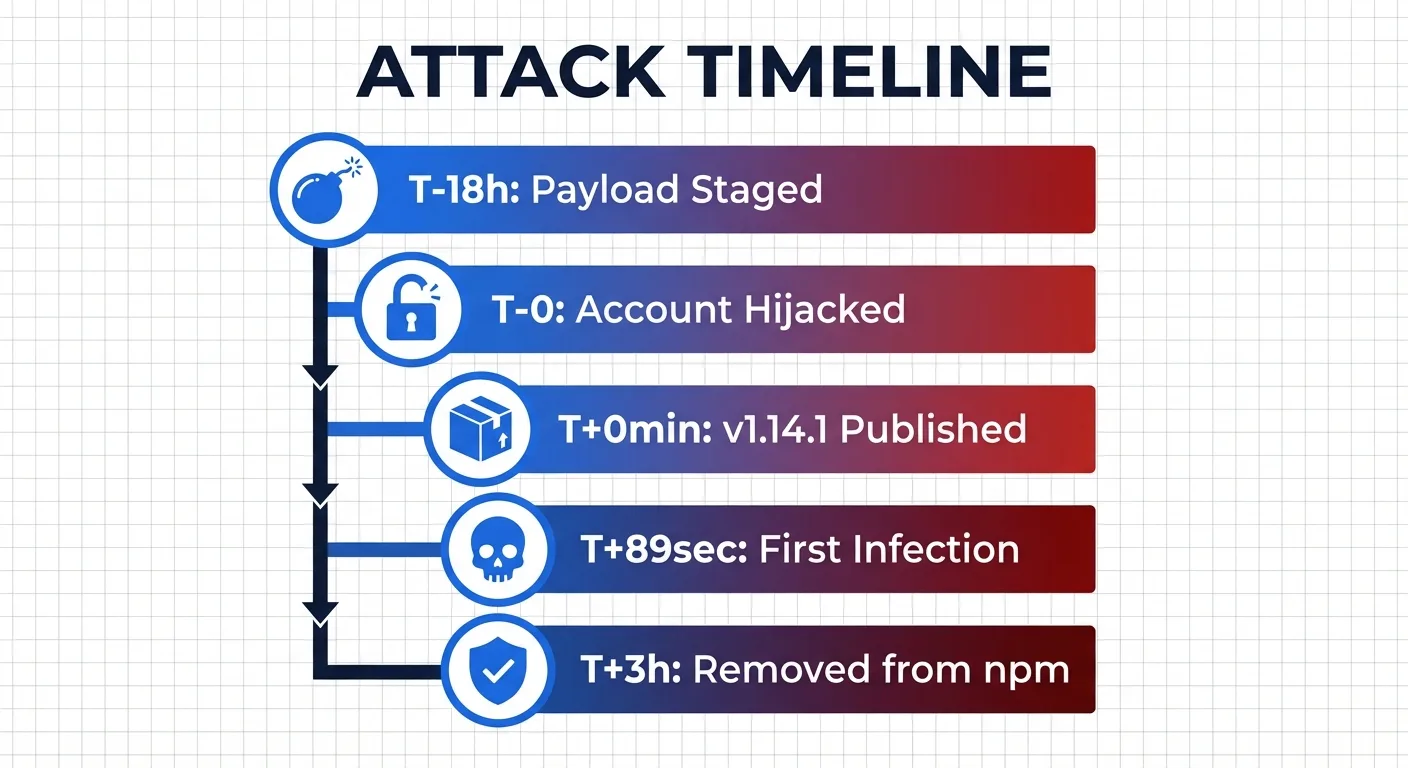
Here's how the most sophisticated npm supply chain attack of 2026 unfolded.
Stage 1: Pre-positioning (T-18 hours)
The attacker registered a fake npm package called [email protected] — a name designed to look legitimate, mimicking the popular crypto-js library. This package contained the actual malicious payload but sat dormant, waiting to be called.
Stage 2: Account Takeover (T-0)
The attacker compromised the npm account of axios lead maintainer Jason. Despite having two-factor authentication enabled, the account was breached — likely through a stolen recovery code.
The attacker changed the account email to an anonymous ProtonMail address, bypassed the normal GitHub Actions CI/CD pipeline entirely, and used a long-lived npm access token to publish directly via npm CLI.
Stage 3: Dual-Branch Poisoning (T+0 to T+39 minutes)
- T+0 min:
[email protected]published (1.x branch) - T+39 min:
[email protected]published (0.x branch)
Both major release branches were hit within 39 minutes. No matter which version you were on, you were a target.
Stage 4: First Infection (T+89 seconds)
Huntress Security Operations Center detected the first compromised host just 89 seconds after the malicious package went live. The speed of modern dependency resolution meant machines were infected before anyone even knew something was wrong.
Stage 5: Detection and Removal (T+3 hours)
StepSecurity first identified the compromise and raised the alarm. npm removed the malicious versions approximately 3 hours after publication. But by then, hundreds of machines were already infected.
How the Payload Works: A Self-Erasing, Cross-Platform RAT
The attack is remarkable for its operational sophistication. Security researchers have called it "the most interesting hacking campaign" they've ever analyzed.
The Injection Mechanism
Both malicious axios versions add [email protected] as a dependency. This package is never actually imported by axios code — its sole purpose is to execute a postinstall script that deploys the RAT.
Platform-Specific Payloads
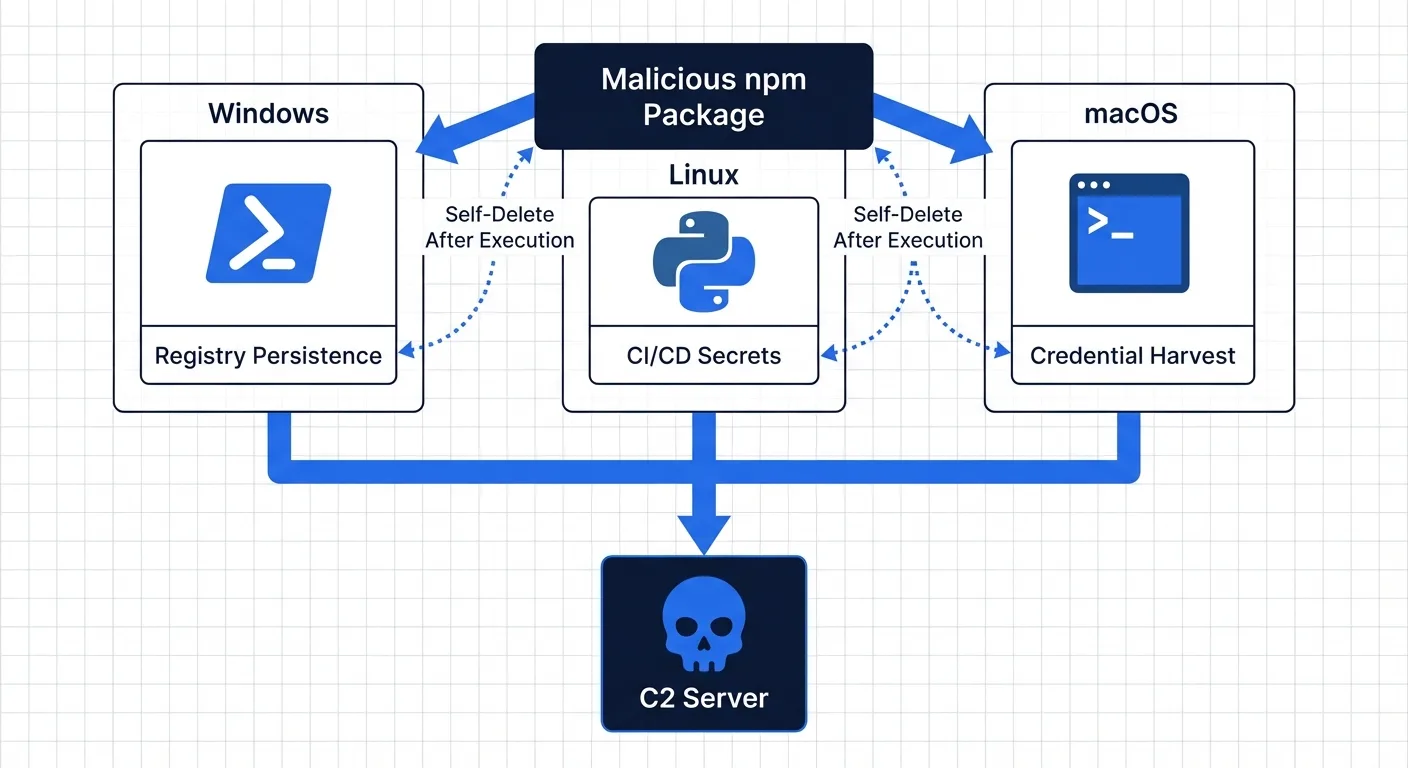
The dropper detects the operating system and deploys a tailored payload for each platform.
Windows:
- PowerShell-based RAT with registry persistence
- Renames
PowerShell.exetowt.exe(Windows Terminal) to disguise the process chain - Adds autorun entry in
HKCUregistry for persistence across reboots - Scans Documents, Desktop, OneDrive, and AppData directories
- Exfiltrates data to C2 server at
sfrclack.com:8000
Linux:
- Python-based RAT with no persistence mechanism
- Intentionally designed for CI/CD pipeline environments
- Targets secrets, tokens, and environment variables
- Optimized for ephemeral containers where reboot never happens — the secrets are all it needs
macOS:
- Separate RAT variant targeting developer workstations
- Focus on credential harvesting and file system reconnaissance
The Cover-Up
After execution, the malware erases all evidence:
- Deletes its own installation script
- Replaces its
package.jsonwith a clean decoy version - Disguises C2 communication as normal npmjs.com traffic
- Uses fake npm package metadata in POST request bodies to evade EDR and SIEM solutions
A developer inspecting their node_modules folder after the fact would find absolutely nothing suspicious.
The Attacker's Signature
Campaign ID 62033H — reversed, it reads H33026, pointing to March 30, 2026. A deliberate calling card embedded in the malware's communication protocol.
Impact: Who Got Hit and What Was Exposed?
According to Huntress, at least 100 compromised hosts were confirmed within the first hours — predominantly macOS developer workstations. The actual number is likely far higher as more organizations audit their systems.
What's at Risk on Infected Machines
- npm tokens and registry credentials — enabling further supply chain attacks
- SSH keys and GPG keys — access to private repositories and servers
- AWS, GCP, and Azure cloud credentials — full infrastructure compromise
- CI/CD secrets and environment variables — pipeline takeover
- Source code and intellectual property — competitive exposure
- Customer data accessible from development environments
The Linux RAT's deliberate lack of persistence reveals the attacker's true target: CI/CD pipelines. These environments hold the most sensitive secrets — deployment keys, database credentials, API tokens — and they never reboot, making persistence unnecessary.
What You Need to Do Right Now
1. Check Your Lock Files
Search your package-lock.json or yarn.lock for the compromised versions. If either [email protected] or [email protected] appears, your environment may have been compromised during the 3-hour exposure window.
2. Search for the Malicious Package
Check whether plain-crypto-js exists anywhere in your node_modules directory. Its presence is a confirmed indicator of compromise.
3. Downgrade to Safe Versions
Roll back to [email protected] or [email protected] — the last known safe releases before the attack.
4. Reinstall with Script Protection
Delete your node_modules directory and package-lock.json, then reinstall with npm install --ignore-scripts to prevent any postinstall hooks from executing.
5. Check Network Logs
Look for any connections to sfrclack.com on port 8000 in your firewall, proxy, or DNS logs. Any communication with this address confirms active compromise.
6. Rotate All Credentials
If you were infected, assume every credential on that machine is compromised. Rotate npm tokens, SSH keys, cloud provider credentials (AWS, GCP, Azure), CI/CD pipeline secrets, and database connection strings immediately.
The Bigger Picture: Open Source Trust Is Broken
This attack exposes a fundamental weakness in the open-source ecosystem: the entire trust model depends on individual maintainer accounts.
One compromised account — despite having 2FA enabled — led to the potential exposure of millions of downstream projects. The postinstall script mechanism, designed for legitimate build steps, became the perfect attack vector. As one developer put it: "Is npm cooked? Are we cooked right now?"
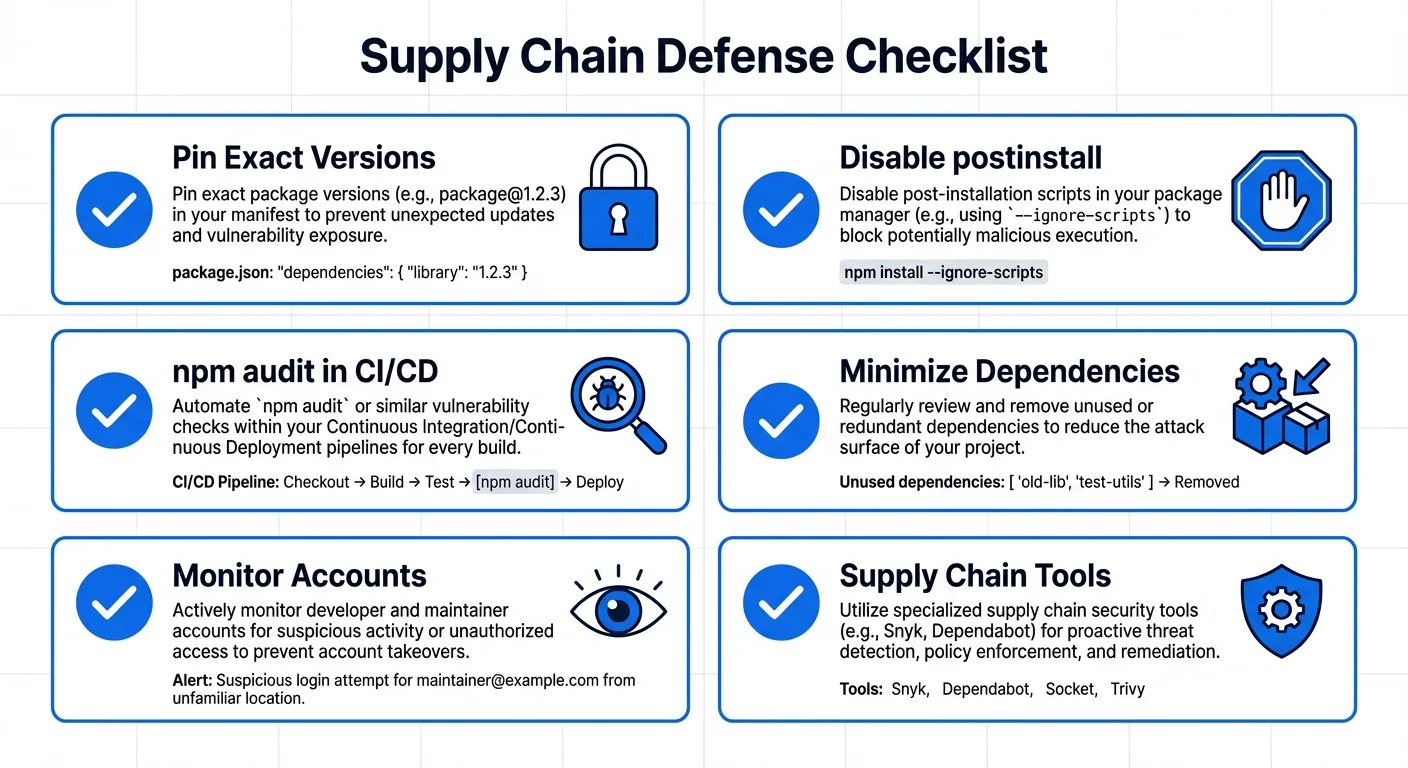
Long-Term Defenses for Development Teams
- Pin exact versions in lock files — never use
^or~for critical dependencies - Disable postinstall scripts with
--ignore-scriptsin your.npmrcconfiguration - Run
npm auditas a mandatory step in every CI/CD pipeline - Minimize your dependency tree — every package you add is an attack surface
- Monitor for account takeovers on your own published npm packages
- Adopt supply chain monitoring tools like Socket, StepSecurity, or Aikido for real-time alerts
Why Document Security Matters More Than Ever
The axios incident is a wake-up call: if your development tools aren't secure, nothing you build with them is secure either. And that includes the documents your business runs on.
Every day, teams share contracts, NDAs, pitch decks, and investor materials through tools that were never designed with security-first architecture. Files get emailed as attachments, shared via public links, or stored in platforms where a single compromised account — just like the axios maintainer — can expose everything.
This is exactly why AiDocX takes a fundamentally different approach to document security:
- End-to-end encryption for every document in transit and at rest — your files are never exposed, even to us
- Granular access controls — set exactly who can view, download, or print each document, and revoke access instantly
- Real-time viewer tracking — know exactly who opened your document, when, from where, and for how long
- Dynamic watermarking — every viewer sees their name embedded in the document, deterring unauthorized screenshots and distribution
- Download and print restrictions — share sensitive investor decks and contracts without losing control of the file
- Secure e-signatures with full audit trails — legally binding signatures with complete chain-of-custody documentation
- AI-powered document creation — generate contracts, NDAs, and business documents in minutes, all within a security-first platform
While the open-source ecosystem scrambles to rebuild trust after incidents like axios, your most sensitive business documents — the contracts that close deals, the pitch decks that raise funding, the NDAs that protect your IP — deserve a platform where security is built in from day one, not bolted on after a breach.
The lesson from axios is clear: trust must be verified, access must be controlled, and security can never be an afterthought. That's the standard every document platform should meet.
Start creating secure documents with AiDocX →
FAQ
Was my project affected by the axios hack?
Check your package-lock.json or yarn.lock for [email protected] or [email protected]. If either version is present, your build environment may have been compromised during the 3-hour exposure window on March 31, 2026.
How did the attacker bypass two-factor authentication?
The maintainer had 2FA enabled, but the attacker appears to have used a recovery code to gain access. The exact method is still under investigation, and the maintainer stated: "I have two-factor authentication on basically everything I interact with."
Is axios safe to use now?
Yes — the malicious versions have been removed from npm. Update to [email protected] or [email protected] and verify your lock files. The axios project itself remains actively maintained.
How can I prevent supply chain attacks on my projects?
Pin exact dependency versions in lock files, disable postinstall scripts where possible, run npm audit in your CI/CD pipeline, minimize your dependency tree, and consider supply chain monitoring tools like Socket or StepSecurity.
What data was stolen from infected machines?
The RAT targets filesystem data (Documents, Desktop, OneDrive), environment variables, SSH keys, cloud credentials, and npm tokens. If your machine was infected, assume all credentials are compromised and rotate them immediately.
How is this different from the Log4j vulnerability?
Log4j was a code vulnerability (CVE) in a library. The axios attack was a social engineering and account takeover — the library code itself was fine, but a malicious version was published through a compromised maintainer account. Both highlight the fragility of the software supply chain, but through different attack vectors.
How do I protect sensitive business documents from supply chain risks?
Use a document platform with built-in security: end-to-end encryption, granular access controls, viewer tracking, and audit trails. Platforms like AiDocX are designed so that even if surrounding tools are compromised, your documents remain protected through independent security layers.
Ready to automate your documents with AI?
Start free with AiDocX — AI contract drafting, meeting minutes, consultation notes, e-signatures, and more in one platform.
Get Started FreeMore from AiDocX Blog
Buy Sell Agreement Template (2026): Triggers, Valuation and Funding for Co-Owners
A free buy sell agreement template for co-owners, with triggering events, valuation methods, insurance funding and cross-purchase vs. redemption structures.
James September 26, 2026 12 min
Consignment Agreement Template (2026): Commission, Title, Risk of Loss and Unsold Goods
Free consignment agreement template for makers, artists and boutiques: commission split, title, insurance and how to protect consigned inventory.
James September 26, 2026 9 min
Distribution Agreement Template (2026): Territory, Exclusivity, Minimums and Reseller Terms
Free distribution agreement template (works as a reseller agreement template too): territory, exclusivity, minimums, pricing, IP and termination.
James September 26, 2026 13 min