
Project Acceptance Form Template: Client Sign-Off With Open Items
Copy a client project acceptance form, record deliverables and exceptions, and send a sign-off email with a clear review deadline.
 AiDocX Team · AiDocX Editorial November 19, 2026 8 min read
A project acceptance form records which deliverables a client reviewed, the decision they made, and any work still open. Include the agreement reference, exact file or release version, acceptance criteria, review evidence, exceptions, and authorized sign-off. Keep delivery, acceptance, and payment as separate records so a file upload does not accidentally become a statement that everything is finished and paid.
This guide is for freelancers and small agencies handing over design, website, or consulting work. The form below is a starting point for a private client project; specialized construction, regulated work, or public procurement may require a different process.
Start with the decision the client needs to make
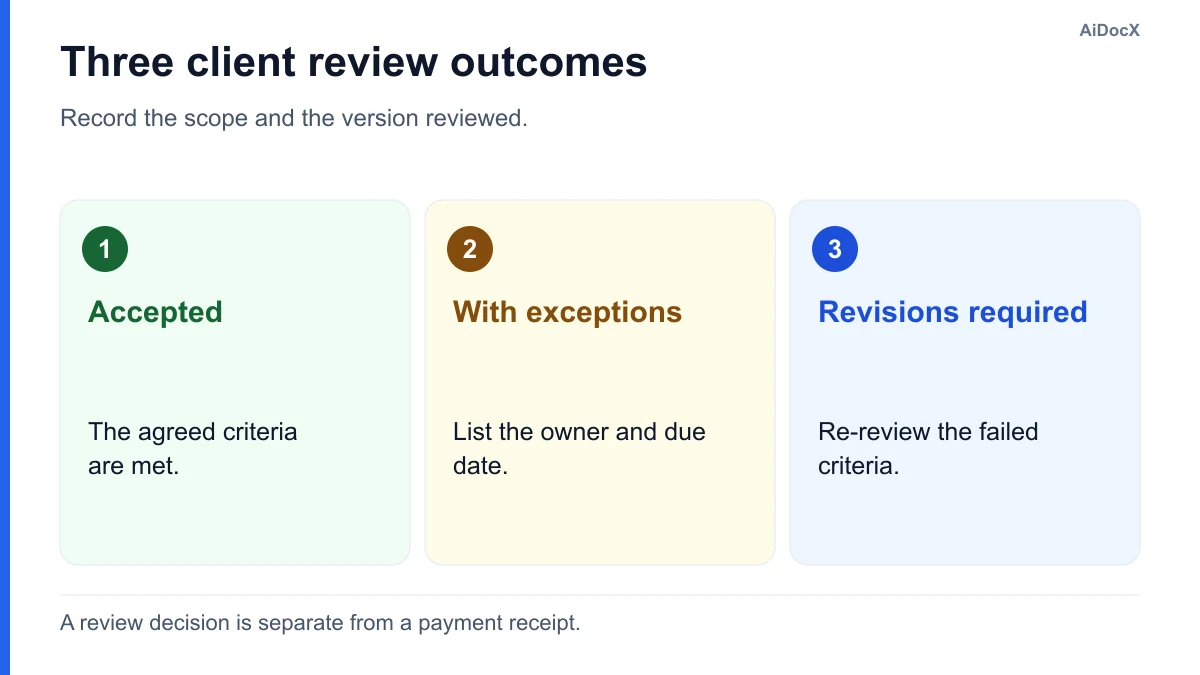
Give the reviewer three explicit choices:
- Accepted: the listed deliverables meet the agreed criteria.
- Accepted with listed exceptions: the reviewer accepts the named scope subject to a specific list of remaining items.
- Revisions required: the reviewer identifies criteria that are not met; acceptance is pending.
Use the choices permitted by your agreement. A client who acknowledges receiving a folder may still need time to inspect its contents. Similarly, accepting a website does not by itself confirm that an invoice was paid, transfer every intellectual property right, or release every future claim. Put those matters in the documents that govern them.
Agree on the acceptance process in the statement of work before delivery. Confirm the criteria, reviewer, response window, and treatment of open items while the project is still easy to discuss.
Copy this project acceptance form template
Copy the block into your document editor. Replace the brackets and remove instructions before circulating it. Keep the deliverable register attached if it is longer than the form.
CLIENT PROJECT ACCEPTANCE RECORD

Project: [NAME / PROJECT ID]
Client: [LEGAL NAME]
Provider: [LEGAL NAME]
Agreement or SOW: [TITLE, DATE, VERSION]
Record number and version: [REFERENCE]
Submitted for review: [DATE]
Review response requested by: [AGREED DATE]

1. SCOPE PRESENTED FOR REVIEW
[Describe the milestone or final deliverables covered by this record.
Identify files, release numbers, links, and dated attachments.]
Excluded from this review: [SPECIFIC EXCLUSIONS / NONE]

2. REVIEW REGISTER
Item | Agreed acceptance criterion | Evidence/version | Result
[A]  | [OBJECTIVE CHECK]           | [REFERENCE]      | [RESULT]
[B]  | [OBJECTIVE CHECK]           | [REFERENCE]      | [RESULT]

3. CLIENT DECISION — SELECT ONE
[ ] Accepted for the scope listed above.
[ ] Accepted with the exceptions recorded below.
[ ] Revisions required; acceptance remains pending for the items noted.

4. EXCEPTIONS AND FOLLOW-UP
Item | Issue | Required action | Owner | Target date | Closure evidence
[ID] | [...] | [...]           | [...] | [...]       | [...]

Next review date or response method: [DETAILS]
Acceptance of excluded or future work: [NOT COVERED / SPECIFY]

5. HANDOVER ITEMS
Files and documentation delivered: [REGISTER / LOCATION]
Access transfer: [SECURE METHOD / RESPONSIBLE PERSON]
Support period and contact: [REFERENCE TO AGREED TERMS]
Payment milestone: [REFERENCE TO AGREEMENT / INVOICE]
This record does not itself confirm receipt of payment or introduce
an additional release of claims or transfer of rights.

6. SIGN-OFF
Client decision-maker: [NAME, ROLE, ORGANIZATION]
Authority or approval reference: [DETAILS]
Signature: [SIGNATURE]   Actual signing date: [DATE]

Provider acknowledgment: [NAME, ROLE]
Signature: [SIGNATURE]   Actual signing date: [DATE]

Attachments: [NUMBERED, DATED LIST]
Where your agreement assigns a particular effect to acceptance, use wording consistent with that agreement. Do not add a sweeping release of liability to an administrative form without discussing the change and getting suitable advice.
Fill the register with evidence, not “looks good”
A useful acceptance criterion is observable. “Professional website” leaves room for different expectations; “the contact form sends the agreed fields to the designated test inbox on the listed browsers” gives the reviewer something to check.
For a fictional four-page website, a short register could look like this:
| Deliverable | Agreed criterion | Evidence submitted | Review outcome |
|---|---|---|---|
| Four public pages | Approved copy and page list implemented | Release 1.3 and page checklist | Accepted |
| Contact form | Required-field validation and test submission work | Test record C2, using dummy data | Accepted |
| Staff profile section | Approved photo and biography displayed | Release 1.3 screenshot | Photo replacement open |
| Editing guide | Client can update the named content fields | Guide version 1.1 and walkthrough | Accepted |
The client chooses accepted with listed exceptions on November 25. The open item says: “Provider replaces the staff photo with client-supplied file P4 by November 27; client confirms against release 1.4.” That is a much clearer follow-up than “small changes later.”
This is an illustration, not a report of a project we tested. If the missing item prevents the client using the deliverable, discuss whether acceptance should remain pending under the agreement. A cosmetic issue and a broken payment checkout should not receive the same treatment by default.
Separate a defect from a new request
At review, clients sometimes discover a requirement nobody included in the scope. Compare the request with the dated specification before deciding what to do.
| Review comment | Practical next step |
|---|---|
| An agreed form does not submit | Record the failed criterion and correction owner |
| The client wants a fifth page | Assess a scope change and its fee and timing |
| An agreed file is missing | Add it to the handover register and complete delivery |
| Feedback conflicts with an earlier approval | Identify the approved version and discuss the requested change |
For added scope, use the agency change order form. Keep the acceptance register focused on the work actually submitted. A new request should not disappear into a vague punch list with no budget or delivery decision.
Send a sign-off email with one clear request
Link to the review package, name the decision-maker, and state the agreed response date. Ask the reviewer to tie each revision to a deliverable and criterion.
Subject: Review requested — [PROJECT], milestone [NUMBER]

Hi [NAME],

The deliverables for [MILESTONE] are ready for review:
[VERSIONED REVIEW PACKAGE LINK]

Please review them against [SOW / CRITERIA REFERENCE] and return the
attached acceptance record by [AGREED DATE]. Select accepted,
accepted with listed exceptions, or revisions required.

For an open item, please include the deliverable ID, expected result,
and evidence of the issue. We will confirm the owner and next review.

This review covers [SCOPE]. [EXCLUDED ITEM] is scheduled separately.

Thank you,
[NAME / CONTACT]
Use a short reminder if the date passes. Ask who can complete the review and propose a documented next step. Do not invent a rule that silence means acceptance if your agreement and applicable rules do not support it.
Close the handover without losing the record
Keep the agreement, criteria, reviewed version, acceptance decision, and exception updates together. A useful record should let a colleague answer “what did they approve?” months later.
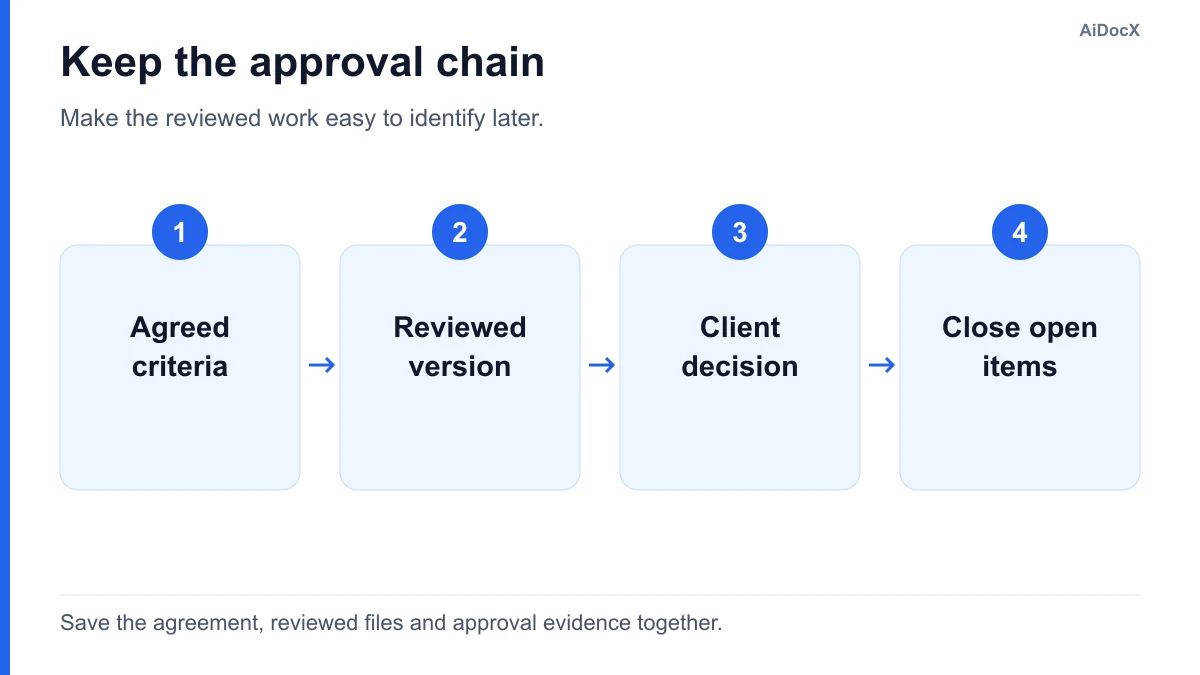
- Save a dated review package before sending it.
- Confirm the client representative is the agreed approver.
- Record the decision and every open item.
- Schedule correction and re-review where needed.
- Save the signed or otherwise approved version and relevant approval evidence.
- Update the linked invoice or support workflow according to the existing agreement.
Transfer credentials through an approved secure channel rather than writing passwords into the acceptance form. Record who received access and which account owns the service. A shared folder link is useful only if the client can open it and permissions remain appropriate after handover.
If the next step is a final payment request, the deposit and final invoice guide shows how to carry forward earlier payments. If work continues beyond the current term, document that separately in a service contract extension.
Questions about client project sign-off
Is an acceptance form the same as a handover document?
The acceptance form records the client's review decision. A handover document records the files, access, instructions, and responsibilities being transferred. One package can contain both, provided the decision and the inventory are clearly labeled.
Can the client sign while small items remain?
Use the options allowed by the agreement. If conditional acceptance is appropriate, name each remaining item, who owns it, its target date, and how completion will be confirmed. Avoid describing unfinished work as unconditionally complete.
Does sign-off mean the final invoice is paid?
No payment should be marked received merely because the client approved a deliverable. Match payment records to the actual transaction. Your agreement determines when a payment becomes due and how acceptance affects that milestone.
Put the form into your next delivery package
Explore AiDocX document signing to prepare the review package and collect the required approvals. Check the completed record against the agreement before sending it.
Editorial method: AI-assisted drafting with fictional examples. This is a practical administrative template, not jurisdiction-specific legal advice.
Ready to automate your documents with AI?
Start free with AiDocX — AI contract drafting, meeting minutes, consultation notes, e-signatures, and more in one platform.
Get Started FreeMore from AiDocX Blog

Deposit Invoice Template: Show the Upfront Payment and Final Balance
Use a deposit invoice template with a worked 40% example, a final balance invoice, payment receipt wording, and checks that prevent duplicate requests.
AiDocX Team November 19, 2026 8 min
Service Contract Extension Addendum Template: Dates, Fees and Scope
Copy a service contract extension template with a three-month example, fee schedule, approval checklist, and clear treatment of unchanged terms.
AiDocX Team November 19, 2026 8 min
Music Permission Request Letter Template: Email + Follow-Up
Copy a music permission request email for a video or client ad, with a follow-up template, rights-holder checklist and a worked example of the requested scope.