Chat With Your Contract: How to Ask AI Questions About Any Document (2026)
Learn how to chat with a contract using AI — ask plain-English questions about clauses, deadlines, and risks instead of reading 30 pages. How it works, what to ask, and why a purpose-built tool beats pasting into ChatGPT.
 Sophie · Product Specialist June 28, 2026 10 min read
Chat With Your Contract: How to Ask AI Questions About Any Document
You just received a 28-page service agreement and you have one practical question: "When can the other side cancel, and do I owe anything if they do?" The answer is somewhere in there — buried across a termination clause on page 9, a notice provision on page 22, and a definition on page 2 that quietly changes what "termination for convenience" means.
Reading the whole thing to find three connected sentences is the old way. The new way is to simply ask the document: type your question in plain English and get an answer that cites the exact clauses. This is what people mean when they talk about "chatting with a contract," and in 2026 it has become one of the most-used features on modern document platforms — for a simple reason. Most people don't want to read contracts. They want answers.
This guide explains how contract chat works, what to ask, where it helps most, and why a purpose-built tool beats pasting text into a general chatbot.
What "Chatting With a Contract" Actually Means
Contract chat is a conversational interface layered on top of a specific document. Instead of a search box that matches keywords, you ask a natural-language question and the AI reads the entire document to answer it — then points you to the clauses it relied on.
The difference from a generic AI chatbot is grounding. A general chatbot answers from its training data and whatever you happened to paste. A contract chat tool answers from your document, in full, every time. Ask "What's the payment term?" and it doesn't guess an industry-standard answer — it finds Net 45 from receipt of an undisputed invoice in Section 6.2 of the file in front of you, and quotes it back.
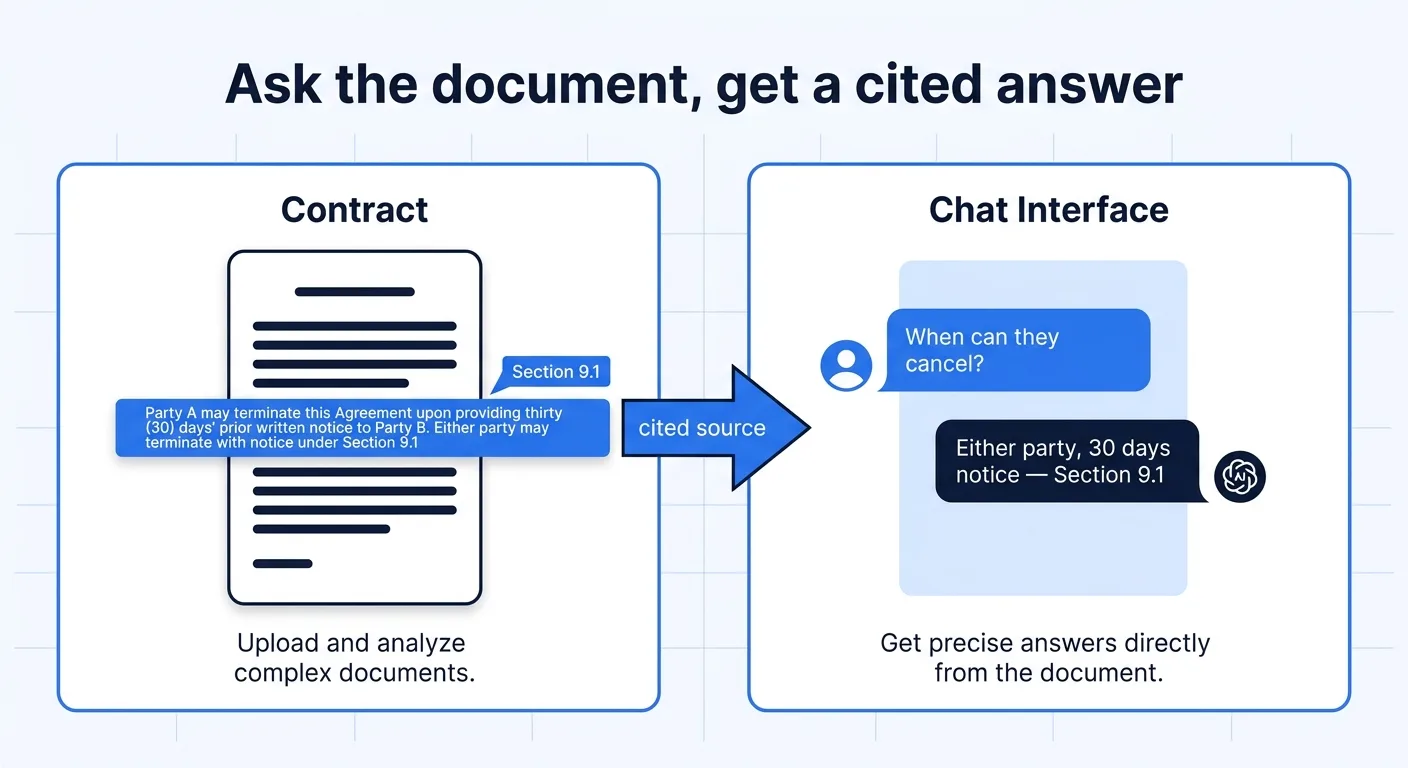
Under the hood, three things make this work:
- Full-document context. Modern large language models can hold an entire contract in their working memory at once, so an answer about page 3 can correctly account for a limitation on page 17.
- Retrieval and citation. The tool links its answer to the source text, so you can verify rather than trust blindly.
- Conversation memory. Follow-up questions ("And what about for the vendor's breach?") build on the previous answer instead of starting over.
Why People Reach for This Instead of Reading
The honest reason is time and confidence. Three patterns show up again and again:
1. The "just tell me the risk" read. A founder, freelancer, or operations lead isn't trying to become a lawyer. They want to know if there's anything dangerous before they sign — auto-renewal traps, unlimited liability, an IP assignment that's broader than expected. Asking "What are the three riskiest clauses for me as the customer?" surfaces those in seconds.
2. The "find the specific term" lookup. You already signed it months ago, and now you need one fact: the renewal notice window, the cap on liability, whether assignment is allowed. Scrolling is slow; asking is instant.
3. The "explain this to me" translation. Legal language is dense on purpose. "Notwithstanding the foregoing, the indemnifying party's aggregate liability shall not exceed..." means something specific, and a good contract chat will restate it in plain terms while keeping the original clause one click away.
ChatGPT vs. a Purpose-Built Contract Tool
A fair question: can't I just paste the contract into ChatGPT? For a short, non-sensitive document, sometimes. But for real contract work, a dedicated tool wins on the things that actually matter.
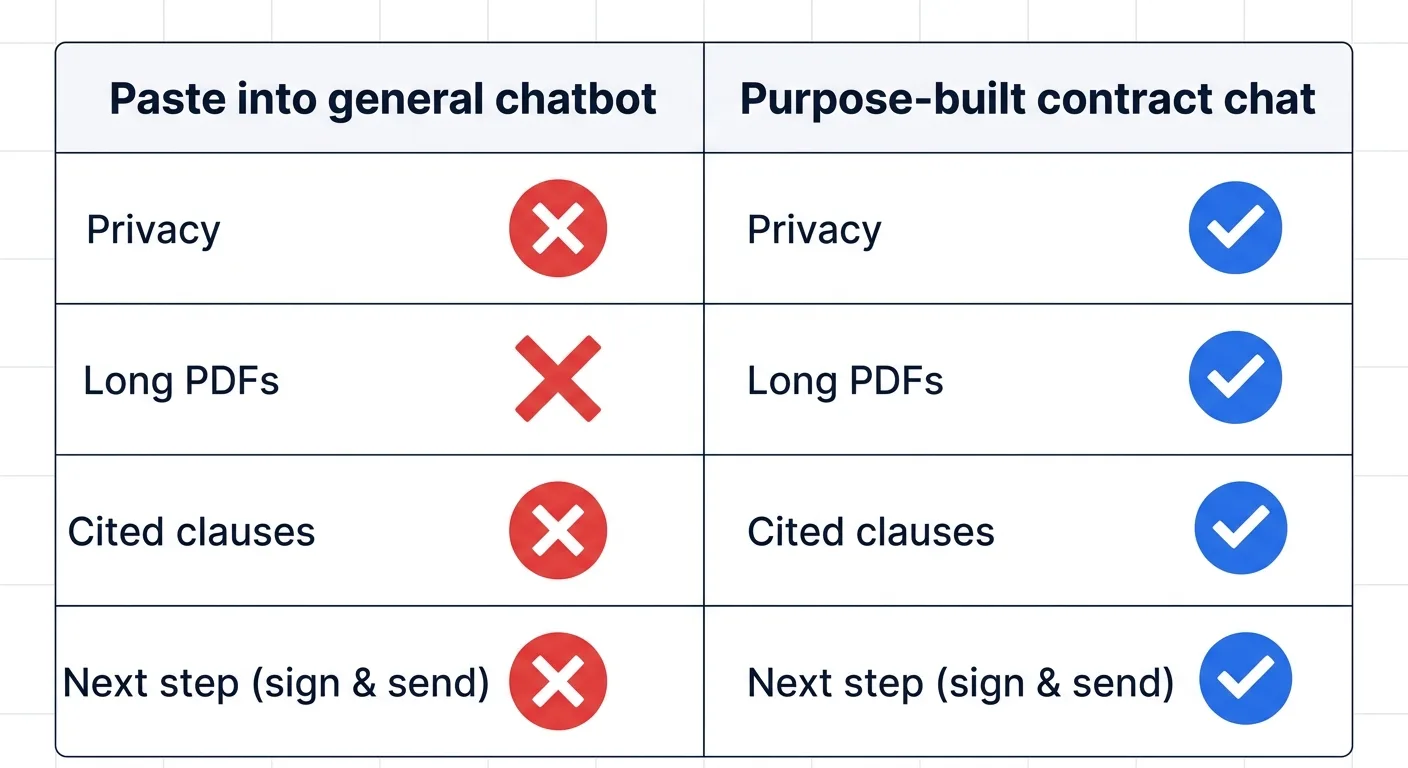
| Paste into a general chatbot | Purpose-built contract chat (e.g. AiDocX) | |
|---|---|---|
| Privacy | Pasted text may leave your control; sensitive terms exposed | Document stays inside your account and workflow |
| Long documents | Manual copy-paste; long PDFs get truncated or split | Whole file ingested in one pass, no copy-paste |
| Citations | Answers rarely point to exact clauses | Answers cite the source clause for verification |
| Scanned PDFs | Can't read image-only files | Built-in handling for uploaded PDFs and Office files |
| Next step | Dead end — you still have to act elsewhere | Chat, then review, e-sign, and share in the same place |
| Repeatability | Re-paste every session | Re-open the document and keep asking |
The deciding factor for most teams isn't answer quality on a single question — both can do well there. It's that a contract chat tool keeps the document, the conversation, and the next action (sign it, send it, store it) in one secure place, instead of bouncing a confidential agreement through a public chat window.
How to Chat With a Contract: Step by Step
The workflow on a platform like AiDocX takes under a minute:
- Upload the document. Drag in a PDF or Office file. The platform reads the full text, including multi-page agreements and common scanned formats.
- Open the AI chat panel. It sits alongside the document, so you can see the clause and the answer together.
- Ask in plain language. No special syntax — "What happens if I miss a payment?" works exactly as written.
- Read the cited answer. The response summarizes the relevant terms and links to the clauses it used, so you can confirm in the original text.
- Follow up. Narrow it down — "Is that cap negotiable based on the rest of the agreement?" — and the conversation builds on what came before.
- Act in the same place. Once you understand it, send it for e-signature, share it via a tracked link, or file it — without switching tools.
The Questions Worth Asking
The quality of the answer depends a lot on the question. These prompts consistently surface what matters:
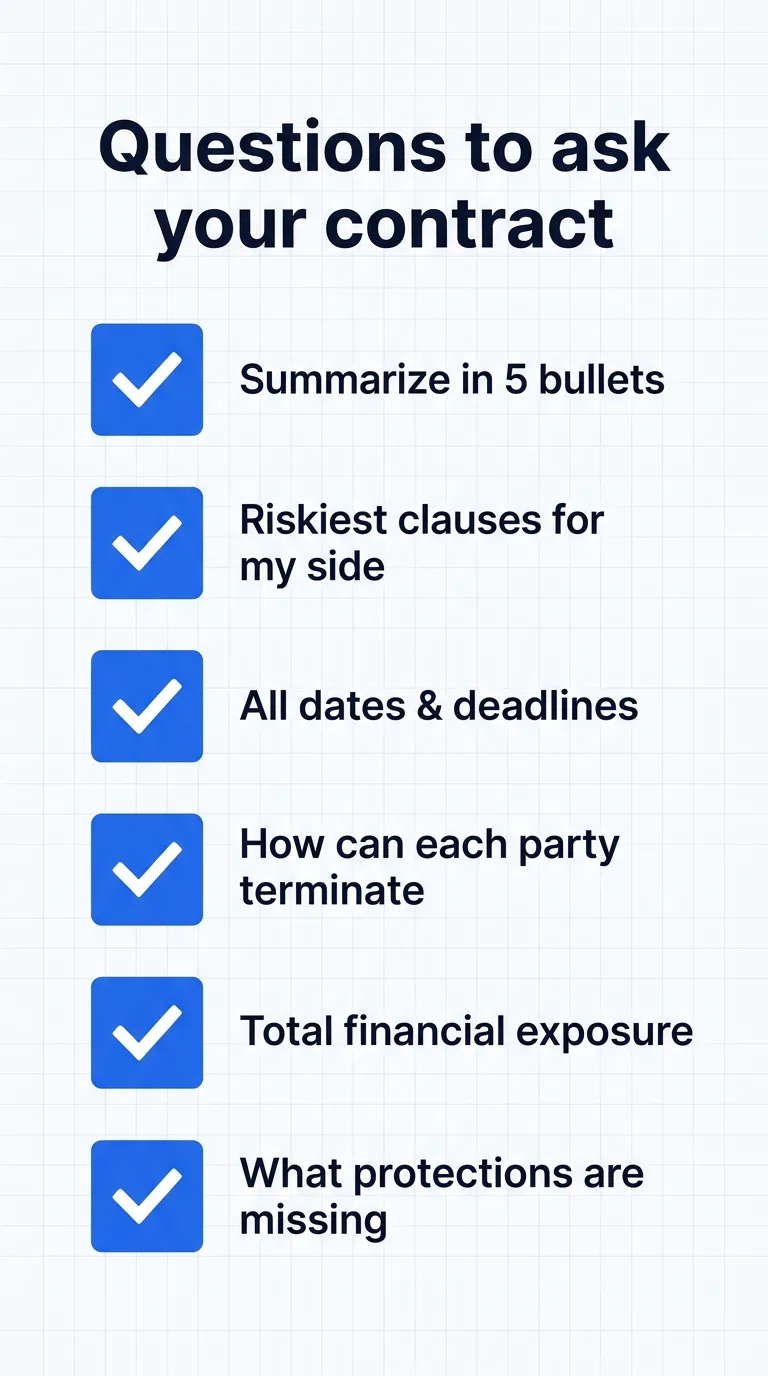
- "Summarize this contract in five bullet points for a non-lawyer." Your fast orientation before anything else.
- "What are the riskiest clauses for me as the [customer / vendor / employee]?" Framing your side is what makes the risk assessment useful.
- "List every date, deadline, and notice period, and what triggers each one." Catches the obligations that cause disputes later.
- "How and when can each party terminate, and what are the consequences?" Often the single most important practical answer.
- "What's the total potential financial exposure here — caps, penalties, fees, and indemnities?" Connects clauses that are scattered across the document.
- "What standard protections are missing from this agreement?" Absence is harder to spot by reading than presence.
- "Explain Section X in plain English." For the one clause you genuinely can't parse.
Where It Helps Most
Freelancers and agencies vet client contracts before signing — checking payment terms, IP ownership, and kill fees without paying for a lawyer on every small deal.
Startups without in-house counsel triage investment documents, vendor agreements, and partnership terms, using chat as a first-pass safety net and escalating only the genuinely tricky items to an attorney.
Operations and procurement teams handle high contract volume — asking the same structured questions across dozens of vendor agreements to standardize what they accept.
Anyone signing as an individual — a lease, an employment offer, a settlement — finally gets a way to understand what they're agreeing to before they sign it, not after.
Honest Limitations
Contract chat is powerful, not magic, and using it well means knowing the edges:
- It is not legal advice. For high-stakes agreements, AI is the first pass that makes a lawyer's time more efficient — not a replacement for professional judgment on the decisions that matter.
- It answers what you ask. A vague question gets a vague answer. Framing your side and being specific changes the quality dramatically.
- Verify the citations. A good tool shows you the source clause precisely so you can check. On anything important, do.
- Context it can't see, it can't weigh. Your business relationship, prior negotiations, and risk tolerance live in your head. The AI evaluates the text; you supply the judgment.
Used as an augment rather than an oracle, it consistently catches things a quick human read misses — while you catch the nuances the AI can't evaluate without context. That complementary split is the whole point.
Frequently Asked Questions
Can I ask AI questions about a PDF contract? Yes. Upload the PDF to a contract chat tool and ask questions in plain English; it reads the full document and answers with references to the relevant clauses. Purpose-built tools also handle long and scanned PDFs that a general chatbot would truncate.
Is it safe to ask AI about a confidential contract? It depends on the tool. Pasting a confidential agreement into a public chatbot can expose sensitive terms. A dedicated platform like AiDocX keeps the document inside your account, which is why teams use one for anything sensitive.
Is AI contract chat legal advice? No. It helps you understand a document quickly and spot likely issues, but it is not a substitute for a lawyer on high-stakes agreements. Use it as a first pass, then escalate the hard questions.
What's the difference between contract chat and AI contract review? Review proactively scans the whole document and reports risks and missing terms; chat is interactive and answers your specific questions. The best workflows use both — review for the overview, chat to dig into what you care about.
Getting Started
If you've never asked a document a question, the barrier has never been lower. Upload a contract you already have, ask it the seven questions above, and compare the answers to your own read. You'll likely find the AI surfaces a clause you skimmed past — and that you can now get to the answer in seconds instead of paragraphs.
Stop reading contracts cover to cover. Start asking them questions. Chat with your first contract on AiDocX — free and see what's hiding in the fine print.
Ready to automate your documents with AI?
Start free with AiDocX — AI contract drafting, meeting minutes, consultation notes, e-signatures, and more in one platform.
Get Started FreeMore from AiDocX Blog
Buy Sell Agreement Template (2026): Triggers, Valuation and Funding for Co-Owners
A free buy sell agreement template for co-owners, with triggering events, valuation methods, insurance funding and cross-purchase vs. redemption structures.
 James September 26, 2026 12 min
Consignment Agreement Template (2026): Commission, Title, Risk of Loss and Unsold Goods
Free consignment agreement template for makers, artists and boutiques: commission split, title, insurance and how to protect consigned inventory.
James September 26, 2026 9 min
Distribution Agreement Template (2026): Territory, Exclusivity, Minimums and Reseller Terms
Free distribution agreement template (works as a reseller agreement template too): territory, exclusivity, minimums, pricing, IP and termination.
James September 26, 2026 13 min